

When we create Registration form on a web application, we have to check that the email address and username that user is entering is unique and is not already taken by another user. In ASP.NET MVC we have Validation Attribute feature under System.ComponentModel.DataAnnotations and System.Web.Mvc which we can use for different type of Validations before sending data to be saved in persistent location.
In System.Web.Mvc we have Remote attribute which is available in ASP.NET MVC 4 in which I am implementing it for this post. I am not sure if it is available in the earlier version of ASP.NET MVC.
So I have this ViewModel:
- public class SignUpViewModel
- {
- public int UserID
- {
- get;
- set;
- }
- [Required(ErrorMessage = "First Name is required")]
- public string FirstName
- {
- get;
- set;
- }
- [Required(ErrorMessage = "Last Name is Required")]
- public string LastName
- {
- get;
- set;
- }
- [Required(ErrorMessage = "Username is Required")]
- [RegularExpression(@ "^[a-zA-Z0-9]+$", ErrorMessage = "user name must be combination of letters and numbers only.")]
- public string UserName
- {
- get;
- set;
- }
- [Required(ErrorMessage = "Password is Required")]
- public string Password
- {
- get;
- set;
- }
- [Required(ErrorMessage = "Password is Required")]
- [System.Web.Mvc.Compare("Password", ErrorMessage = "Both Password fields must match.")]
- public string ConfirmPassword
- {
- get;
- set;
- }
- [Required(ErrorMessage = "Email Address is required")]
- [EmailAddress(ErrorMessage = "Invalid Email Address")]
- public string Email
- {
- get;
- set;
- }
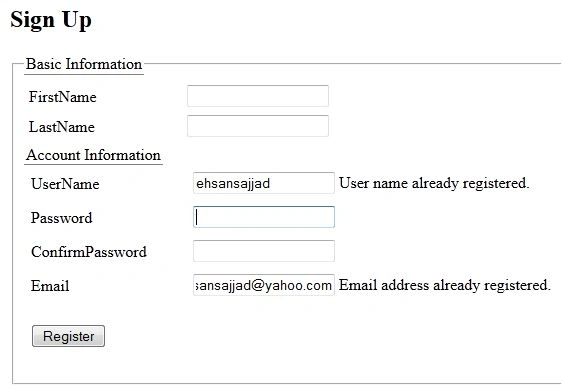
Now what will happen if user enters a username or Email Address which is already registered, one way is to check in post action for username and Email Address and show user error message that username or Email Address has already taken which does not look though, as validation should be done before posting data to action using unobtrusive validation.
Now here we will use Remote attribute which will check for both UserName and Email Address field, here is how it will be done:
- [Required(ErrorMessage = "Username is Required")]
- [RegularExpression(@ "^[a-zA-Z0-9]+$", ErrorMessage = "user name must be combination of letters and numbers only.")]
- [Remote("UsernameExists", "Account", HttpMethod = "POST", ErrorMessage = "User name already registered.")]
- public string UserName
- {
- get;
- set;
- }
- [Required(ErrorMessage = "Email Address is required")]
- [EmailAddress(ErrorMessage = "Invalid Email Address")]
- [Remote("EmailExists", "Account", HttpMethod = "POST", ErrorMessage = "Email address already registered.")]
- public string Email
- {
- get;
- set;
- }
- Action Name which will be called which will have input parameter for this property value.
- Controller Name of which action will be executed.
- HttpMethod (Get or Post).
- ErrorMessage (Error Message that will be displayed if validation fails).
Let's come to the action part we need to write action method in the Account controller for Validation, for this post just for readers understanding I am just checking specific username and email (my name and dummy email address), but in your project you will need to check in your database for that particular criteria and return true or false respectively.
Here is the action code:
- public JsonResult UsernameExists(string username)
- {
- return Json(!String.Equals(username, "ehsansajjad", StringComparison.OrdinalIgnoreCase));
- }
- public JsonResult EmailExists(string email)
- {
- return Json(!String.Equals(email, "[email protected]", StringComparison.OrdinalIgnoreCase));
- }
- @model CustomValidationMessageHelper.ViewModels.SignUpViewModel
- @{
- Layout = null;
- }
- <!DOCTYPE html>
- <html>
- <head>
- <meta name="viewport" content="width=device-width" />
- <title>SignUp</title>
- <link href="@Url.Content("~/Content/jquery.qtip.css")" rel="stylesheet" />
- <script src="@Url.Content("~/Scripts/jquery-1.9.1.js")"></script>
- <script src="@Url.Content("~/Scripts/jquery.unobtrusive-ajax.js")"></script>
- <script src="@Url.Content("~/Scripts/jquery.validate.js")" type="text/javascript"></script>
- <script src="@Url.Content("~/Scripts/jquery.validate.unobtrusive.js")" type="text/javascript"></script>
- <script src="@Url.Content("~/Scripts/jquery.qtip.min.js")" type="text/javascript"></script>
- </head>
- <body>
- <div>
- @using (Html.BeginForm("SignUp", "Account", FormMethod.Post, new { @class = "form-inline", role = "form" }))
- {
- @Html.AntiForgeryToken()
- <div class="row">
- <div class="span8 offset5 aui-page-panel">
- <div>
- <h2>Sign Up</h2>
- </div>
- <fieldset style="margin-bottom: 40px;">
- <legend style="border-bottom: 1px solid gray; font-size: 16px;">Basic Information</legend>
- <table width="100%" border="0" cellspacing="0" cellpadding="0">
- <tr id="tr_basic">
- <td style="vertical-align: top;" width>
- <div id="basicinfo" style="width: 100%">
- <div style="height: auto !important; overflow-y: visible;">
- <table cellpadding="3">
- <tbody>
- <tr>
- <td width="150">
- @Html.LabelFor(model => model.FirstName, new { @class = "sr-only" })
- </td>
- <td>
- @Html.TextBoxFor(model => model.FirstName, new { @class = "form-control input-sm" })
- @Html.ValidationMessageFor(model => model.FirstName)
- </td>
- </tr>
- <tr>
- <td>
- @Html.LabelFor(model => model.LastName)
- </td>
- <td>
- @Html.TextBoxFor(model => model.LastName, new { @class = "input-xsmall" })
- @Html.ValidationMessageFor(model => model.LastName)
- </td>
- </tr>
- <tr>
- </tr>
- </tbody>
- </table>
- </div>
- </td>
- </tr>
- </table>
- <legend style="border-bottom: 1px solid gray; font-size: 16px;">Account Information</legend>
- <table cellpadding="5">
- <tr>
- <td width="150">
- @Html.LabelFor(model => model.UserName)
- </td>
- <td>
- @Html.TextBoxFor(model => model.UserName)
- @Html.ValidationMessageFor(model => model.UserName)
- </td>
- <td id="tdValidate">
- <img id="imgValidating" src="@Url.Content("~/Images/validating.gif")" style="display:none;" /></td>
- </tr>
- <tr>
- <td>
- @Html.LabelFor(model => model.Password)
- </td>
- <td>
- @Html.PasswordFor(model => model.Password)
- @Html.ValidationMessageFor(model => model.Password)
- </td>
- </tr>
- <tr>
- <td>
- @Html.LabelFor(m => m.ConfirmPassword, new { @class = "control-label" })
- </td>
- <td>
- @Html.PasswordFor(model => model.ConfirmPassword)
- @Html.ValidationMessageFor(model => model.ConfirmPassword)
- </td>
- </tr>
- <tr>
- <td>
- @Html.LabelFor(m => m.Email, new { @class = "control-label" })
- </td>
- <td>
- @Html.TextBoxFor(model => model.Email)
- @Html.ValidationMessageFor(model => model.Email)
- </td>
- </tr>
- <tr>
- <td>
- <p>
- <div class="control-group">
- <div class="controls">
- <input id="btnRegister" type="submit" class="btn btn-primary" value="Register" />
- </div>
- </div>
- </p>
- </td>
- <td></td>
- </tr>
- </table>
- </div>
- </div>
- }
- </div>
- </body>
- </html>
Hassan RazaPosted Jan 6, 2019, 2:11 AM
For checking in db var RegEmailId = db.Users.Where(x => x.Email == email).Select(x => x.Email).FirstOrDefault(); return Json(!String.Equals(email, RegEmailId, StringComparison.OrdinalIgnoreCase));
Hassan RazaPosted Jan 6, 2019, 1:52 AM
You need to enter [AllowAnonymous] on methods in controller.
Vishal DongaPosted Jun 25, 2018, 6:23 AM
Nice..But How can I validate all username from database?
RajaPosted Jul 4, 2016, 12:37 AM
Nice Share..
Sirisha KPosted Jul 3, 2016, 12:53 PM
Nice..
Prasanna MuraliPosted Jul 3, 2016, 11:06 AM
Nice one...
Ehsan SajjadPosted Jul 3, 2016, 5:06 AM
Thanks kalu singh rao
kalu singh raoPosted Jul 3, 2016, 4:23 AM
Nice...
Ehsan SajjadPosted Jan 18, 2016, 4:08 PM
Thanks for appreciation
Santhakumar MunuswamyPosted Dec 27, 2015, 9:03 AM
Thanks for nice article
Manas MohapatraPosted Dec 27, 2015, 8:05 AM
Good one
Gowtham KPosted Dec 27, 2015, 6:09 AM
Good One, Thanks for sharing