

These two functions are analytical functions in SQL Server. In actual scenarios we need to analyze the data, for example, comparing previous sales data.
The Lag and Lead functions support the window partitioning and ordering clauses in SQL Server. The Lag and Lead functions do not support the window frame clause.
LAG
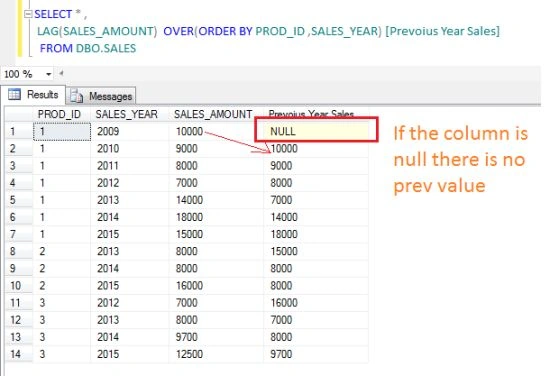
The Lag function gives the previous column values based on ordering.
LEAD
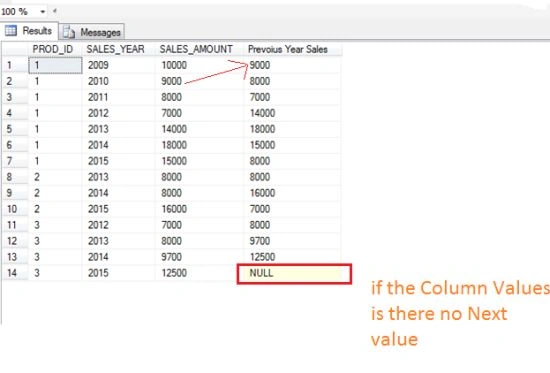
The Lead function gives the next column values based on ordering.
Demo
CREATE TABLE DBO.SALES
(
    PROD_ID INT,
    SALES_YEAR INT,
    SALES_AMOUNT INT
);
INSERT INTO DBO.SALES(PROD_ID, SALES_YEAR, SALES_AMOUNT) VALUES (1, 2009, 10000);
INSERT INTO DBO.SALES(PROD_ID, SALES_YEAR, SALES_AMOUNT) VALUES (1, 2010, 9000);
INSERT INTO DBO.SALES(PROD_ID, SALES_YEAR, SALES_AMOUNT) VALUES (1, 2011, 8000);
INSERT INTO DBO.SALES(PROD_ID, SALES_YEAR, SALES_AMOUNT) VALUES (1, 2012, 7000);
INSERT INTO DBO.SALES(PROD_ID, SALES_YEAR, SALES_AMOUNT) VALUES (1, 2013, 14000);
INSERT INTO DBO.SALES(PROD_ID, SALES_YEAR, SALES_AMOUNT) VALUES (1, 2014, 18000);
INSERT INTO DBO.SALES(PROD_ID, SALES_YEAR, SALES_AMOUNT) VALUES (1, 2015, 15000);
INSERT INTO DBO.SALES(PROD_ID, SALES_YEAR, SALES_AMOUNT) VALUES (2, 2013, 12000);
INSERT INTO DBO.SALES(PROD_ID, SALES_YEAR, SALES_AMOUNT) VALUES (2, 2014, 8000);
INSERT INTO DBO.SALES(PROD_ID, SALES_YEAR, SALES_AMOUNT) VALUES (2, 2015, 16000);
INSERT INTO DBO.SALES(PROD_ID, SALES_YEAR, SALES_AMOUNT) VALUES (3, 2012, 7000);
INSERT INTO DBO.SALES(PROD_ID, SALES_YEAR, SALES_AMOUNT) VALUES (3, 2013, 8000);
INSERT INTO DBO.SALES(PROD_ID, SALES_YEAR, SALES_AMOUNT) VALUES (3, 2014, 9700);
INSERT INTO DBO.SALES(PROD_ID, SALES_YEAR, SALES_AMOUNT) VALUES (3, 2015, 12500);
SELECT * FROM DBO.SALES;

The following example shows the Previous Year Sales Amount.
SELECT *,
       LAG(SALES_AMOUNT) OVER(ORDER BY PROD_ID, SALES_YEAR) AS [Previous Year Sales]
FROM DBO.SALES;
The following example shows the Next Year Sales Amount.
SELECT *,
       LEAD(SALES_AMOUNT) OVER(ORDER BY PROD_ID, SALES_YEAR) AS [Next Year Sales]
FROM DBO.SALES
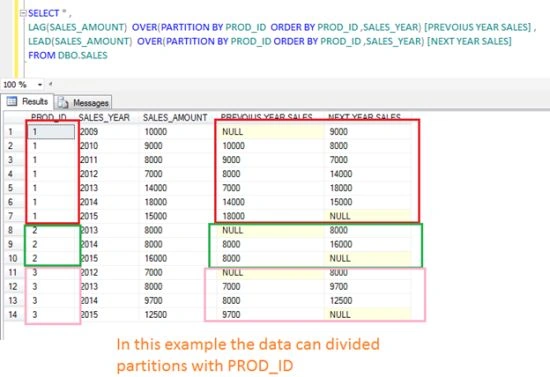
The following example shows the Previous Year Next Year Sales Amount using the partition by clause.
SELECT *,
    LAG(SALES_AMOUNT) OVER(PARTITION BY PROD_ID ORDER BY PROD_ID, SALES_YEAR) AS [PREVIOUS YEAR SALES],
    LEAD(SALES_AMOUNT) OVER(PARTITION BY PROD_ID ORDER BY PROD_ID, SALES_YEAR) AS [NEXT YEAR SALES]
FROM DBO.SALES
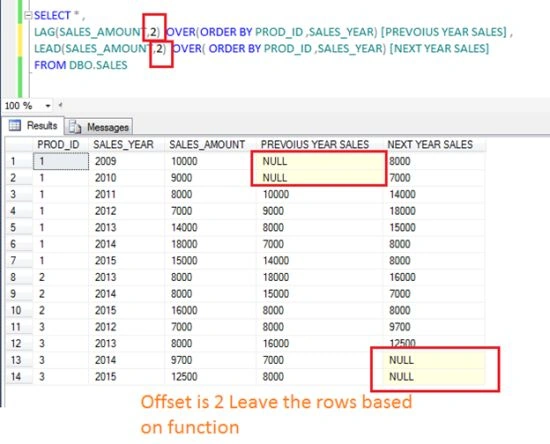
The following example shows an offset other than 1.
The offset is by default 1. If we want an offset other than 1 then we need to provide 2 argument values in the Lag and Lead functions.
SELECT *,
       LAG(SALES_AMOUNT, 2) OVER(ORDER BY PROD_ID, SALES_YEAR) AS [PREVIOUS YEAR SALES],
       LEAD(SALES_AMOUNT, 2) OVER(ORDER BY PROD_ID, SALES_YEAR) AS [NEXT YEAR SALES]
FROM DBO.SALES
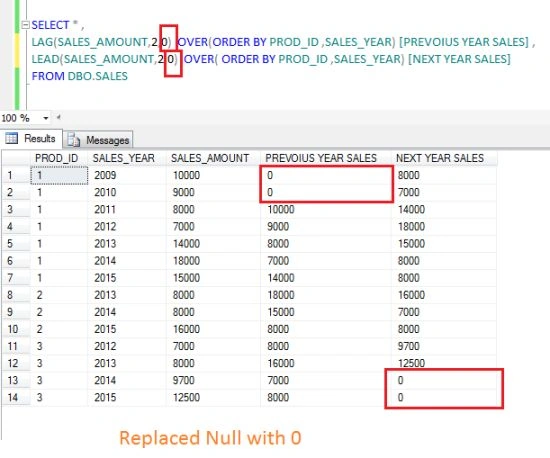
The following example shows replacing the null with various values.
SELECT *,
    LAG(SALES_AMOUNT, 2, 0) OVER (ORDER BY PROD_ID, SALES_YEAR) AS [PREVIOUS YEAR SALES],
    LEAD(SALES_AMOUNT, 2, 0) OVER (ORDER BY PROD_ID, SALES_YEAR) AS [NEXT YEAR SALES]
FROM DBO.SALES;
Rakesh KalluriPosted Jul 31, 2015, 1:35 AM
Thanks Santhakumar Munuswamy
Rakesh KalluriPosted Jul 31, 2015, 1:34 AM
Thanks Pankaj Kumar Choudhary
Rakesh KalluriPosted Jul 31, 2015, 1:34 AM
Thanks Gopi Chand
Rakesh KalluriPosted Jul 31, 2015, 1:34 AM
Thanks Rajeesh Menoth
Rakesh KalluriPosted Jul 31, 2015, 1:33 AM
Thanks Rakesh Chavda
Santhakumar MunuswamyPosted Jul 30, 2015, 3:00 AM
Good. Thanks for sharing
Pankaj Kumar ChoudharyPosted Jul 29, 2015, 7:33 PM
Nice Article Sir.... But i think there is a little bit mistake . your second query for Lead function is SELECT * , LEAD(SALES_AMOUNT) OVER(ORDER BY PROD_ID ,SALES_YEAR) [Next Year Sales] FROM DBO.SALES according this query column name should be [Next Year Sales] but o/p is showing [Previous Year Sales] name for column can you check this again...........
Pankaj Kumar ChoudharyPosted Jul 29, 2015, 1:46 PM
Again A Nice Article Sir......
Gopi ChandPosted Jul 29, 2015, 11:50 AM
Nice one
Rajeesh MenothPosted Jul 29, 2015, 11:20 AM
Good Article
RakeshPosted Jul 29, 2015, 9:51 AM
Good one