

Before proceeding to this article, please go through my previous articles:
- ASP.NET WEB API with Entity Framework 6 code first technique- Part I
- ASP.NET WEB API with Entity Framework 6 code first technique- Part 2
- ASP.NET WEB API with Entity Framework 6 code first technique- Part 3
In this article we are going to learn how to call ASP.NET WEB API from .NET Application.
Create One Employee model class in the project
- public class Employee
- {
- [Key]
- public int EmployeeId
- {
- get;
- set;
- }
- public string FirstName
- {
- get;
- set;
- }
- public string LastName
- {
- get;
- set;
- }
- public int Age
- {
- get;
- set;
- }
- }
Create a Context class in the project:
- public class CRUDAPIContext : DbContext
- {
- public CRUDAPIContext() : base("name=CRUDAPIContext")
- {
- }
- public System.Data.Entity.DbSet<CRUDAPI.Models.Employee> Employees { get; set; }
- }
- public class EmployeesController : ApiController
- {
- private CRUDAPIContext db = new CRUDAPIContext();
- // GET: api/Employees
- public IQueryable<Employee> GetEmployees()
- {
- return db.Employees;
- }
- // GET: api/Employees/5
- [ResponseType(typeof(Employee))]
- public async Task<IHttpActionResult> GetEmployee(int id)
- {
- Employee employee = await db.Employees.FindAsync(id);
- if (employee == null)
- {
- return NotFound();
- }
- return Ok(employee);
- }
- // PUT: api/Employees/5
- [ResponseType(typeof(void))]
- public async Task<IHttpActionResult> PutEmployee(int id, Employee employee)
- {
- if (!ModelState.IsValid)
- {
- return BadRequest(ModelState);
- }
- if (id != employee.EmployeeId)
- {
- return BadRequest();
- }
- db.Entry(employee).State = EntityState.Modified;
- try
- {
- await db.SaveChangesAsync();
- }
- catch (DbUpdateConcurrencyException)
- {
- if (!EmployeeExists(id))
- {
- return NotFound();
- }
- else
- {
- throw;
- }
- }
- return StatusCode(HttpStatusCode.OK);
- }
- // POST: api/Employees
- [ResponseType(typeof(Employee))]
- public async Task<IHttpActionResult> PostEmployee(Employee employee)
- {
- if (!ModelState.IsValid)
- {
- return BadRequest(ModelState);
- }
- db.Employees.Add(employee);
- await db.SaveChangesAsync();
- return CreatedAtRoute("DefaultApi", new { id = employee.EmployeeId }, employee);
- }
- // DELETE: api/Employees/5
- [ResponseType(typeof(Employee))]
- public async Task<IHttpActionResult> DeleteEmployee(int id)
- {
- Employee employee = await db.Employees.FindAsync(id);
- if (employee == null)
- {
- return NotFound();
- }
- db.Employees.Remove(employee);
- await db.SaveChangesAsync();
- return Ok(employee);
- }
- }
- }
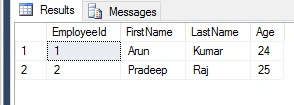
SQL Table
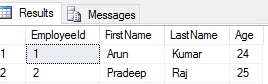
Our API’s are ready, so now we can call these API from the .NET Application. In my case I’m taking a console Application.
Create one console Application:
Use NuGet Package Manager to install the Web API Client Libraries package for Console Application or else use Install –Package Microsoft.AspNet.WebApi.Client command in package manager console.
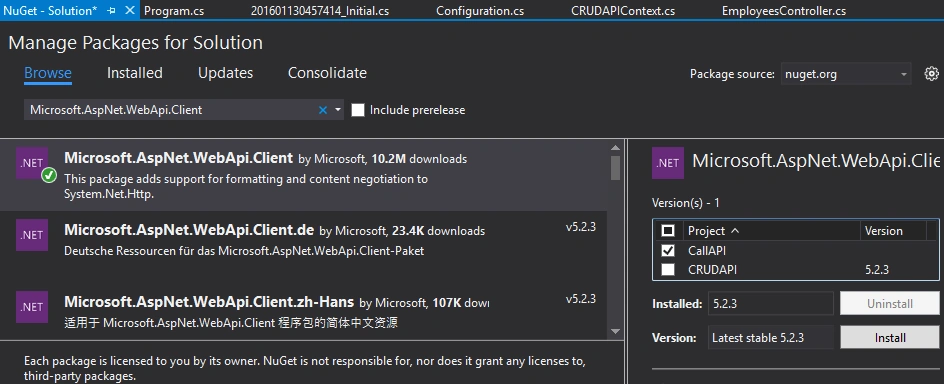
Create a Model class in Console Application
- public class Employee
- {
- public int EmployeeId
- {
- get;
- set;
- }
- public string FirstName
- {
- get;
- set;
- }
- public string LastName
- {
- get;
- set;
- }
- public int Age
- {
- get;
- set;
- }
- }
Call GetEmployees API Action from Console Application using HTTP Client
It is a class which is from System.Net.Http Namespace and provides a base class for sending HTTP requests and receiving HTTP responses from a resource identified by a URI.
Example
- class Program
- {
- static void Main(string[] args)
- {
- ApiCall().Wait();
- }
- static async Task ApiCall()
- {
- using (var client = new HttpClient())
- {
- HttpResponseMessage response = client.GetAsync("http://localhost:57135/api/Employees/1").Result;
- if (response.IsSuccessStatusCode)
- {
- Employee emp = await response.Content.ReadAsAsync<Employee> ();
- Console.WriteLine("{0}\t{1}\t{2}\t{3}", emp.EmployeeId, emp.FirstName, emp.LastName, emp.Age);
- Console.ReadKey();
- }
- }
- }
- }
Result

Call Employees POST API Action
- class Program
- {
- static void Main(string[] args)
- {
- ApiCall();
- }
- static void ApiCall()
- {
- using (var client = new HttpClient())
- {
- //HTTP POST
- var addEmp = new Employee() { FirstName = "John", LastName = "Miller", Age = 25 };
- HttpResponseMessage response = client.PostAsJsonAsync("http://localhost:57135/api/Employees", addEmp).Result;
- Console.WriteLine("{0}\t{1}", "StatusCode:", response.StatusCode);
- Console.ReadKey();
- }
- }
- }

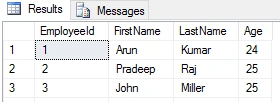
Call Employees PUT API Action
- class Program
- {
- static void Main(string[] args)
- {
- ApiCall();
- }
- static void ApiCall()
- {
- using (var client = new HttpClient())
- {
- //HTTP PUT
- var updateEmp = new Employee() {EmployeeId=3, FirstName = "John", LastName = "Miller", Age = 27 };
- HttpResponseMessage response = client.PutAsJsonAsync("http://localhost:57135/api/Employees/3", updateEmp).Result;
- Console.WriteLine("{0}\t{1}", "StatusCode:", response.StatusCode);
- Console.ReadKey();
- }
- }
- }

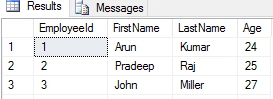
Call Employees Delete API Action
- class Program
- {
- static void Main(string[] args)
- {
- ApiCall();
- }
- static void ApiCall()
- {
- using (var client = new HttpClient())
- {
- //HTTP DELETE
- HttpResponseMessage response = client.DeleteAsync("http://localhost:57135/api/Employees/3").Result;
- Console.WriteLine("{0}\t{1}", "StatusCode:", response.StatusCode);
- Console.ReadKey();
- }
- }
- }
I hope you enjoyed this article. Your valuable feedback, question, or comments about this article are always welcomed.
Santhakumar MunuswamyPosted Jan 17, 2016, 2:29 PM
Thanks for nice share
Arul RPosted Jan 17, 2016, 10:43 AM
Nice
Sandeep NeelaPosted Jan 15, 2016, 6:31 AM
Nice Article
Mohammed IbrahimPosted Jan 14, 2016, 9:15 AM
nice
Debasis SahaPosted Jan 14, 2016, 8:16 AM
Good One..