

Before proceeding to this article, please go through my previous article:
GET :/api/employees -> action in Employees Controller, gives the employee details
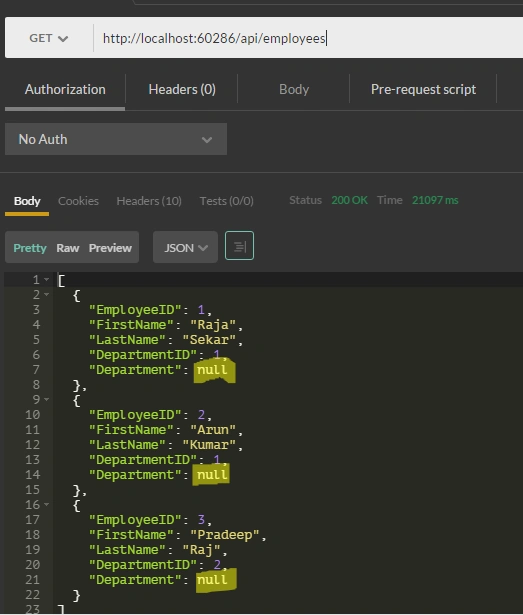
The following trace log of the SQL query confirms this:
- {SELECT [Extent1].[EmployeeID] AS [EmployeeID], [Extent1].[FirstName] AS [FirstName], [Extent1].[LastName] AS [LastName], [Extent1].[DepartmentID] AS [DepartmentID] FROM [dbo].[Employees] AS [Extent1]}
The SELECT statement take from the Employee table, and does not reference the Department table.
Now Eager Loading and the lazy loading comes into the picture.
Eager Loading
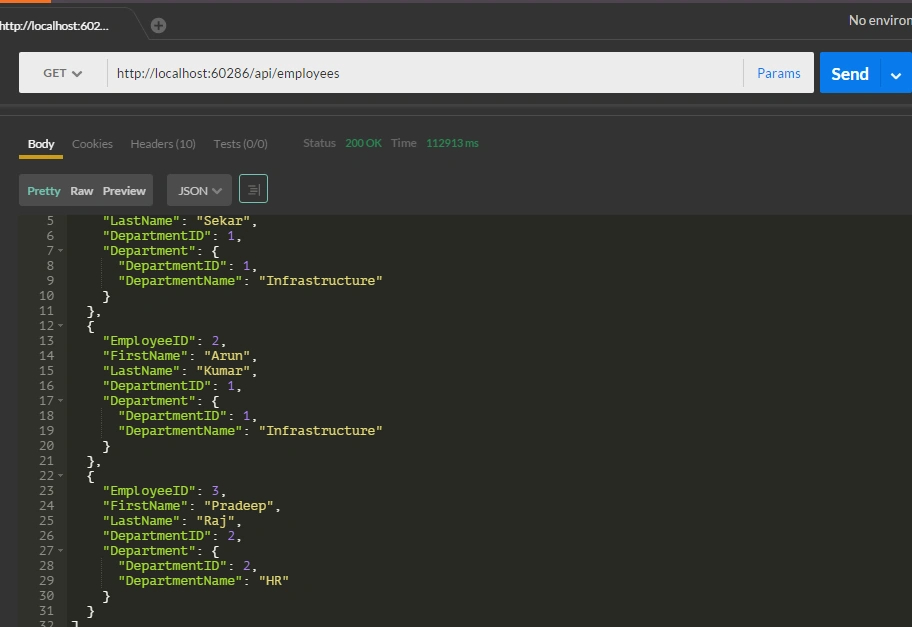
Entity Framework loads related entities as part of the initial database query, Replace get Action in Employees Controller code to the following code,
- public IQueryable<Employees> GetEmployees()
- {
- return db.Employees.Include(dept=>dept.Department);
- }
The trace log of the SQL query,
- {SELECT [Extent1].[EmployeeID] AS [EmployeeID], [Extent1].[FirstName] AS [FirstName], [Extent1].[LastName] AS [LastName], [Extent1].[DepartmentID] AS [DepartmentID], [Extent2].[DepartmentID] AS [DepartmentID1], [Extent2].[DepartmentName] AS [DepartmentName] FROM [dbo].[Employees] AS [Extent1] INNER JOIN [dbo].[Departments] AS [Extent2] ON [Extent1].[DepartmentID] = [Extent2].[DepartmentID]}
To enable the lazy loading, make the navigation property virtual as in the following code,
- public class Employees
- {
- [Required]
- [Key]
- public int EmployeeID
- {
- get;
- set;
- }
- [Required]
- public string FirstName
- {
- get;
- set;
- }
- public string LastName
- {
- get;
- set;
- }
- public int DepartmentID
- {
- get;
- set;
- } //Foreign Key
- public virtual Department Department
- {
- get;
- set;
- } //Navigation Property
- }
In Employee controller replace the GET action method with the following code:
- var Employee = db.Employees.ToList();
- var dept = Employee[0].Department;
- {
- SELECT[Extent1].[EmployeeID] AS[EmployeeID], [Extent1].[FirstName] AS[FirstName], [Extent1].[LastName] AS[LastName], [Extent1].[DepartmentID] AS[DepartmentID] FROM[dbo].[Employees] AS[Extent1]
- }
- {
- SELECT[Extent1].[DepartmentID] AS[DepartmentID], [Extent1].[DepartmentName] AS[DepartmentName] FROM[dbo].[Department] AS[Extent1] where[Extent1].[DepartmentID] = @EntityKeyValue1
- }
- {
- SELECT[Extent1].[DepartmentID] AS[DepartmentID], [Extent1].[DepartmentName] AS[DepartmentName] FROM[dbo].[Department] AS[Extent1] where[Extent1].[DepartmentID] = @EntityKeyValue1
- }
- {
- SELECT[Extent1].[DepartmentID] AS[DepartmentID], [Extent1].[DepartmentName] AS[DepartmentName] FROM[dbo].[Department] AS[Extent1] where[Extent1].[DepartmentID] = @EntityKeyValue1
- }
Lazy loading in the Entity Framework will send a query each times it retrieves a related entity.
Circular References:
We have defined a navigation property on the Employee class for the Employee-department relationship, suppose if we add the navigation property to the department class it will create an issue when we serialize the models. If we load the related data, it creates a circular object graph.
- public class Department
- {
- [Required]
- public int DepartmentID
- {
- get;
- set;
- }
- [Required]
- public string DepartmentName
- {
- get;
- set;
- }
- public ICollection < Employees > Employees
- {
- get;
- set;
- }
- }
Now, the response of the /api/employee service as shown in figure 3,
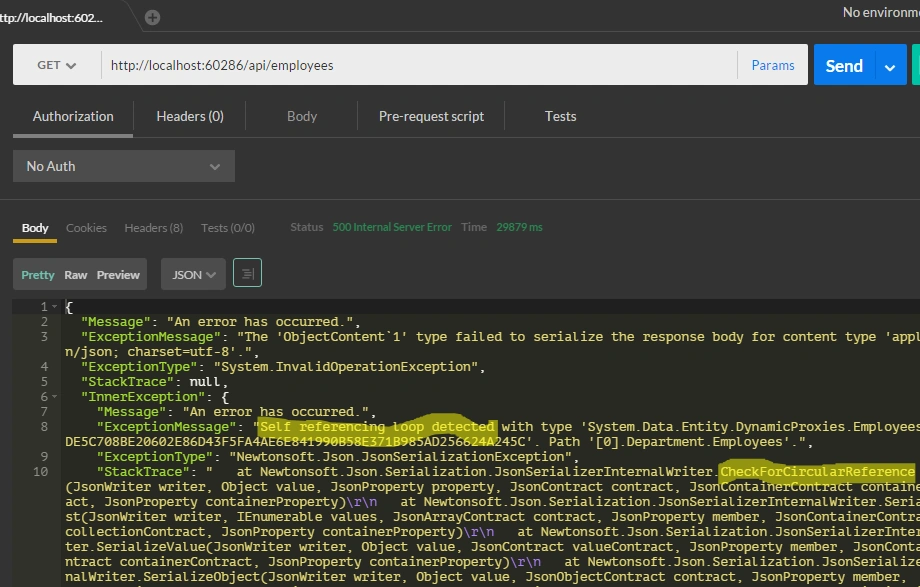
We can overcome this issue by using Data Transfer Objects (DTOs).
Data Transfer Objects (DTOs):
Code in EmployeeDetailDTO.cs,
- public class EmployeeDetailDTO
- {
- public int EmployeeID
- {
- get;
- set;
- }
- public string FristName
- {
- get;
- set;
- }
- public string LastName
- {
- get;
- set;
- }
- public string DepartmentName
- {
- get;
- set;
- }
- public int DepartmentID
- {
- get;
- set;
- }
- }
Code in EmployeeDTO.cs,
- public class EmployeeDTO
- {
- public int EmployeeID
- {
- get;
- set;
- }
- public string FristName
- {
- get;
- set;
- }
- public string DepartmentName
- {
- get;
- set;
- }
- }
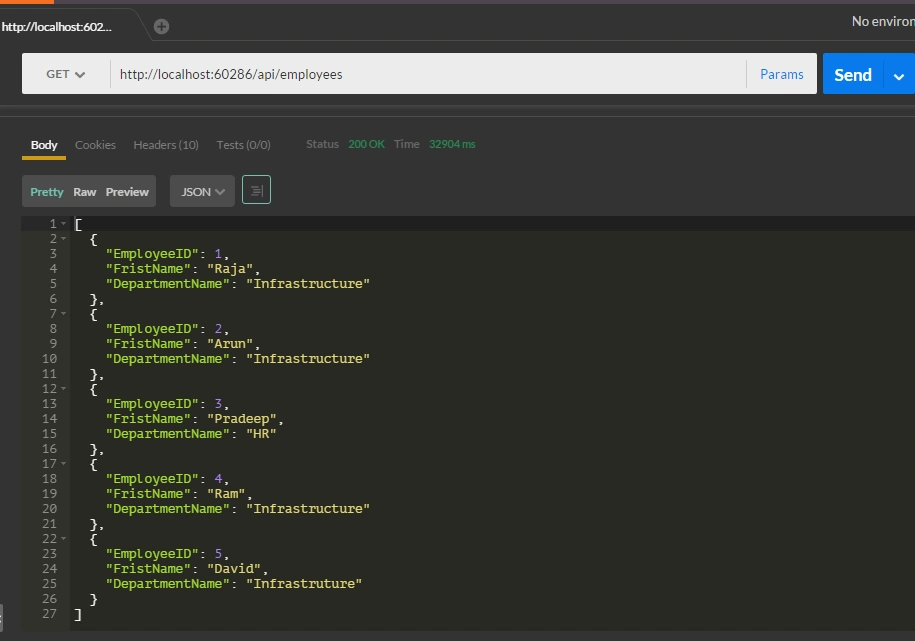
Now let we change the API actions in the Employees Controller:
GET action code
- public IQueryable < EmployeeDTO > GetEmployees()
- {
- var employeedetail = from s in db.Employees
- select new EmployeeDTO()
- {
- EmployeeID = s.EmployeeID,
- FristName = s.FirstName,
- DepartmentName = s.Department.DepartmentName
- };
- return employeedetail;
- }
Response
/api/employee /{emplyeeid}
- [ResponseType(typeof(EmployeeDetailDTO))]
- public async Task < IHttpActionResult > GetEmployees(int id)
- {
- EmployeeDetailDTO employees = await db.Employees.Include(s => s.Department).Select(
- b => new EmployeeDetailDTO()
- {
- EmployeeID = b.EmployeeID,
- FristName = b.FirstName,
- LastName = b.LastName,
- DepartmentName = b.Department.DepartmentName,
- DepartmentID = b.DepartmentID
- }).SingleOrDefaultAsync(c => c.EmployeeID == id);
- if (employees == null)
- {
- return NotFound();
- }
- return Ok(employees);
- }
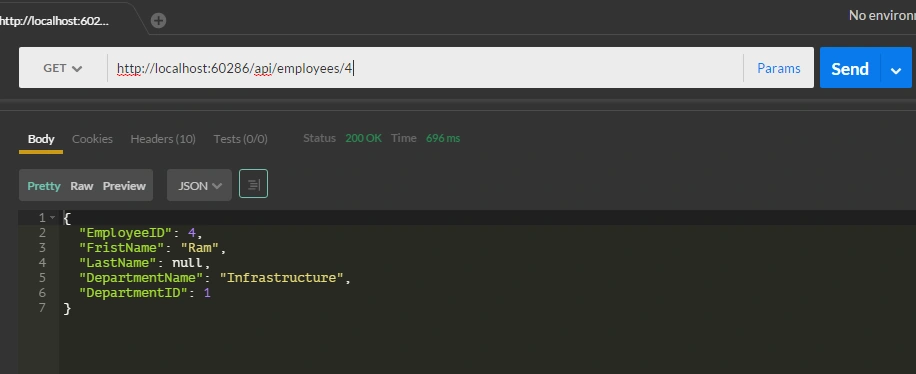
POST: /api/employee - This service is used to add the employee records,
- [ResponseType(typeof(Employees))]
- public async Task < IHttpActionResult > PostEmployees(Employees employees)
- {
- if (!ModelState.IsValid)
- {
- return BadRequest(ModelState);
- }
- db.Employees.Add(employees);
- await db.SaveChangesAsync();
- db.Entry(employees).Reference(s => s.Department).Load();
- var StoreEmp = new EmployeeDTO()
- {
- EmployeeID = employees.EmployeeID,
- FristName = employees.FirstName,
- DepartmentName = employees.Department.DepartmentName
- };
- return CreatedAtRoute("DefaultApi", new
- {
- id = employees.EmployeeID
- }, StoreEmp);
- }
Response
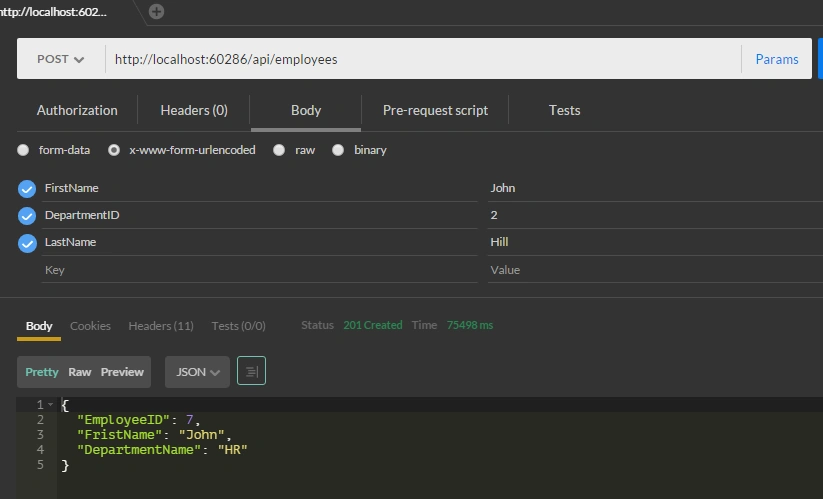
PUT: /api/employee - This service is used to update the employee records,
- [ResponseType(typeof(void))]
- public async Task < IHttpActionResult > PutEmployees(int id, Employees employees)
- {
- if (!ModelState.IsValid)
- {
- return BadRequest(ModelState);
- }
- if (id != employees.EmployeeID)
- {
- return BadRequest();
- }
- db.Entry(employees).State = EntityState.Modified;
- try
- {
- await db.SaveChangesAsync();
- } catch (DbUpdateConcurrencyException)
- {
- if (!EmployeesExists(id))
- {
- return NotFound();
- } else
- {
- throw;
- }
- }
- return StatusCode(HttpStatusCode.NoContent);
- }
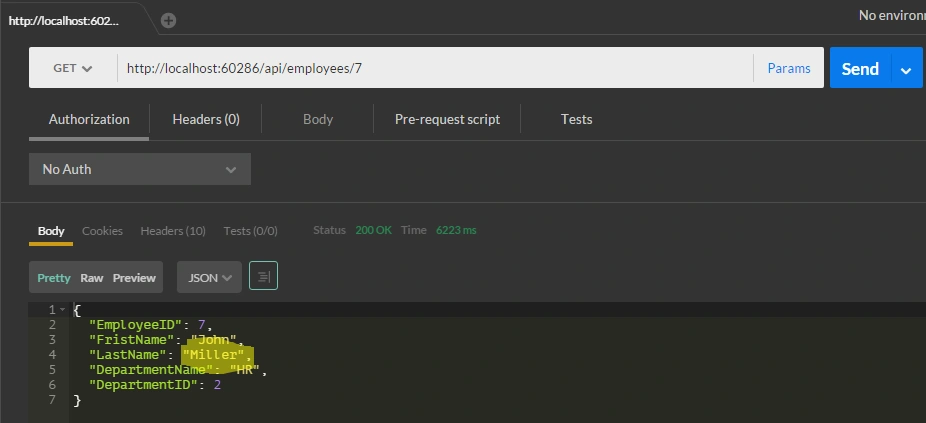
Response
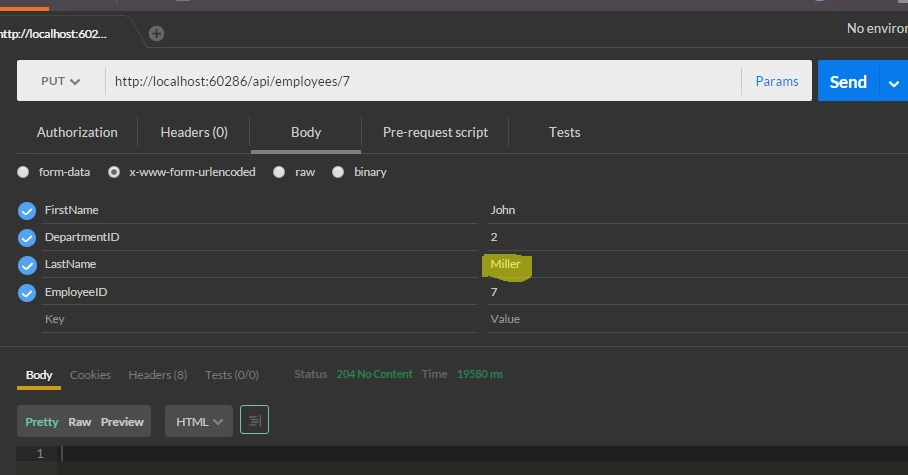
Result
I hope you have enjoyed this article. Your valuable feedback, question, or comments about this article are always welcomed.
Arul RPosted Jan 17, 2016, 10:49 AM
Thanks for nice article
Humayun Kabir MamunPosted Dec 24, 2015, 12:02 AM
Nice...
Santhakumar MunuswamyPosted Dec 23, 2015, 10:34 AM
Thanks for nice article. Keep it up
Raja TPosted Dec 23, 2015, 7:06 AM
Good, Thanks for sharing
Sabyasachi MishraPosted Dec 23, 2015, 6:16 AM
Good one.You have used no authentication, hoping for the next article using individual account.