

In this article we’ll learn about the database snapshot feature. It is the most interesting feature introduced by SQL Server, which we’ll explore through this article.
I’ve divided the article in the following listed parts:
- Introduction.
- Scenarios.
- Creating Database Snapshot.
- Restoring from Database Snapshot.
- Conclusion.
Database Snapshot (DS) feature was introduced in SQL Server 2005 which allow users to create read-only copies of your source database.
Database snapshots are dependent on the source database and the snapshot always resides on the same instance as its source database.
The following are some important points related to database snapshot,
- DS can be created in all recovery models.
- It’s not possible to take backup of the database snapshot.
- You cannot restore, detach a DS.
- Full textindexes are not supported in DS.
- We can create multiple snapshots for a single database.
- DS can only be created by T-SQL. It’s not possible to create DS with GUI.
- If DS is created for any database, SQL Server won’t allow you to drop the source database until you drop the related DS. If you try, you’ll get the following error.
Msg 3709, Level 16, State 2, Line 3
Cannot drop the database while the database snapshot "CSharpCornerDB_Snapshot" refers to it. Drop that database first. - If you try to delete any object from DS, SQL Server won’t allow doing it and will throw the following error message.
Msg 3906, Level 16, State 1, Line 3
Failed to update database "CSharpCornerDB_Snapshot" because the database is read-only. - DS cannot be created on system databases. If you try to create, you’ll get the following error message.
Msg 1816, Level 16, State 1, Line 1
Database snapshot on the system database master is not allowed.
Scenarios
There are various scenarios where database snapshots can be useful. Some of them are listed below.
- If we want to restore our database rather than SQL backup file, we can go with database snapshot. It’s a quick way to restore a database.
- If any user wants to do any kind of manipulation with the data on temporary basis, we can create a database snapshot of the database and let user to use this snapshot instead of the original database. This seems beneficial because the user can perform their manipulation without making any changes in original database. Once done with the activity, user can delete the snapshot.
- Database Snapshot can be used for reporting purpose.
Execute the following code on database CSharpCorner on server to create Database Snapshot. You can refer to my previous article for database creation and table creation script.
- USE master
- GO
- --Drop database snapshot
- if it already exists
- IF EXISTS
- (
- SELECT name FROM sys.databases WHERE name = N 'CSharpCornerDB_Snapshot'
- )
- DROP DATABASE CSharpCornerDB_Snapshot
- GO
- --Create the database snapshot
- CREATE DATABASE CSharpCornerDB_Snapshot ON
- (
- NAME = CSharpCornerDB,
- FILENAME =
- 'A:\SQL Data File\SQLPROD2008\CSharpCornerDB_Snapshot.ss'
- )
- AS SNAPSHOT OF CSharpCornerDB
- GO
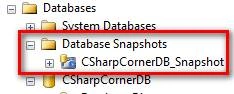
Refresh the Database Snapshot folder in Object Explorer and you’ll see you created snapshot as in the following:
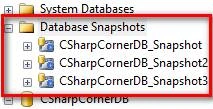
You can also create multiple snapshots for a single database as shown below.
Now if we make changes in source database, it’ll reflect from the next snapshot we create for the database. Let’s check it by adding a new table to it.
- create table tblEvents
- (
- EventId int primary key identity,
- EventName varchar(50) not null,
- Location varchar(20) not null,
- Country varchar(20) not null
- )
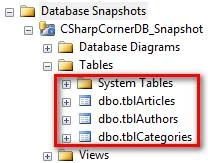
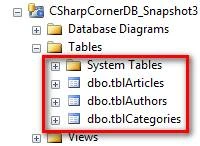
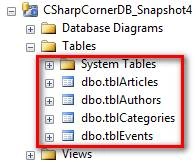
As we can see in above snapshots, after creatina table in source table, changesare only reflected in snapshot4 database snapshot. In other snapshots, we didn’t see any changes.
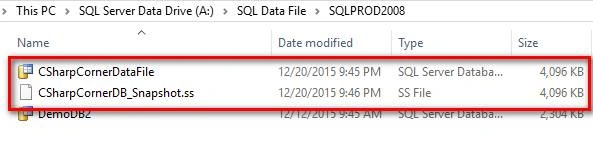
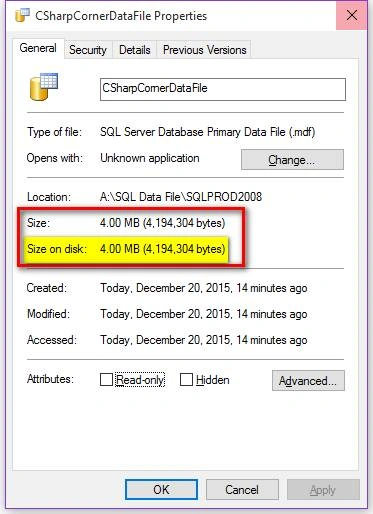
Also, if you see, both the files (.MDF and .SS) are of same size i.e. 4 MB. Let’s check both the files properties and see the difference.
CSharpCorner database file (.MDF) file detail.
CSharpCorner Database Snapshot (.SS) file detail.
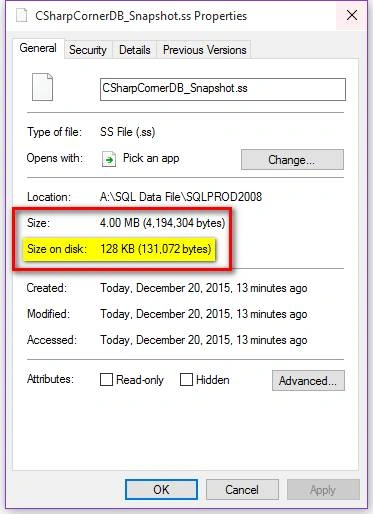
As we can see, both files are of size 4 MB. But .MDF file is occupying 4 MB space on disk and on the other hand database snapshot file is only taking 128 KB of space on disk.
As we already explained, that SQL Server doesn’t allocate space on disk for snapshot file instead it uses sparefile.
Now, let’s see data of all the tables in datafile and in our newly created snapshot file.
- select * from CSharpCornerDB.dbo.tblAuthors
- GO
- select * from CSharpCornerDB_Snapshot.dbo.tblAuthors
- GO
Now let’s delete all tables from sourcedatabase with help of the following query.
- drop table tblAuthors
- drop table tblArticles
- drop table tblCategories
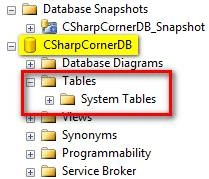
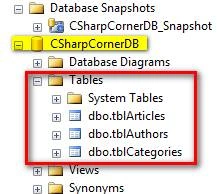
Now we’ll restore our database from snapshot and we’ll try to bring back those deleted tables.
Restore from Database Snapshot:
As we don’t have any SQL backup file, we’ll try to restore our database from database snapshot only. Execute the following query to begin the restore for database CSharpCornerDB.
- USE master
- GO
- RESTORE DATABASE CSharpCornerDB
- FROM DATABASE_SNAPSHOT = 'CSharpCornerDB_Snapshot';
Conclusion
This was the article based on Database snapshot, where we saw what snapshot is and under which scenario we can use the snapshot feature. We also createda snapshot of a database and checked how much space they occupy on the disk. Also, we created multiple snapshots for a single database and we updated the source database to view whether changes reflects in old snapshots or not.
I hope this article helped you understand the concept of snapshot in SQL Server. If you have any queries please let me know, I’ll try my best to resolve those.
Please provide your valuable feedback and comments that enable me to provide a better article the next time. Until then keep learning and sharing.
Santhakumar MunuswamyPosted Jan 23, 2016, 2:22 AM
Thanks for nice article
Arul RPosted Jan 21, 2016, 12:22 AM
Nice
Raja TPosted Jan 20, 2016, 10:53 PM
Nice, Thanks for sharing
Nanddeep NachanPosted Jan 20, 2016, 5:02 AM
Nice
sabarimalai iyyappanPosted Jan 20, 2016, 4:36 AM
good one abhishek
Yashwant VishwakarmaPosted Jan 20, 2016, 12:07 AM
Superb article, thanks for sharing !!
Santhakumar MunuswamyPosted Jan 19, 2016, 2:41 PM
Thanks for nice article
Saillesh PawarPosted Jan 19, 2016, 10:07 AM
Nice1
Mohammed IbrahimPosted Jan 19, 2016, 8:59 AM
nice
Aasim AbdullahPosted Jan 19, 2016, 8:40 AM
Like the way you explain. Thanks Abhi
Humayun Kabir MamunPosted Jan 19, 2016, 7:41 AM
Nice...