

Introduction
One of the major benefits of the Entity Framework is that our entity model does not need to match our stored model (database model). Table splitting gives us the ability to map multiple entities to a single database table. Table splitting is just the opposite of entity splitting. In other words, two or more entities of our model are mapped to the same physical database table. Earlier, the database's first approach is known as Table Per Hierarchy (TPH). In this article, I am explaining it with the Code First approach.
Table Per Hierarchy is one of the inheritance types and uses a single table in the database to maintain the data and uses multiple entities in Entity Framework. In other words, table splitting involves mapping multiple entities in a conceptual layer to a single table in a store (database) layer.
Suppose we have a table in the database called “EmployeeMaster” to store the employee information and in the entity model there are two entities, one for the stored basic information (code and name) and another for storing additional information (phone number and email address). Here the database table stores all the information in a single physical table.
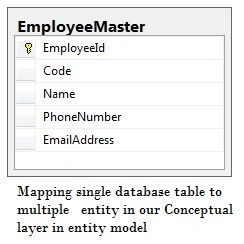
In Code First, we will have the following two entities and DbContext configuration to accomplish this scenario.
[Table("EmployeeMaster")]
public partial class Employee
{
    [Key]
    [DatabaseGenerated(DatabaseGeneratedOption.Identity)]
    public int EmployeeId { get; set; }

    [StringLength(10)]
    public string Code { get; set; }

    [StringLength(50)]
    public string Name { get; set; }

    [ForeignKey("EmployeeId")]
    public virtual EmployeeDetails Details { get; set; }
}

[Table("EmployeeMaster")]
public partial class EmployeeDetails
{
    [Key]
    [DatabaseGenerated(DatabaseGeneratedOption.Identity)]
    public int EmployeeId { get; set; }

    [StringLength(25)]
    public string PhoneNumber { get; set; }

    [StringLength(255)]
    public string EmailAddress { get; set; }

    public virtual Employee Employee { get; set; }
}
DbContext Class
public partial class EntityModel : DbContext
{
    public EntityModel() : base("name=EntityModel")
    {
        Database.Log = Console.WriteLine;
    }

    public virtual DbSet<Employee> Employees { get; set; }
    public virtual DbSet<EmployeeDetails> EmployeeDetails { get; set; }

    protected override void OnModelCreating(DbModelBuilder modelBuilder)
    {
        modelBuilder.Entity<Employee>()
            .HasRequired(e => e.Details)
            .WithRequiredDependent(e => e.Employee);
    }
}
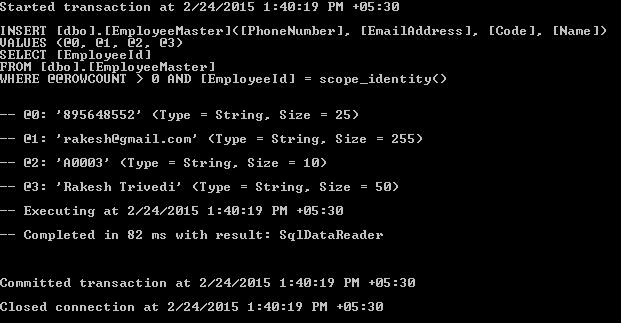
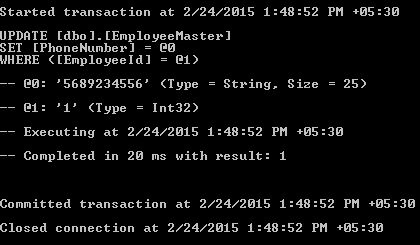
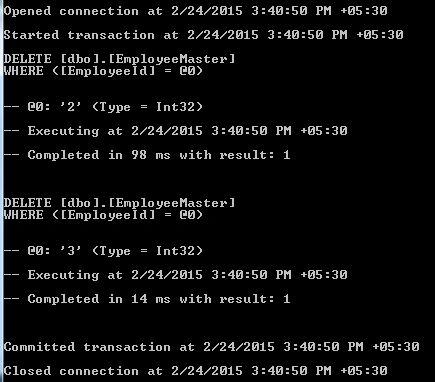
When we query the employee and employee details entity, Entity Framework will automatically generate the query. To analyze the query, we just turn on the "Logging SQL" of Entity Framework.
Let us consider the four scenarios of selecting, inserting, updating, and deleting and check the behavior of the Entity Framework.
Select scenario
Querying on Employees Entity
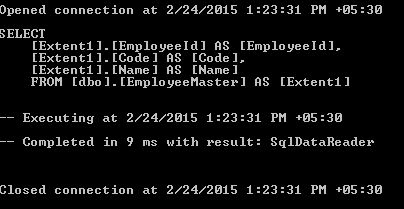
When we query on employee entity, it will retrieve the columns related to the Employee entity (EmployeeId, Code, and Name).
Example code
using (EntityModel context = new EntityModel())
{
    var employees = context.Employees.ToList();
}
Output
Tom MohanPosted Mar 1, 2015, 7:53 PM
Good one.
Vithal WadjePosted Feb 26, 2015, 11:24 AM
nice
Rahul Kumar SaxenaPosted Feb 26, 2015, 4:33 AM
Very Useful...
Sibeesh VenuPosted Feb 26, 2015, 2:39 AM
Good One.