

We are very familiar with drive properties in operating system, through drive properties
We can gain important information of selected drive such as used space, free space, file system….
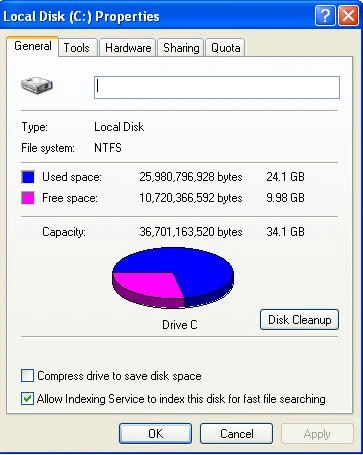
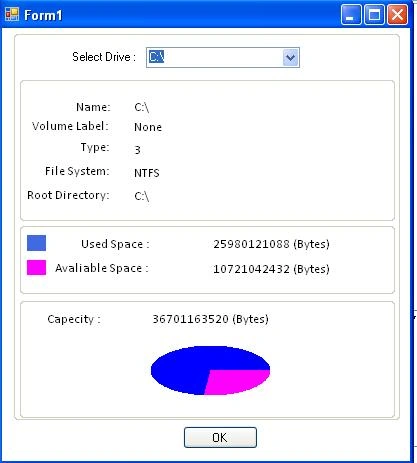
We can also create drive property page in vb.net
by using Driveinfo class of System.IO namespaces.
User can determine
what drives are available and capacity and
available free space on the drive. System.IO.DriveInfo provides various methods
and properties for handling above discussed task these are as follows:
Methods :
|
Name |
Description |
|
Equals(Object) |
Determines whether the specified Object is equal to the current Object. |
|
Finalize |
Allows an Object to attempt to free resources and perform other cleanup operations before the Object is reclaimed by garbage collection. |
|
GetDrives |
Retrieves the drive names of all logical drives on a computer. |
|
GetHashCode |
Serves as a hash function for a particular type |
|
GetType |
Gets the Type of the current instance |
|
MemberwiseClone |
Creates a shallow copy of the current Object. |
|
ToString |
Returns a drive name as a string. |
Properties :
|
Name |
Description |
|
AvailableFreeSpace |
Indicates the amount of available free space on a drive. |
|
DriveFormat |
Gets the name of the file system, such as NTFS or FAT32. |
|
DriveType |
Gets the drive type. |
|
IsReady |
Gets a value indicating whether a drive is ready. |
|
Name |
Gets the name of a drive. |
|
RootDirectory |
Gets the root directory of a drive. |
|
TotalFreeSpace |
Gets the total amount of free space available on a drive. |
|
TotalSize |
Gets the total size of storage space on a drive. |
|
VolumeLabel |
Gets or sets the volume label of a drive. |
Code :
Add new window form and add some controls Labels, Groupboxes,buton(see picture)
Create load event of form, selectedindexChanged event of combox and paint event of groupbox on where chart is shown.
Now first we need to bind all available drive's name in combo box like this
Private Sub Form1_Load(ByVal sender As System.Object, ByVal e As System.EventArgs) Handles MyBase.Load
Dim drives As System.IO.DriveInfo() = System.IO.DriveInfo.GetDrives
For i As Integer = 0 To drives.Length - 1
cmbCombo.Items.Add(drives(i).ToString)
Next
cmbCombo.SelectedIndex = -1
End Sub
For showing various information regarding selected drive we need to write this code on SelectedIndexChanged event of combo box:
Dim Drive_Info As System.IO.DriveInfo
Drive_Info = New System.IO.DriveInfo(cmbCombo.Text)
lblName.Text = Drive_Info.Name
If Drive_Info.IsReady Then
If Drive_Info.VolumeLabel.Length > 0 Then
lblVolumeLabel.Text = Drive_Info.VolumeLabel
lblVolumeLabel.Text = "None"
End If
lblFileSystem.Text = Drive_Info.DriveFormat
lblType.Text = Drive_Info.DriveType
lblRootDir.Text = Drive_Info.RootDirectory.FullName
lblCapacity.Text = Drive_Info.TotalSize & " (Bytes)"
lblAvalspace.Text = Drive_Info.TotalFreeSpace & " (Bytes)"
Dim usedSpace As Long
usedSpace = Drive_Info.TotalSize - Drive_Info.TotalFreeSpace
lblUsedSpace.Text = usedSpace & " (Bytes)"
Dim ProgressCurrentValue As Integer = usedSpace * 100 / Drive_Info.TotalSize
End If
We can also use Pie chart for showing used and free space in drive by various color using paint event and FillPie method of graphices class like this
Private Sub GroupBox3_Paint(ByVal sender As System.Object, ByVal e As System.Windows.Forms.PaintEventArgs) Handles GroupBox3.Paint
Dim rect As Rectangle = New Rectangle(130, 50, 120, 50)
If IsInfoAvailiable Then
e.Graphics.FillPie(Brushes.Fuchsia, rect, 0, Piemark)
e.Graphics.FillPie(Brushes.Blue, rect, Piemark, 360 - Piemark)
Application.DoEvents()
End If
End Sub
Edward Lance LorillaPosted Apr 16, 2021, 2:51 PM
Here the link you would like see: https://www.youtube.com/watch?v=saAcQAcYhYA