

For some reasons, SharePoint 2013’s prerequisite installer can't find which server manager to use and fails installation of prerequisite files.
So, what you should do is: Go to Windows/System32, find servermanager.exe, duplicate it and then rename it to "servermanagercmd.exe".
After this, re-run prerequisite installer, it will work perfectly:
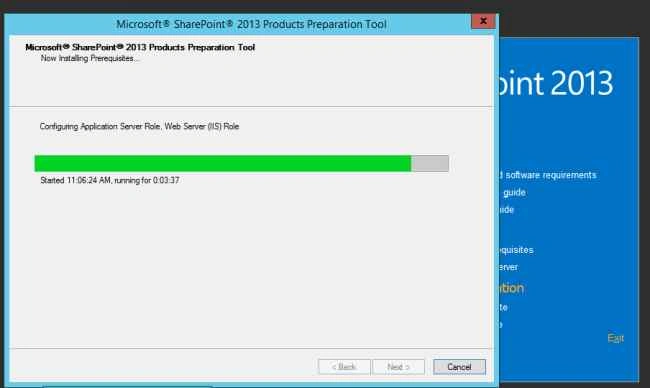
If it doesn’t work then you haven’t enabled downloading setup files remotely in MMC (group policy editor) settings.
To do this, follow the below given steps:
- Add “GP Editor” Snapin in MMC.
- Then, go to Computer Configuration, Administrative Templates, then System.
- Update “Specify settings for optional” policy as Enabled.
- Update “Contact Windows Update” as selected.
- Click Apply.
- Make sure IIS Admin Service also works in Server Manager.
That's it!
Vaikesh K PPosted Sep 3, 2015, 2:08 AM
Nice work
Santhakumar MunuswamyPosted Sep 2, 2015, 3:00 PM
Nice share
Mohammed IbrahimPosted Sep 2, 2015, 11:29 AM
thanks for sharing information
RakeshPosted Sep 2, 2015, 6:59 AM
Good share sir
Sibeesh VenuPosted Sep 2, 2015, 6:45 AM
Nice Share
Karthikeyan KPosted Sep 2, 2015, 2:52 AM
Good one sir..Thanks for sharing
Vinodh NarayananPosted Sep 2, 2015, 2:45 AM
nice one sir