

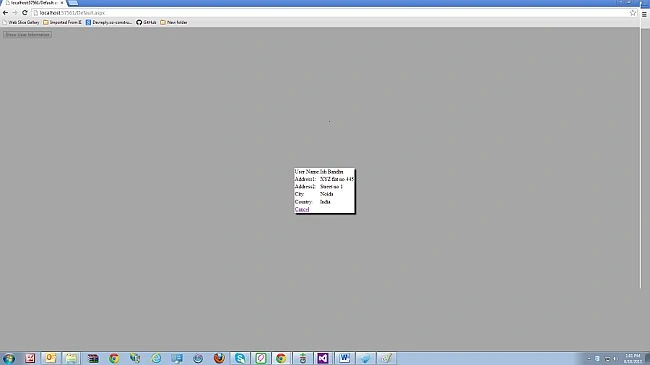
In this article, I will explain how to bind User Control data on a button click with a modal popup.
1. Create a user control. I created the UserInfo.ascx User Control in the given sample.
I added some controls to that User Control to bind the user information as given below:
- <table width="100%" border="0" cellspacing="0" style="background-color:white">
- <tr>
- <td>
- User Name:
- </td>
- <td>
- <asp:Label ID="UserNameLabel" runat="server"></asp:Label>
- </td>
- </tr>
- <tr>
- <td>Address1:</td>
- <td>
- <asp:Label ID="Address1Label" runat="server"></asp:Label>
- </td>
- </tr>
- <tr>
- <td>Address2:</td>
- <td>
- <asp:Label ID="Address2Label" runat="server">
- </asp:Label>
- </td>
- </tr>
- <tr>
- <td>
- City:
- </td>
- <td>
- <asp:Label ID="CityLabel" runat="server"></asp:Label>
- </td>
- </tr>
- <tr>
- <td>
- Country:
- </td>
- <td>
- <asp:Label ID="CountryLable" runat="server"></asp:Label>
- </td>
- </tr>
- <tr>
- <td colspan="2">
- //For hide the modal popup
- <a href="#" id="Cancel" onclick="$find('ShowUserInfoModalPopUp').hide(); return false;">Cancel</a>
- </td>
- </tr>
- </table>
2. In UserInfo.ascx.cs create a function BindUser(), to bind the user information.
- public void BindUser()
- {
- UserNameLabel.Text = "Ish Bandhu";
- Address1Label.Text = "XYZ flat no 445";
- Address2Label.Text = "Street no 1";
- CityLabel.Text = "Noida";
- CountryLable.Text = "India";
- }
- <%@ Register Src="~/UserInfo.ascx" TagName="UserInformation" TagPrefix="uc1" %>
- <%@ Register Assembly="AjaxControlToolkit" Namespace="AjaxControlToolkit" TagPrefix="ajaxToolkit" %>
- <style type="text/css">
- .modalBackGround
- {
- background-color: gray;
- filter: alpha(opacity=50);
- opacity: 0.7;
- }
- </style>
- <asp:ScriptManager runat="server" ID="ScriptManager1">
- </asp:ScriptManager>
- <asp:Button ID="TargetButton" runat="server" Style="display: none" />
- <ajaxToolkit:ModalPopupExtender ID="ShowUserInfoModalPopUp" runat="server" PopupControlID="UserInfoPanel" DropShadow="true"
- TargetControlID="TargetButton" BackgroundCssClass="modalBackGround" RepositionMode="RepositionOnWindowResizeAndScroll"
- BehaviorID="ShowUserInfoModalPopUp">
- </ajaxToolkit:ModalPopupExtender>
8. Add a panel and add the userinfo User Control to that panel:
- <asp:Panel ID="UserInfoPanel" runat="server" Style="display: none">
- <asp:UpdatePanel ID="UserInfoUpdatePanel" runat="server" UpdateMode="Conditional">
- <ContentTemplate>
- <uc1:UserInformation ID="UserInformationControl" runat="server" />
- </ContentTemplate>
- </asp:UpdatePanel>
- </asp:Panel>
You can see that I added the userinfo User Control within the update panel, because after binding the user information we will call the update method of that update panel to update the user control information.
9. Add a button to show the user information in the modalpopup:
- <asp:Button ID="ShowUserInforButton" runat="server" OnClick="ShowUserInforButton_Click" Text="Show User Information" />
- protected void ShowUserInforButton_Click(object sender, EventArgs e)
- {
- UserInfo userInfo = (UserInfo)Page.FindControl("UserInformationControl");
- userInfo.BindUser();
- ShowUserInfoModalPopUp.Show();
- }
Anitha MaruthapandianPosted Feb 8, 2018, 5:09 AM
Its not working. i tried this source code