

Introduction
There is no easy way to export the tests, test results, and so on in an easy to use format. Luckily there is a tool named Test Scribe that allows you to see Test Plan, Test Results, Test Suites, Test Cases, Test Configurations, and Test Settings in a Word document which you can also print out.
Installing Test Scribe
You can download Test Scribe from this location (You will also find the installation instructions and pre-requisites here): http://visualstudiogallery.msdn.microsoft.com/e79e4a0f-f670-47c2-9b8a-3b6f664bf4ae
Putting Test Scribe to Use
Once you have installed the Test Scribe you have done all the hard work, and the only thing you need to do is go through the walk-through below.
Step 1 :
- Open Microsoft Test Manager
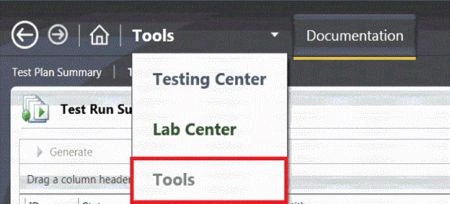
- Click on the Tools dropdown
- A new option Tools is added to the drop down list. Select it.
Step 2:
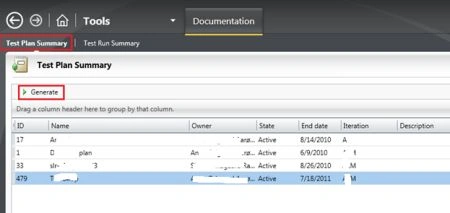
- Click on Test Plan Summary
- Select/Highlight a Test Plan
- Click on the Generate Button
Wait a few seconds or minutes to get the Report.
As soon as it finishs generating the report the Word document will be opened as below.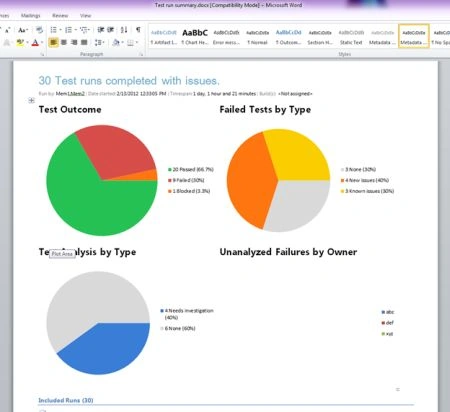
And more...
The Test Plan document will display the following Test Plan details, Test Suite details, Test Case details, and Test Configuration details. By default this Word document will be saved at the location:
Libraries\Documents\Test run summary.docx
Thanks.
Bharat ChambambadiPosted May 27, 2016, 3:46 AM
Hello Jawed, I was able to generate the report in Word from the tab - Test run Summary under Tools - Documentations. However when i try to run the same from Test Plan Summary after selecting the plan i get a error pop up that says some state and properties are obsolete.. any suggestions? thanks
Bharat ChambambadiPosted May 27, 2016, 3:32 AM
Hi Jawed,
Mahesh ChandPosted May 9, 2012, 10:25 AM
Thanks Javed. Yesterday, I was looking for my bug list to export to Excel and found your article.
Monika AroraeditedPosted Feb 16, 2012, 11:04 PMEdited Feb 16, 2012, 11:05 PM
Its a very useful article for those who wants to learn how to export Microsoft Test Manager 2010 Test Results to Word.
Monika AroraeditedPosted Feb 16, 2012, 11:04 PMEdited Feb 16, 2012, 11:05 PM
Its nice also.
Mahesh ChandPosted Feb 16, 2012, 11:03 PM
Nice to see somebody is using Visual Studio 2010 for testing. I have not see too many testers using Visual Studio as their primary testing tool.
Laura ParkerPosted Feb 16, 2012, 11:00 PM
You presented well.
Amit MaheshwariPosted Feb 16, 2012, 10:49 PM
Hi, Jawed it's a good effort to accomplish such task keep it up and thanks for sharing............