
In this article, we will discuss the Calendar Control in ASP.Net. Here we add the Birthaday, Anniversary and Meetings in the relevant dates of the calendar. For this use these steps:
Step 1: First we create a table in the database like this:
Create table AddOccasion
(
Occasion varchar(20),
Date DateTime,
Title varchar(60),
DateOfTheday int
)
Step 2: Now we use a Calendar Control in our .aspx page:
<asp:Calendar ID="Calendar1" runat="server"
></asp:Calendar>
Step 3: After That we take Three Buttons ( one for add the BirthDay, one for add the Anniversary and one for add the meeting).
<asp:Button ID="btnBirthDay" runat="server" Text="Add Birthday"
Width="84px" />
<asp:Button ID="btnAnniversary" runat="server" Text="Add Anniversary" <asp:Button ID="btnBirthDay" runat="server" Text="Add Birthday"
onclick="btnBirthDay_Click" Width="84px" />
<asp:Button ID="btnAnniversary" runat="server" Text="Add Anniversary"
onclick="btnAnniversary_Click" />
<asp:Button ID="btnmeeting" runat="server" Text="Add Meeting" onclick="btnmeeting_Click"
/>
/>
<asp:Button ID="btnmeeting" runat="server" Text="Add Meeting" />
Here we use a TextBox which is helpful for saving the data. And set its visible property to false:
<asp:TextBox ID="TextBox1" runat="server" Visible="false"></asp:TextBox>
Here is the Output: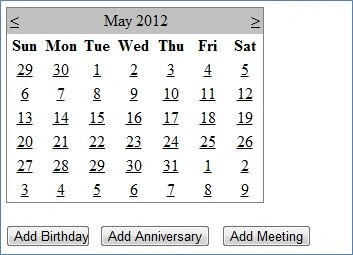
Step 4: After that we add another page in our project for adding the Occasion (Add Occasion.aspx).
Step 5: After that we add the controls in the (Add occasion.aspx) page like this:
<tr>
<td class="style2">
Occasion</td>
<td>
<asp:TextBox ID="txtOccasion" runat="server"></asp:TextBox>
</td>
</tr>
<tr>
<td class="style2">
Date</td>
<td>
<asp:TextBox ID="txtdate" runat="server"></asp:TextBox>
</td>
</tr>
<tr>
<td class="style2">
Title</td>
<td>
<asp:TextBox ID="txtTitle" runat="server"></asp:TextBox>
</td>
</tr>
<tr>
<td class="style2">
</td>
<td>
<asp:Button ID="btnAdd" runat="server" Text="Add" Width="64px"
/>
<asp:Button ID="btnCancel" runat="server" Text="Cancel"
/>
</td>
</tr>
The Output Will Be: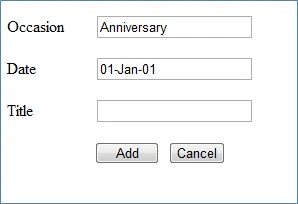
Step 6: Now we write the code to add the Birthday in the Default.aspx page:
protected void btnBirthDay_Click(object sender, EventArgs e)
{
String a = Calendar1.SelectedDate.Date.Date.Day.ToString();
Response.Write(a);
Int32 b = Convert.ToInt32(a);

Add Events in the Calendar With the Help of ASP.NET
Join the conversation! Your thoughts help the community grow.
Sign in to leave a comment
It is the same account you read, post and publish with — and you will come straight back to this page.
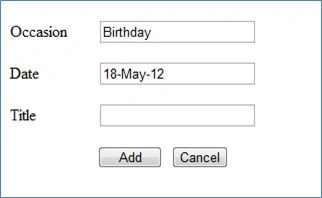
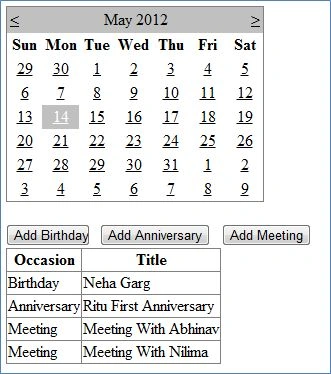
Rahul SharmaPosted Jan 28, 2017, 8:56 AM
I want to show a calendar to the asp.net website with few dates highlighted. I want to select these dates from database. So that i could enter dates in the database and those dates shows up in the front page of the website. any solution.
Tati OkoPosted Apr 29, 2016, 3:36 AM
How to also implement EDIT and DELETE EVENTS ?
mayur panditPosted Feb 11, 2015, 6:17 AM
i want add text and image in simple calendar or rad calendar ,can you help me ??
John Carlo HuelarPosted Aug 29, 2012, 7:12 AM
Can I also know what codes and sql source I'll use (is it SqlDataSource or SqlLinqDataSource or SqlObjectDatasource and how can I connect it to the Calendar. Many thanks! :)
John Carlo HuelareditedPosted Aug 29, 2012, 6:57 AMEdited Aug 29, 2012, 7:11 AM
There's a problem here on this tutorial. You didn't put: using System.Configuration; using System.Data; using System.Data.SqlClient;in the codes of Add Occasion.aspx which is why some who manage to use that kind of Calendar fails. More or less it was quite a best tutorial for web developers who wanted to use a calendar events via C# :)