

This article shows how to add data binding support among controls in WPF.
The Binding Class
The mother of data binding in WPF is the Binding class. Let's take a quick look at how the Binding class glue two objects together to support real-time data transfer.
The Binding class provides the communication channel between two objects regardless of what these objects types. The object that consumes the data is called binding target and the object that provides the data is called binding source. A binding source can be a UIElement, a list object, a CLR object that is associated with ADO.NET data or Web Services, or an XmlNode that contains your XML data.
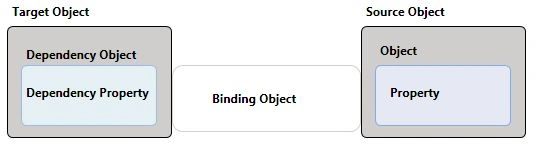
The data binding process in WPF has five objects - A binding target object, a binding target property, a binding source object, a binding source object property, and a binding object to build a link between these. The target property must be a dependency property.
Data Binding with Controls
Now, using the above approach of the Binding class, we will create an application that will have a real-time data transfer between multiple controls on a WPF page.
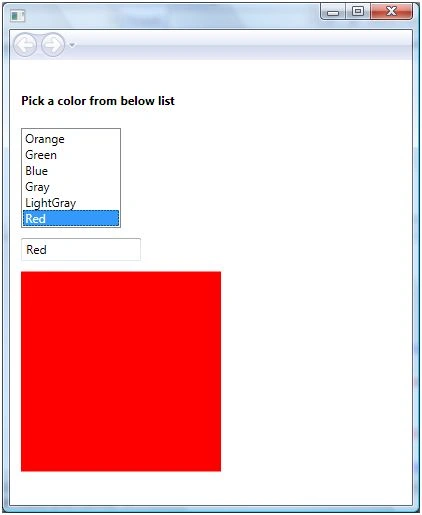
We will create an application that looks like Figure 1. In Figure 1, we have a ListBox with a list of colors, a TextBox, and a Canvas. When we pick a color from the ListBox, the text of TextBox and color of Canvas changes dynamically to the color selected in the ListBox and this is possible to do all in XAML without writing a single line of code in the code behind file.
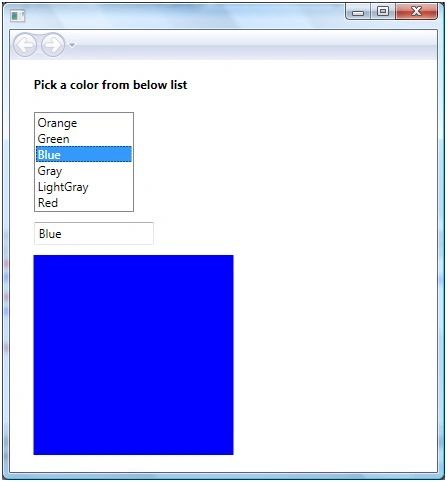
Figure 1.
The XAML code of the page looks like following.
<StackPanel Orientation="Vertical">
<TextBlock Margin="10,10,10,10" FontWeight="Bold">
Pick a color from below list
</TextBlock>
<ListBox Name="mcListBox" Height="100" Width="100"
Margin="10,10,0,0" HorizontalAlignment="Left" >
<ListBoxItem>Orange</ListBoxItem>
<ListBoxItem>Green</ListBoxItem>
<ListBoxItem>Blue</ListBoxItem>
<ListBoxItem>Gray</ListBoxItem>
<ListBoxItem>LightGray</ListBoxItem>
MonalisaPosted Dec 12, 2008, 1:43 AM
Hi realy liked ur article and a good one to start learning databinding in WPF. Can u explain more about dynamic binding