

So far we have seen only the draw methods of the Graphics class. As we discussed earlier, pens are used to draw the outer boundary of graphics, shapes, and brushes are used to fill the interior of graphics shapes. In this section we will cover the Fill methods of the Graphics class. You can fill only certain graphics shapes; hence there are only a few Fill methods available in the Graphics class. Table 3.5 lists them.
The FillCloseCurve Method
FillCloseCurve fills the interior of a closed curve. The first parameter of FillClosedCurve is a brush. It can be solid brush, a hatch brush, or a gradient brush. The second parameter is an array of points. The third and fourth parameters are optional. The third parameter is a fill mode, which is resented by the FillMode enumeration.
The FillMode enumeration specifies the way the interior of a closed path is filled. It has two modes: alternate or winding. The values for alternate and winding are Alternate and Winding, respectively. The default mode is Alternate. The fill mode matters only if the curve intersects itself (see Section 3.2.1.10).
To fill a closed curve using FillClosed Curve, an application first creates a Brush object and an array of points for the curve. The application can then set the fill mode and tension (which is optional) and call FillClosedCurve.
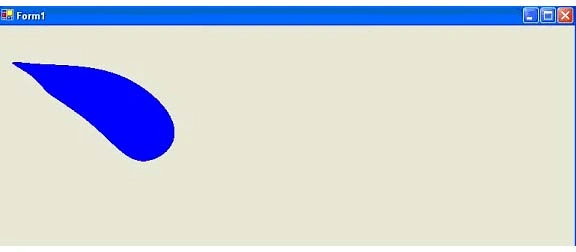
Listing 3.24 creates an array of PointF structures and a SolidBrush object, and calls FillClosedCurve.
LISTING 3.24: Using FillClosedCurve to fill a closed curve
private void Form1_Paint (object sender,
System.Windows.Forms.PaintEventArgs e)
{
// Create a pen
Pen bluePen = new Pen (Color.Blue, 1);
// Create an array of points
PointF pt1 = new PointF(40.0F, 50.0F);
PointF pt2 = new PointF(50.0F, 75.0F);
PointF pt3 = new PointF(100.0F, 115.0F);
PointF pt4 = new PointF(200.0F, 180.0F);
PointF pt5 = new PointF(200.0F, 90.0F);
PointF[] ptsArray =
{
pt1, pt2, pt3, pt4, pt5
};
// Fill a closed curve
float tension = 1.0F;
FillMode flMode = FillMode.Alternate;
SolidBrush blueBrush = new SolidBrush(Color.Blue);
e.Graphics.FillClosedCurve(blueBrush,ptsArray,flMode,tension);
// Dispose of object
blueBrush.Dispose();
}
TABLE 3.5: Graphics fill methods
| Method | Description |
|
FillCloseCurve |
Fills the interior of a closed cardinal spline curve defined by an array of Point structures. |
|
FillEllipse |
Fills the interior of an ellipse defined by a bounding rectangle specified by a pair of coordinates, a width and a height. |
|
FillPath |
Fills the interior of a GraphicsPath object. |
|
FillPie |
Fills the interior of a pie section defined by an ellipse specified by a pair of coordinates, a width, a height, and two radial lines. |
|
FillPolygon |
Fills the interior of a polygon defined by an array of points specified by Point structures. |
|
FillRectangle |
Fills the interior of a rectangle specified by a pair of a coordinates, a width, and a height. |
|
FillRectangles |
Fills the interiors of a series of rectangles specified by Rectangle structures. |
|
FillRegion |
Fills the interiors of a Region object. |

Join the conversation! Your thoughts help the community grow.