

A polyline is a collection of connected straight lines. The Polyline object represents a polyline shape and draws a polyline with the given points. The Points property represents the points in a polyline. The Stroke property sets the color and StrokeThickness represents the width of the line of a polyline.
Creating a Polyline
The Polyline element in XAML creates a polyline shape. The following code snippet creates a polyline by setting its Points property. The code also sets the black stroke of width 4.
- <Polyline Points="10,100 100,200 200,30 250,200 200,150" Stroke="Black" StrokeThickness="4" />
The output looks like Figure 12.
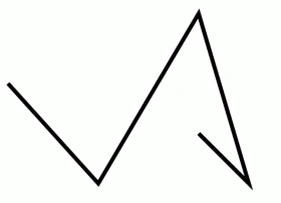
Figure 12. A Polyline
The CreateAPolyline method listed in Listing 11 draws the same rectangle in Figure 12 dynamically.
- privatevoid CreateAPolyline()
- {
- // Create a blue and a black Brush
- SolidColorBrush yellowBrush = newSolidColorBrush();
- yellowBrush.Color = Colors.Yellow;
- SolidColorBrush blackBrush = newSolidColorBrush();
- blackBrush.Color = Colors.Black;
- // Create a polyline
- Polyline yellowPolyline = newPolyline();
- yellowPolyline.Stroke = blackBrush;
- yellowPolyline.StrokeThickness = 4;
- // Create a collection of points for a polyline
- System.Windows.Point Point1 = new System.Windows.Point(10, 100);
- System.Windows.Point Point2 = new System.Windows.Point(100, 200);
- System.Windows.Point Point3 = new System.Windows.Point(200, 30);
- System.Windows.Point Point4 = new System.Windows.Point(250, 200);
- System.Windows.Point Point5 = new System.Windows.Point(200, 150);
- PointCollection polygonPoints = newPointCollection();
- polygonPoints.Add(Point1);
- polygonPoints.Add(Point2);
- polygonPoints.Add(Point3);
- polygonPoints.Add(Point4);
- polygonPoints.Add(Point5);
- // Set Polyline.Points properties
- yellowPolyline.Points = polygonPoints;
- // Add polyline to the page
- LayoutRoot.Children.Add(yellowPolyline);
- }
Listing 11
Ray AkkansonPosted Mar 22, 2010, 2:22 PM
Is there any memory or performance limitations using polylines or vectors?