

The PrintPreviewDialog control displays the Print Preview Dialog with all buttons and settings so the users can change their settings before a document goes to the printer. But there are circumstances when you would need to just display print preview without any buttons and options and show only the preview. This is where the PrintPreviewControl can be used.
Creating a PrintPreviewControl
PrintPreviewControl is defined in the System.Drawing.Printing namespace. You must import this namespace before using the PrintPreviewControl class.
We can create a PrintPreviewControl by dragging the control from the Toolbox onto a Form or we can use the PrintPreviewControl class.
The following code snippet creates a PrintPreviewControl, sets it's properties and adds control to the Form by calling Controls.Add() method.
C# Code
- private PrintPreviewControl ppc;
- private PrintDocument docToPrint = new PrintDocument();
- private void CreatePrintPreviewControl()
- {
- ppc = new PrintPreviewControl();
- ppc.Name = "PrintPreviewControl1";
- ppc.Dock = DockStyle.Fill;
- ppc.Location = new Point(88, 80);
- ppc.Document = docToPrint;
- ppc.Zoom = 0.25;
- ppc.Document.DocumentName = "c:\\";
- ppc.UseAntiAlias = true;
- // Add PrintPreviewControl to Form
- Controls.Add(this.ppc);
- }
Adding the PrintDocument.PrintPage Event Handler
Remember, a PrintPreviewControl displays preview only and does not print a document. To print a document, we must implement the PrintDocument.PrintPage event handler. The following code snippet adds a PrintDocument.PrintPage event handler and prints some text using the DrawString method of the Graphics object.
C# Code
- // Add PrintDocument PrintPage event handler
- this.docToPrint.PrintPage +=
- new System.Drawing.Printing.PrintPageEventHandler(PrintPage);
- private void PrintPage(object sender, PrintPageEventArgs e)
- {
- string text = "This text to be printed. ";
- e.Graphics.DrawString(text, new Font("Georgia", 35, FontStyle.Bold),
- Brushes.Black, 10, 10);
- }
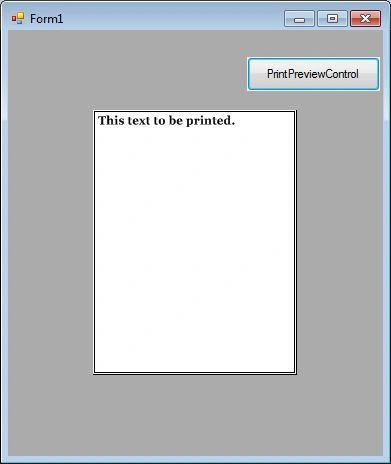
The output looks like Figure 1 where the print preview of a document to be printed is displayed.
Summary
In this article, we discussed how to use a PrintPreviewControl control to display print preview of documents in Windows Forms applications. Download the attached project to learn more about this control.
Further Readings
Here is a list of top articles and tutorials about printing you will want to read to learn more about printing.
- Printing Directly to the Printer by john donell on Jan 04, 2006
- Printing Invoices using C# and .NET by Mike Gold on Jan 04, 2006
- Printing a Ruler using C# and GDI+ by Mike Gold on Jan 04, 2006
- Printing out your W2 Form using C# and .NET by Mike Gold on Jan 04, 2006
- Notepad.NET - Printing a multiline textbox in C# and .NET by Mike Gold on Aug 29, 2006
- How To: Printing Form Controls in C# and .NET by Mike Gold on Aug 30, 2006
- How To Print a Data Grid in C# and .NET by Mike Gold on Aug 30, 2006
- Print a Text File in C# by Mahesh Chand on Jun 06, 2007
- Printing in C# by Mike Gold on Feb 28, 2010
- PrintDialog in C#
rohini RajPosted Apr 9, 2020, 11:58 PM
Can we use mouse events inside this, like zoom in and zoom out of the preview on mouse left and right-click
anurag nagarPosted Jan 3, 2019, 6:44 AM
Very helpful article, some additional guidance required on it I have added numericUpDown for top and left margin it works first time but preview is not refreshing after changing data in numericUPDown and button_click
Sagar Pandurang KapPosted Dec 18, 2017, 1:33 AM
Good for loading big files instead first preview about them.Helpful.
Ali AhmedPosted Dec 16, 2017, 6:26 AM
How can i only preview the text i want to print not the whole page? Is it possible
Sharmila MeenaPosted May 12, 2015, 2:11 AM
i just want to view the uploaded file without download using c#
Varinder RaieditedPosted Nov 16, 2011, 2:51 AMEdited Nov 16, 2011, 2:55 AM
hello Sir, I have following problem Print Previews DefaultPageSettings.Landscape =true is not working Even after setting true it is showing preview in Portrait . Please help me how can i achieve this. thanks.
sagar bhattPosted Jun 7, 2011, 1:33 AM
Mahesh,Great article... I have one query regarding this... If we have .doc or .pdf format file then how can we show in print preview control ? Thanks in advance...
Ankit NandekarPosted Mar 9, 2011, 5:56 AM
great article