

The WPF Frame control using XAML and C# supports content navigation within content. A Frame can be hosted within a Window, NavigationWindow, Page, UserControl, or a FlowDocument control.

How to create a Frame in WPF
This XAML code shows how to create a Frame control and sets its Source property to load a XAML page within it.
- <Window x:Class="FrameSample.Window1"
- xmlns="http://schemas.microsoft.com/winfx/2006/xaml/presentation"
- xmlns:x="http://schemas.microsoft.com/winfx/2006/xaml"
- Title="Window1" Height="300" Width="300">
- <Grid>
- <TextBlock>Outside area of frame</TextBlock>
- <Frame Source="Page1.xaml">
- </Frame>
- </Grid>
- </Window>
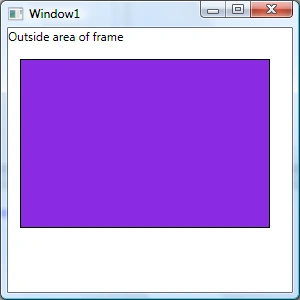
Now you can manage the contents of a frame the way you want.
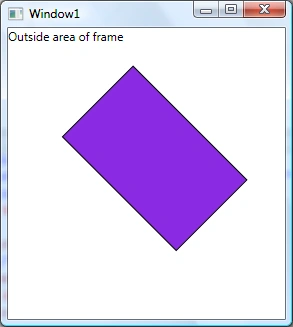
For example, the following code rotates the contents of the frame to a 45 degree angle.
- <Frame Source="Page1.xaml">
- <Frame.LayoutTransform>
- <RotateTransform Angle="45" />
- </Frame.LayoutTransform>
- </Frame>
How to Navigate to a URI in a WPF Frame
The following code creates a Frame within a window and adds a button control to the window. On the button click event handler we will navigate to a URI using a Frame.
- <Window x:Class="FrameSample.Window1"
- xmlns="http://schemas.microsoft.com/winfx/2006/xaml/presentation"
- xmlns:x="http://schemas.microsoft.com/winfx/2006/xaml"
- Title="Window1" Height="300" Width="300">
- <Grid>
- <TextBlock>Outside area of frame</TextBlock>
- <Frame Name="FrameWithinGrid" >
- </Frame>
- <Button Height="23" Margin="114,12,25,0"
- Name="button1" VerticalAlignment="Top" Click="button1_Click">Navigate to C# Corner
- </Button>
- </Grid>
- </Window>
- private void button1_Click(object sender, RoutedEventArgs e)
- {
- FrameWithinGrid.Navigate(new System.Uri("Page1.xaml",
- UriKind.RelativeOrAbsolute));
- }
- FrameWithinGrid.Source = new Uri("http://www.c-sharpcorner.com/Default.aspx", UriKind.Absolute);
- NavigationWindow window = new NavigationWindow();
- Uri source = new Uri("http://www.c-sharpcorner.com/Default.aspx", UriKind.Absolute);
- window.Source = source; window.Show();
Vithal WadjePosted Dec 16, 2014, 11:38 PM
Good one,thanks for sharing