

The <PasswordBox> element of XAML represents a password box in WPF.
This article has moved here: Working with a WPF Password Box using XAML and C#
- <PasswordBox Height="42" Width="200" Margin="22,28,28,0"
- Name="passwordBox1" VerticalAlignment="Top"
- Background="LightBlue" Foreground="DarkBlue"
- />
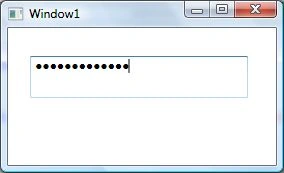
Figure 1
The MaxLength property gets and sets the maximum number of characters you can enter in a PasswordBox.
The Password property is used to get and set the current password in a PasswordBox.
The PasswordBox is not a PasswordBox without its masking feature. The PasswordChar property is used to get and set the masking character for the PasswordBox. The default masking character is a dot.
The following code snippets sets the MaxLength, PasswordChar and Password properties of a PasswordBox control.
- <PasswordBox Height="42" Width="200" Margin="22,28,28,0"
- Name="passwordBox1" VerticalAlignment="Top"
- Background="LightBlue" Foreground="DarkBlue"
- MaxLength="25" PasswordChar="*"
- Password="mahesh"
- />
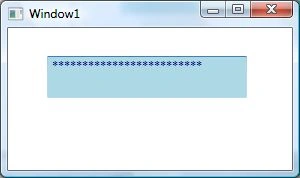
Figure 2
The SecurePassword property gets the password currently held by the PasswordBox as a SecureString. The SecureString represents text that should be kept confidential. The text is encrypted for privacy when being used and is deleted from computer memory when no longer needed.
Events
Besides the preceding discussed properties, the PasswordBox has a very important event called PasswordChanged. This even occurs when the value of the Password property is changed.
The following code snippet sets this property and shows a property event handler.
- <PasswordBox Height="42" Width="200" Margin="22,28,28,0"
- Name="passwordBox1" VerticalAlignment="Top"
- Background="LightBlue" Foreground="DarkBlue"
- MaxLength="25" PasswordChar="*"
- Password="mahesh" PasswordChanged="passwordBox1_PasswordChanged"
- />
- private void passwordBox1_PasswordChanged(object sender, RoutedEventArgs e)
- {
- MessageBox.Show("Password changed");
- }
This article has moved here: Working with a WPF Password Box using XAML and C#
Anoop MishraPosted Mar 29, 2018, 5:03 AM
Can we bind password box password property...