

XAML WrapPanel Tutorial
A parent control with multiple child elements may require wrapping functionality to place child elements in an order. The WrapPanel element in XAML is used to provide vertical or horizontal wrapping of child elements of the panel.
The XAML WrapPanel element a wrap panel.
The Orientation property is used to provide wrapping functionality of child elements. It can either be horizontally or vertically.
- <WrapPanel Width="300" Height="200"
- Background="LightBlue" />
The following code snippet sets the Orientation of a WrapPanel to Horizontal.
- <WrapPanel Orientation=”Horizontal”>
- Children
- </WrapPanel>
Listing 1 is the complete code that defines a WrapPanel and sets the Orientation, ItemHeight, and ItemWidth properties of a WrapPanel in XAML. This below code will have every item of a WrapPanel have height and width 100 respectively.
- <Window x:Class="WrapPanelSample.Window1"
- xmlns="http://schemas.microsoft.com/winfx/2006/xaml/presentation"
- xmlns:x="http://schemas.microsoft.com/winfx/2006/xaml"
- Title="Window1" Height="400" Width="539.426" Name="RootWindow">
- <WrapPanel Width="300" Height="200"
- Background="LightBlue" Orientation="Vertical"
- ItemHeight="100" ItemWidth="100" />
- </Window>
Listing 1.
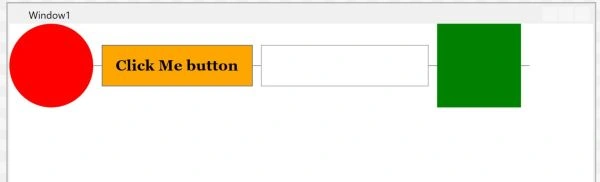
- <WrapPanel>
- <Ellipse Width="100" Height="100" Fill="Red" />
- <Separator Width="10" />
- <Button Background="Orange" Width="180" Height="50"
- FontFamily="Georgia" FontSize="18"
- FontWeight="Bold" Name="ClickMeButton" >Click Me button</Button>
- <Separator Width="10" />
- <TextBox Height="50" Width="200" Name="Button1" />
- <Rectangle Width="100" Height="100" Fill="Green" />
- </WrapPanel>
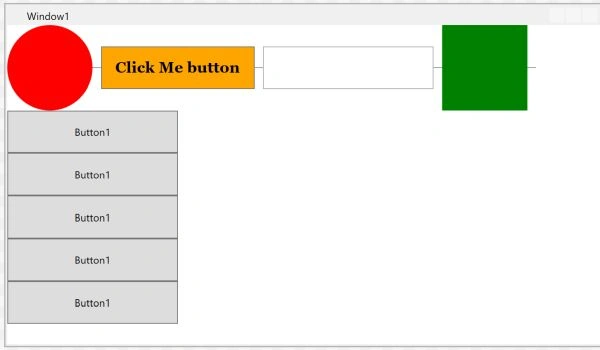
- <Window x:Class="WrapPanelSample.Window1"
- xmlns="http://schemas.microsoft.com/winfx/2006/xaml/presentation"
- xmlns:x="http://schemas.microsoft.com/winfx/2006/xaml"
- Title="Window1" Height="400" Width="700" Name="RootWindow">
- <WrapPanel>
- <Ellipse Width="100" Height="100" Fill="Red" />
- <Separator Width="10" />
- <Button Background="Orange" Width="180" Height="50"
- FontFamily="Georgia" FontSize="18"
- FontWeight="Bold" Name="ClickMeButton" >Click Me button</Button>
- <Separator Width="10" />
- <TextBox Height="50" Width="200" Name="Button1" />
- <Separator Width="10" />
- <Rectangle Width="100" Height="100" Fill="Green" />
- <Separator Width="10" />
- <!-- Child WrapPanel-->
- <WrapPanel Orientation="Vertical" >
- <Button Height="50" Width="200" >Button1</Button>
- <Button Height="50" Width="200" >Button1</Button>
- <Button Height="50" Width="200" >Button1</Button>
- <Button Height="50" Width="200" >Button1</Button>
- <Button Height="50" Width="200" >Button1</Button>
- </WrapPanel>
- </WrapPanel>
- </Window>
Listing 3.
Santhakumar MunuswamyPosted Feb 1, 2015, 2:51 PM
Nice article sir