
These are very simple steps to create and connect an Access database in C#.
- Create Access database (e.g student)
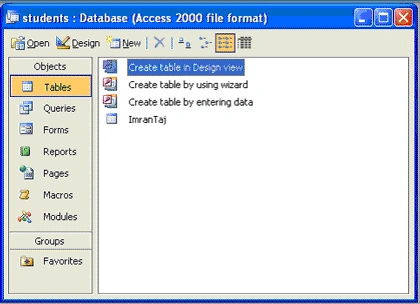
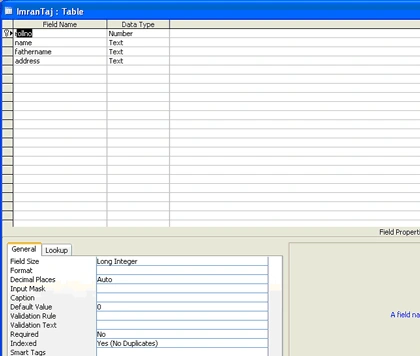
- Now open you notepad and click on save As button. Name then Imran.hdl. Change save type "ALL FILES".
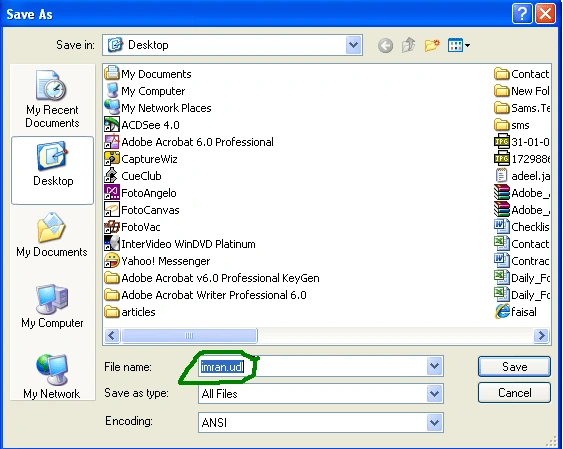
- Now double click on imran.udl file. A wizard will start like this:
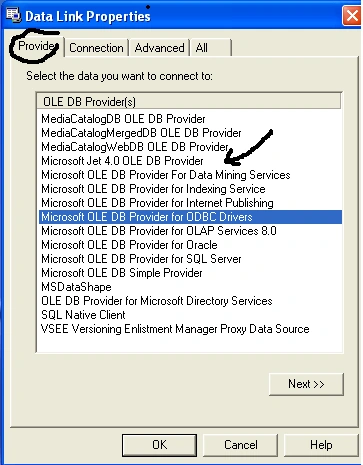
- Click Provider TAB, select Microsoft Jet 4.0 OLE DB (denoted by black arrow) then click next. Now click "Select or enter a database name" and select the desire database then click open.
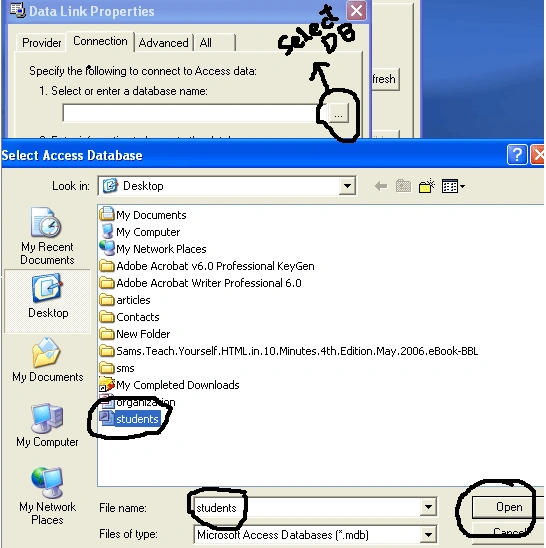
- Now click on test connection and click OK
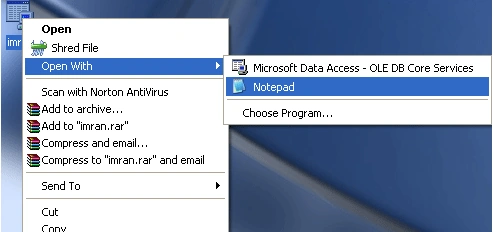
- Now edit this UDL file with note pad and copy link as shown below
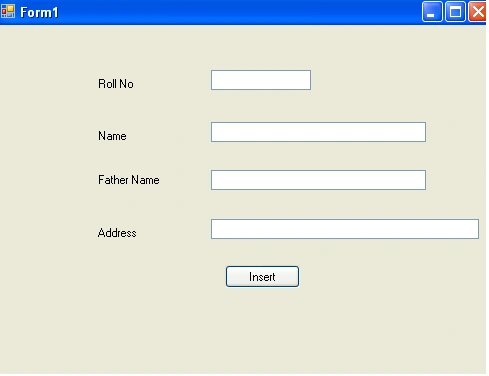
- Now Open Visual Studio editor and create Text boxes and buttons like
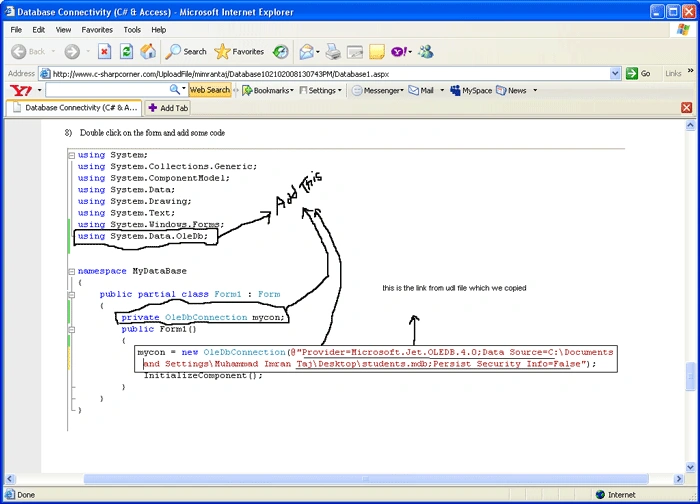
- Double click on the form and add some code
- cmd.CommandText = "insert into student values(" + this.textBox1.Text + ",'" + this.textBox2.Text + ",'" + this.textBox3.Text + ",'" + this.textBox4.Text + "');";
- int temp = cmd.ExecuteNonQuery();
- if (temp > 0)
- {
- MessageBox.Show("Record Added");
- }
- else
- {
- MessageBox.Show("Record not Added");
- }
- mycon.Close();
Ali HamzaPosted Apr 3, 2018, 1:02 AM
How I deploy this application?
SharadPosted Jul 17, 2015, 3:44 AM
good one...
jack the bestPosted Feb 12, 2015, 9:53 PM
hi can you help me?how add you category for the products and on product frm show you a combox with all category?
Vishwas KumarPosted Jun 28, 2012, 3:17 AM
nice...
Vichit DaraPosted Feb 12, 2012, 11:59 PM
Thanks for your article but something are made me heartly to understand it. On the step "Open Notepad and save as" it mean we already have the notepad yet right ! and how i create it, what code in it ? why we need it ?
MoluttyPosted Jun 6, 2011, 3:43 AM
Microsoft Jet 4.0 OLE DB is not seen infile.udl saved in OD Windows 7
MoluttyPosted Jun 6, 2011, 3:43 AM
Microsoft Jet 4.0 OLE DB is not seen infile.udl saved in OD Windows 7
MoluttyPosted Jun 6, 2011, 3:43 AM
Microsoft Jet 4.0 OLE DB is not seen infile.udl saved in OD Windows 7
ben zPosted Jun 1, 2011, 3:51 AM
i wanted to connect a web form log in with ms access, help needed pls. thank u
Vilas GitePosted Apr 9, 2011, 5:21 AM
RUSSEL SIR U JUST GO STEP BY STEP.. U WILL SOLVE YOUR QUIRES. THANKS
Vilas GitePosted Mar 15, 2011, 1:48 AM
Sir I heartly say to u... THANKING YOU... because i learn such important coding from your article.....:)
a aPosted Feb 9, 2011, 11:29 PM
thank you for source code.
Raza QureshiPosted Dec 8, 2010, 11:02 PM
Assalam O Alaikum! Imran bhai I was looking article on Search query but I found your article which very helpful to me. If you know about Search query how to make so plz post or email me. [email protected] Regards Raza Qureshi.
Raghav BetageriPosted Dec 8, 2010, 2:27 AM
ITs really nice But my problem is I want to create user DSN through C# code for my windows application for SQl server 2005
EkenePosted Nov 7, 2010, 10:09 PM
Please, someone should help me out. I'm getting an annoying Unhandled exception(System.NullReferenceException: Object reference not set to an instance of an object.)
manoj harnePosted Oct 8, 2010, 9:13 AM
i have to submit project within 15 days ...i have submited synopsis on online evevt mangement so plz help me...main bahut tension main hu...my mail id u knoe it but again write here [email protected] u have this one project plz send on this email.....and thanks for database
eugenePosted Sep 22, 2010, 10:09 AM
Hello Imran, According to your example, can you have a customised query with the: WHERE .... LIKE %something% pattern in your C# application using Access 2003 ? Thanks for your help.
Martin CsomosPosted Jul 8, 2010, 1:49 AM
SQL injection ?!?!?
d deditedPosted Jun 27, 2010, 9:20 AMEdited Jun 27, 2010, 9:31 AM
Just to add, the fixed code will look like this (I used one of my own Database's for this example): OleDbCommand cmd = new OleDbCommand(); OleDbConnection myCon = new OleDbConnection(); myCon.ConnectionString = @"Provider=Microsoft.Jet.OLEDB.4.0; User Id=; Password=; Data Source=C:\Program Files\SongsDB.mdb"; cmd.CommandText = "insert into student values(" + this.textBox1.Text + ",'" + this.textBox2.Text + ",'" + this.textBox3.Text + ",'" + this.textBox4.Text + "');"; cmd.Connection = myCon; myCon.Open(); int temp = cmd.ExecuteNonQuery(); if (temp > 0) { MessageBox.Show("Record Added"); } else { MessageBox.Show("Record not Added"); } myCon.Close();
d deditedPosted Jun 27, 2010, 9:20 AMEdited Jun 27, 2010, 9:30 AM
The answer for the cmd error is that the coding is wrong, he never defined the 'cmd' variable to begin with. To fix this, add this line below where you have the connection string (The thing that starts with 'Provider=Microsoft.Jet') OleDbCommand cmd = new OleDbCommand(); This defines cmd as an OleDbcommand, which will solve the error. He also has not defined the command to have a connection string, so add this below that line also: cmd.Connection = myCon; And also, you need to open the connection first. Add this above the "int temp = cmd.ExecuteNonQuery()" line... myCon.Open();
zain luckyPosted Aug 15, 2009, 3:38 PM
con is here command private oledbcommand con; its solved
Kirk VilaimalPosted May 25, 2009, 3:45 AM
Hi I'm Kirk, just beginner
jay patelPosted Apr 4, 2009, 12:17 AM
kindly answer
GeorgePosted Mar 29, 2009, 5:10 AM
The CODE: using System; using System.Collections.Generic; using System.ComponentModel; using System.Data; using System.Drawing; using System.Text; using System.Windows.Forms; using System.Data.OleDb; namespace InterfataBaza { public partial class Form1 : Form { private OleDbConnection mycon; public Form1() { mycon=new OleDbConnection(@"Provider=Microsoft.Jet.OLEDB.4.0;Data Source=C:\Documents and Settings\george\My Documents\studenti.mdb;Persist Security Info=False"); InitializeComponent(); } private void button2_Click(object sender, EventArgs e) { cmd.CommandText = "insert into student values(" + this.textBox1.Text + ",'" + this.textBox2.Text + ",'" + this.textBox3.Text + ",'" + this.textBox4.Text + "');"; int temp = cmd.ExecuteNonQuery(); if (temp > 0) { MessageBox.Show("Record Added"); } else { MessageBox.Show("Record not Added"); } mycon.Close(); } } } The ERRORS: Error 1 The name 'cmd' does not exist in the current context Error 2 The name 'cmd' does not exist in the current context
Naeem KhanPosted Oct 11, 2008, 4:59 PM
assallam wallekum bhai jaan well hor r u ............. its nice artical and very help full for me and thenx to u sir........... sir i needs some more help if u have time na then plz tell me