
What is webscript?
A Web Script is a service bound to a URL that responds to HTTP methods like GET, POST, PUT and DELETE.
A Webscript consists of the following three files:
A Webscript descriptor XML file.
Controller file: Either it can be a server-side JavaScript or Java backed.
Presentation file: Free Marker Template file.
In this article, I show how to create a simple Java backed webscript for Alfresco Repository.
Create a Java backed webscript
Step 1: Create a new Java project with the following structure:
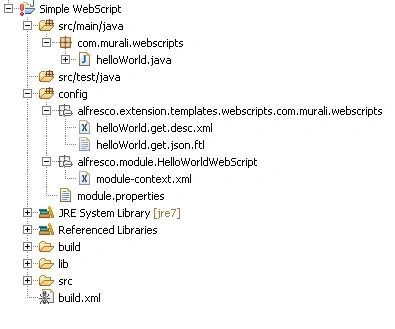
Step 2: Extend the helloWorld.java using DeclarativeWebScript.
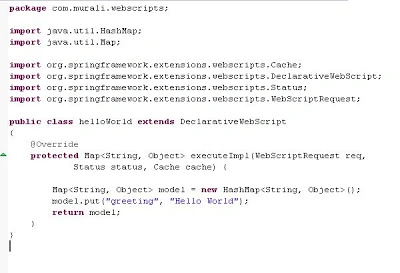
Step 3: Override the executeImpl method. In this method create a new HashMap object, add a greeting message and return it. Refer to the following image:
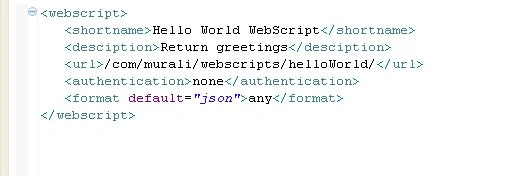
Step 4: Now, we need to create a webscript descriptor XML file ("helloWorld.get.desc.xml") in the "config/alfresco/extension/templates/webscripts/com/murali/webscripts" path.
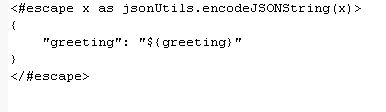
Step 5: Now we need to create a simple FreeMarker Template file ("helloWorld.get.json.ftl") to render the output.
Step 6: Register the webscript bean like:
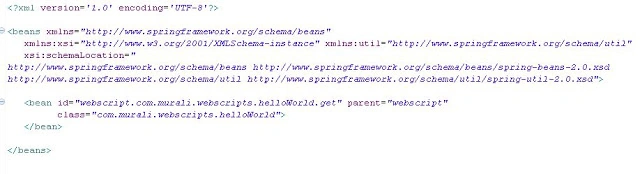
Step 7: Create the "module.properties" file in the "config/alfresco" path.

Step 8: Create the alfresco amp by using following build.xml file.
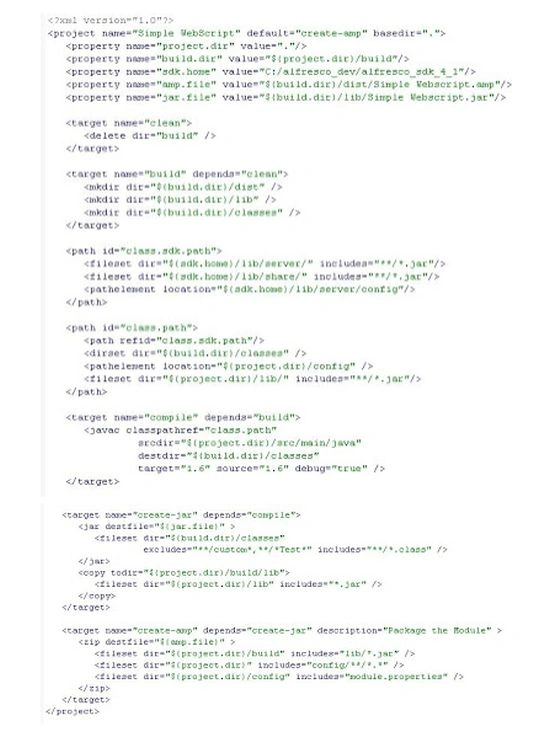
Step 9: Install the amp, delete the exploded directory of Alfresco.
Step 10: Restart Tomcat.
Step 11: Navigate to http://localhost:<portNumber>/alfresco/service/index/all
Step 12: Search for your "/com/murali/webscripts" package and click "GET /alfresco/service/com/murali/webscripts/helloWorld/" URL to invoke the webscript.
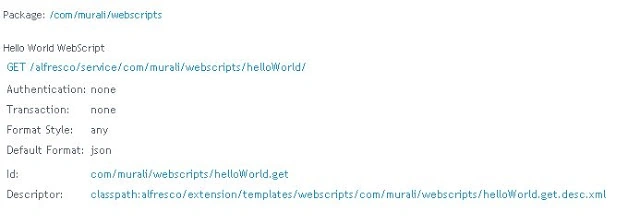
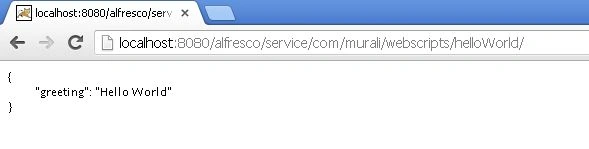
Step 13: Webscript output
Hope this helps someone!
Muralidharan DheenadhayalanPosted Aug 1, 2013, 7:23 AM
Do you Alfresco 4.1 SDK installed on your machine? You should be able get all the referenced jar files from alfresco sdk 4.1
Bradley DornerPosted Jun 26, 2013, 3:54 PM
I am unable to find the library file for the springframework required for your example