

The following article is about a feature provided by Microsoft Visual Studio to generate a sequence diagram from existing code.
Before getting into the details of how Visual Studio generates the sequence diagram, the following describes what a sequence diagram is. (The following description is from Wikipedia.)
Sequence Diagram
A sequence diagram is a kind of interaction diagram that shows how processes operate with one another and in what order. It is a construct of a Message Sequence Chart. A sequence diagram shows object interactions arranged in time sequence. It depicts the objects and classes involved in the scenario and the sequence of messages exchanged between the objects needed to carry out the functionality of the scenario. Sequence diagrams are typically associated with use case realizations in the Logical View of the system under development.
Read more on this : Sequence diagram
Now in the following way I designed my code and than I will show the sequence of this code.View Layer
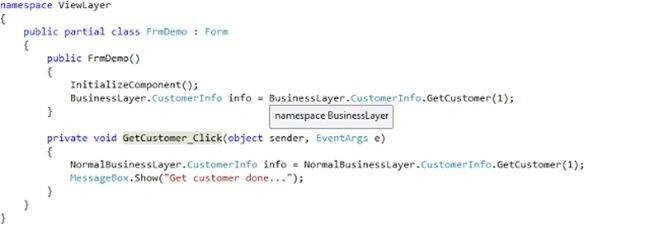
This layer of the code is the View part that is to be displayed to the end user of the application, in other words the front end of the application.
Business Layer
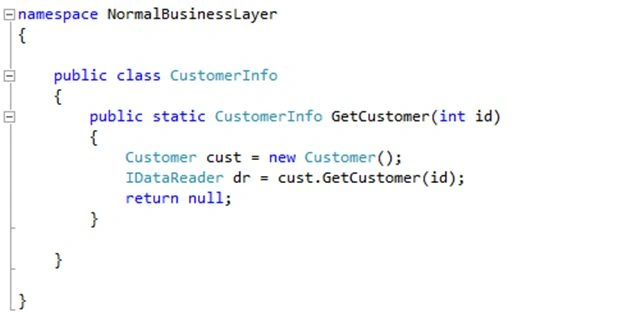
This layer of the code provides the business logic for the front end of the application . This layer does all the complex activity and communicates with the datalyer.
Data Layer
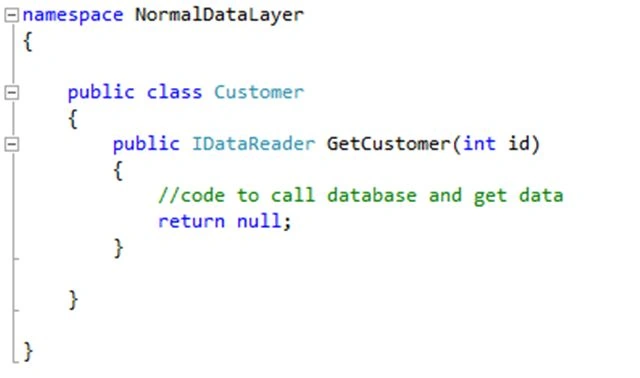
This layer of code communicates with the DataBase or DataStructure where the data is stored and brings that data out of it.
Now after doing all this for the new developer in a team or to my manager I want to show the flow of code that goes from the front end of the application and the data is obtained in and out of the database or datastructure. The flow of the code needs to be covered by the following things:
- How the code flows from one layer to another layer
- What classes are involved
- What methods of the classes are involved
So to do this Visual Studio provides features to generate a Sequence Diagram that answers the preceding questions.
Generate Sequence Diagram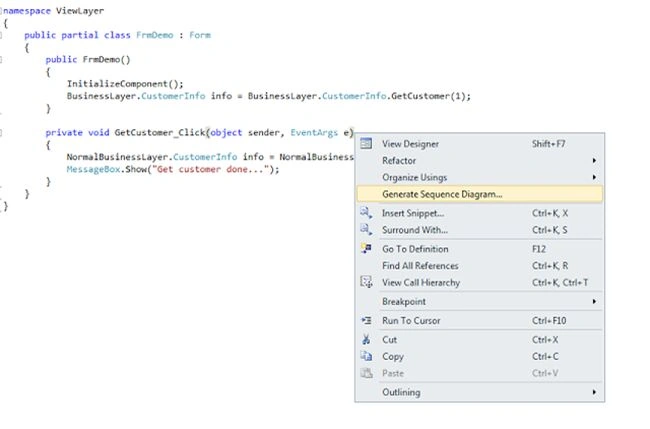
To generate a sequence diagram just right-click on the method of the code and in the context menu there is an option "Generate Sequence diagram" as you see in the image.
Generate Sequence Diagram Window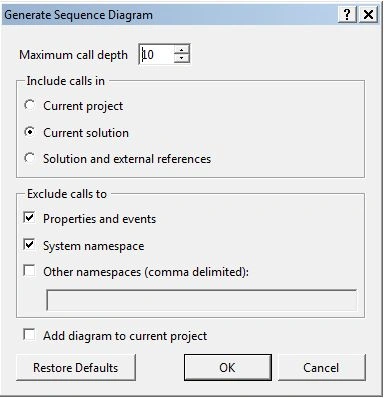
Once clicked on the menu the above dialog is displayed that asks the use to provide input for generating a sequence diagram. The following are some important parameters of it.
- Maximum call depth: How much depth you want to go, in other words if there is more than one class involved in the call and how deep you want to go.
- Include calls in: as the options says include class and methods of project only or full solution or full solution and external references.
- Exclude calls to: exclude call made to the property, the system namespace or any other namespaces.
Generated Sequence Diagram
Now after clickiing on the dialog, generate a sequence diagram as shown in the above. The sequence diagram above shows the call made to GetCustomer detail to display on the front end, in other words to the user of the application.
If you see the code above in the images or recall the preceding image code, it is divided into three layers and three classes involved that are respectively part of each layer.
The following procedure is done to get data from the database layer displayed by the sequence diagram above.
- The View layer of application, in other words the Font asks for getting the customer data from the business layer by calling the Getcustomer method that is a static method of the business class so there is no call to create an object of the business layer class.
- The Business layer of the application receives the call to the method called GetCustomer so to fill the customer details it gives a call to the datalayer. But before making the call it creates an instance of the datalayer Customer class.
- The Database layer of application receives call to the method call and in turns it make call to database and retrieve data.
Now the database layer returns this data back to the business layer customer class. - The Business layer does the process of row data returned from the datalayer and returns the customer object back to the view layer.
- The View layer of the fetch value from the object is returned by the business layer and it is displayed to the end user.
So by the means of generating the sequence diagram I will actually determine the flow of my code between the layers, classes and methods. Also this answers all the preceding questions.
Note: I specified a 10 in maximum call TextBox of the dialog but over here only 3 levels are displayed, because as explained my layer of code only involves three classes of three layers.
Go to code from the Sequence Diagram
Using the sequence diagram generated by Visual Studio I can also jump to specify the method of the code directly by double-clicking on the message or method call.
For example I clicked on the new Customer create message or method call, in other words on the method call that is marked red in the above image.
Code on double click from sequence diagram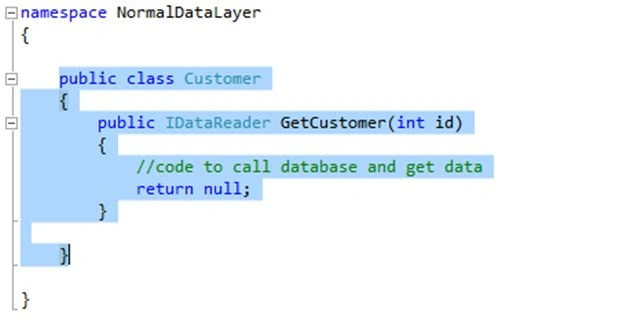
So after double-clicking on the method call it directly redirects me to the code part form the generated sequence diagram.
Advantages of generating the Sequence Diagram
- The biggest advantage of this is that its helps to understand the code built by someone else, in other words if you are involved in the development of the project and the code is built by some other developer that is not part of your team and you want to find the flow of the code from the start point to the end point.
- It also helps you to explain code built by you and you want to explain to the other developers joining your team.
- It displays the all classes and methods called in the code.
Note: This feature generates a sequence diagram from the method you clicked until the end but it doesn't display the method called before the method you selected.
For example
If I clicked on a method of the business layer of my project to generate a sequence diagram and it generates a sequence diagram from that method, in other words from the business layer and the database layer. It doesn't display those methods that call to the method on which I clicked, that means I am not able to get the information from which the front-end method of this method is called from.
So when generating a sequence diagram by clicking on the business layer method of the code explained above, it generates a sequence diagram as displayed above. As explained it doesn't display a method of the view layer that called the business layer method.
Conclusion
So this cool feature of Visual Studio is very helpful when you want to explain your own code or you want to understand code.
Thanks for reading and do post comments if you like it or if something is missing or wrong.
Reference
Ivan ClimovPosted Mar 12, 2019, 7:23 AM
The link "Download Free .NET & JAVA Files API" does not work.Could you post the file again
Ivan ClimovPosted Mar 12, 2019, 7:22 AM
The link "Download Free .NET & JAVA Files API" does not work.
Sridar PeyyetiPosted Sep 11, 2018, 10:14 AM
I am using Visual Studio 2017. When I right-click on my method I do NOT see "Generate Sequence Diagram." BTW, I can see "View Class Diagram" when I right-click a c# program when in "Class View."