

Repeater Controls in ASP.NET
The Repeater control is used to display a repeated list of items that are bound to the control. The Repeater control may be bound to a database table, an XML file, or another list of items.
Repeater is a Data Bind Control. Data Bind Controls are container controls. Data Binding is the process of creating a link between the data source and the presentation UI to display the data. ASP .Net provides rich and wide variety of controls, which can be bound to the data.
Repeater has 5 inline template to format it:
- <HeaderTemplate>
- <FooterTemplate>
- <ItemTemplate>
- <AlternatingItemTemplate>
- <SeperatorTemplate>
- <AlternatingItemTemplate>
HeaderTemplate: This template is used for elements that you want to render once before your ItemTemplate section.
FooterTemplate: - This template is used for elements that you want to render once after your ItemTemplate section.
ItemTemplate: This template is used for elements that are rendered once per row of data. It is used to display records
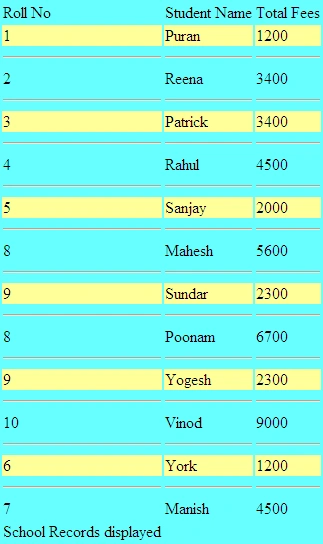
AlternatingItemTemplate: This template is used for elements that are rendered every second row of data. This allows you to alternate background colors. It works on even number of records only.
SeperatorTemplate: It is used for elements to render between each row, such as line breaks.
Some point about Repeater Control
- It is used to display backend result set. It is used to display multiple tuple.
- It is an unformatted control. The Repeater control is a basic templated data-bound list. It has no built-in layout or styles, so you must explicitly declare all layout, formatting, and style tags within the control's templates.
- The Repeater control is the only Web control that allows you to split markup tags across the templates. To create a table using templates, include the begin table tag (<table>) in the HeaderTemplate, a single table row tag (<tr>) in the ItemTemplate, and the end table tag (</table>) in the FooterTemplate.
- The Repeater control has no built-in selection capabilities or editing support. You can use the ItemCommand event to process control events that are raised from the templates to the control.
We have to use scriptlets for data access.
Data Bind Control can display connected and disconnected model.
Data Bind Control have DataBind() method and DataBound event
-> DataBind()
-> ItemCreated -> Event
-> DataBound -> Event
System.Commom.Data namespace
-> DBDataRecord Class
Controls -> Child Control
Every DataBindControl implement collection.
The data in DataSource is bound to Repeater using its DataBind Method. Once the data is bound, the format of each data item is defined by a template like ItemTemplate.
How to use a Repeater Control?
Create a new website with name RepeaterControl
Double click the web.config file and write following code in it:
- <connectionStrings>
- <add name="constr" connectionString="initial catalog=puran; data source=MCN002; integrated security=sspi"/>
- </connectionStrings>
Yashwanth MuthineniPosted Aug 14, 2015, 12:56 AM
Nice Article..
Shridhar SharmaPosted Aug 12, 2015, 7:25 PM
nice start. keep it up.
Santhakumar MunuswamyPosted Aug 12, 2015, 2:58 PM
Good Article. Thanks for sharing
Gopi ChandPosted Aug 12, 2015, 7:31 AM
Good effort...welcome
Sumit JoshiPosted Aug 12, 2015, 6:14 AM
Good Vilas
RakeshPosted Aug 12, 2015, 5:16 AM
Good one
Sibeesh VenuPosted Aug 12, 2015, 3:08 AM
Nice Share...
Pankaj Kumar ChoudharyPosted Aug 12, 2015, 12:52 AM
Nice Start Vilas.............
Rajeesh MenothPosted Aug 12, 2015, 12:04 AM
Nice share
Karthikeyan KPosted Aug 11, 2015, 11:35 PM
Thanks for sharing..Nice one sir