

The following is my menu item data table in design mode:
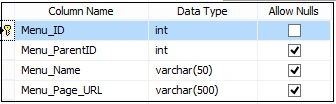
The following is the script of my table:
- CREATE TABLE [dbo].[tbl_Menu](
- [Menu_ID] [int] IDENTITY(1,1) NOT NULL,
- [Menu_ParentID] [int] NULL,
- [Menu_Name] [varchar](50) NULL,
- [Menu_Page_URL] [varchar](500) NULL,
- CONSTRAINT [PK_tbl_Menu] PRIMARY KEY CLUSTERED
- (
- [Menu_ID] ASC
- )WITH (PAD_INDEX = OFF, STATISTICS_NORECOMPUTE = OFF, IGNORE_DUP_KEY = OFF, ALLOW_ROW_LOCKS = ON, ALLOW_PAGE_LOCKS = ON) ON [PRIMARY]
- ) ON [PRIMARY]
- GO
Now the data in my tbl_Menu table:
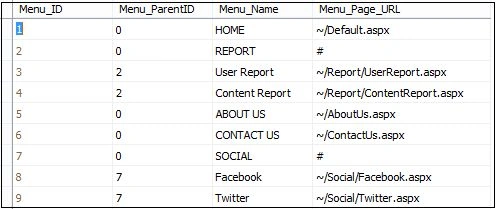
Here in this application I am using a Master Pager to provide a consistent look in the entire application. So I wrote code to generate a menu item from the database in MasterPage.master.cs.
The following is my MasterPage.Master:
- <%@ Master Language="C#" AutoEventWireup="true" CodeBehind="MasterPage.master.cs" Inherits="MenuFromDB.MasterPage" %>
- <!DOCTYPE html>
- <html xmlns="http://www.w3.org/1999/xhtml">
- <head runat="server">
- <title></title>
- <link href="StyleSheetMenu.css" rel="stylesheet" />
- <link href="StyleSheet.css" rel="stylesheet" />
- <asp:ContentPlaceHolder ID="head" runat="server">
- </asp:ContentPlaceHolder>
- </head>
- <body>
- <form id="form1" runat="server">
- <div>
- <table cellpadding="1" cellspacing="1" width="880px" align="center" class="BlueBorder"
- style="background: White;">
- <tr>
- <td style="height: 100px; background-color: skyblue; padding-left: 10px;">
- <span style="font-size: 20pt; font-weight: bold; color: blue;">Data Base Driven Menu Item In ASP.NET C#</span>
- </td>
- </tr>
- <tr>
- <td style="background-color: orange; padding-left: 1px;">
- <asp:Menu ID="MenuFromDB" runat="server" Orientation="Horizontal">
- <levelmenuitemstyles>
- <asp:menuitemstyle cssclass="Parent_Menu" />
- <asp:menuitemstyle cssclass="level_menu" />
- </levelmenuitemstyles>
- <staticselectedstyle cssclass="selected" />
- </asp:Menu>
- </td>
- </tr>
- <tr>
- <td style="padding-top: 40px; padding-bottom: 80px; padding-left: 10px">
- <asp:ContentPlaceHolder ID="ContentPlaceHolder1" runat="server">
- </asp:ContentPlaceHolder>
- </td>
- </tr>
- </table>
- </div>
- </form>
- </body>
- </html>
Now the MasterPage.Master.cs is:
- using System;
- using System.Collections.Generic;
- using System.Linq;
- using System.Web;
- using System.Web.UI;
- using System.Web.UI.WebControls;
- using System.IO;
- using System.Data;
- using System.Data.SqlClient;
- using System.Configuration;
- namespace MenuFromDB
- {
- public partial class MasterPage : System.Web.UI.MasterPage
- {
- SqlDataAdapter da;
- DataSet ds = new DataSet();
- DataTable dt = new DataTable();
- protected void Page_Load(object sender, EventArgs e)
- {
- if (!Page.IsPostBack)
- {
- dt = GetMenuDataFromDB(0);
- PopulateMenu(dt, 0, null);
- }
- }
- public DataTable GetMenuDataFromDB(int MenuParentID)
- {
- SqlConnection con = new SqlConnection();
- ds = new DataSet();
- con.ConnectionString = @"Data Source=MyPC\SqlServer2k8; Initial Catalog=Test; Integrated Security=true;";
- SqlCommand cmd = new SqlCommand("SELECT * FROM tbl_Menu WHERE Menu_ParentID='" + MenuParentID + "'", con);
- da = new SqlDataAdapter(cmd);
- da.Fill(ds);
- con.Open();
- cmd.ExecuteNonQuery();
- con.Close();
- return ds.Tables[0];
- }
- private void PopulateMenu(DataTable dt, int Menu_Parent_ID, MenuItem Parent_MenuItem)
- {
- string currentPage = Path.GetFileName(Request.Url.AbsolutePath);
- foreach (DataRow row in dt.Rows)
- {
- MenuItem menuItem = new MenuItem
- {
- Value = row["Menu_Id"].ToString(),
- Text = row["Menu_Name"].ToString(),
- NavigateUrl = row["Menu_Page_URL"].ToString(),
- Selected = row["Menu_Page_URL"].ToString().EndsWith(currentPage, StringComparison.CurrentCultureIgnoreCase)
- };
- if (Menu_Parent_ID == 0)
- {
- MenuFromDB.Items.Add(menuItem);
- DataTable dtChildMenu = new DataTable();
- dtChildMenu = this.GetMenuDataFromDB(int.Parse(menuItem.Value));
- PopulateMenu(dtChildMenu, int.Parse(menuItem.Value), menuItem);
- }
- else
- {
- Parent_MenuItem.ChildItems.Add(menuItem);
- }
- }
- }
- }
- }
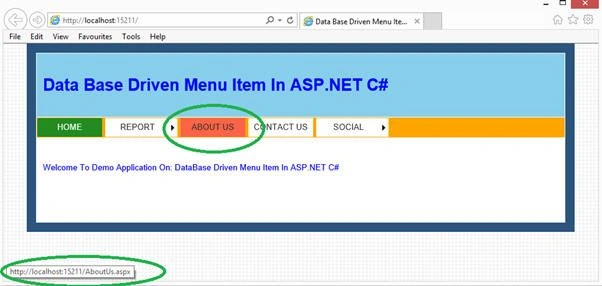
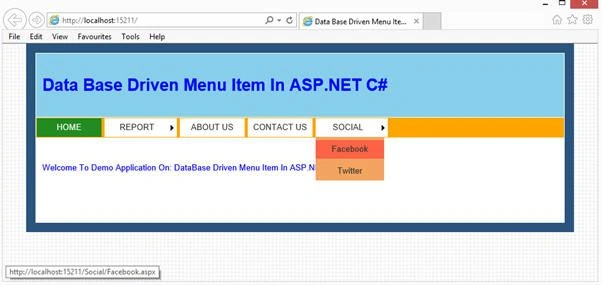
Now run the application.
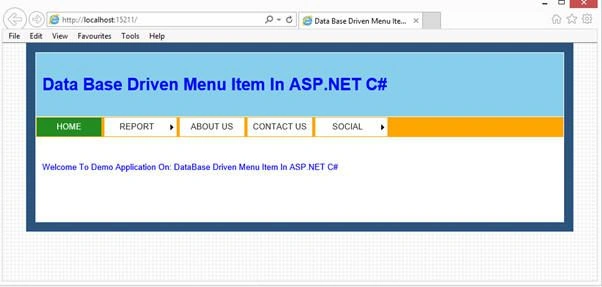
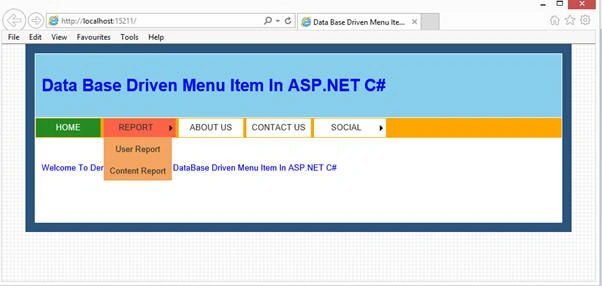
Now hover on any menu and see the child menu.
khaled yabroudiPosted Nov 21, 2016, 9:49 AM
What if there are submenus and submenus to those submenus?
monoj biswasPosted Nov 20, 2015, 2:59 AM
Good article Rahul Saxena
Rahul Kumar SaxenaPosted Aug 16, 2015, 4:12 AM
thanks Rajeesh Menoth
Rajeesh MenothPosted Aug 16, 2015, 2:20 AM
Good One
Rahul Kumar SaxenaPosted Aug 1, 2015, 2:33 AM
Hi ER Nidhi.. welcome
ER NidhiPosted Jul 31, 2015, 11:44 AM
oh i got it...thanks
ER NidhiPosted Jul 31, 2015, 11:35 AM
Can u provide the css codes you have used.
ER NidhiPosted Jul 31, 2015, 11:34 AM
Hello Sir
BANNARI IT DepartmentPosted Jun 16, 2015, 7:45 AM
Hi Rahul..Can You Please Update the Menu based on roles
Rahul Kumar SaxenaPosted Feb 24, 2015, 8:06 AM
Thanks...
Manish Kumar ChoudharyPosted Feb 9, 2015, 11:17 PM
Nice one..