

In this article you will learn how to consume a Web API using HttpClient in WPF.
What is HttpClient? It provides a base class for sending HTTP requests and receiving HTTP responses from a resource identified by a URI.
Getting Started
Start Visual Studio 2012 and create a WPF Application and provide a name of the project.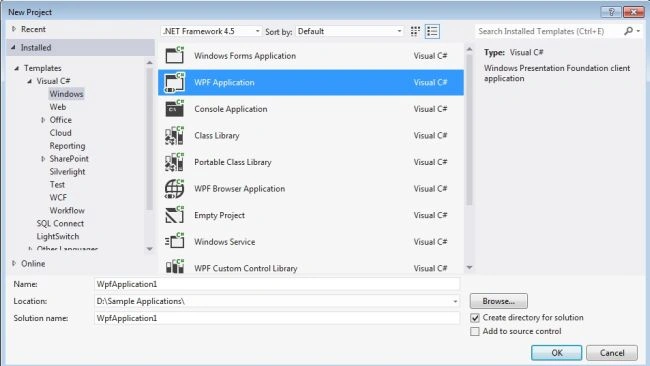
Image 1.
Now right-click on the solution and click on "Manage NuGet Packages".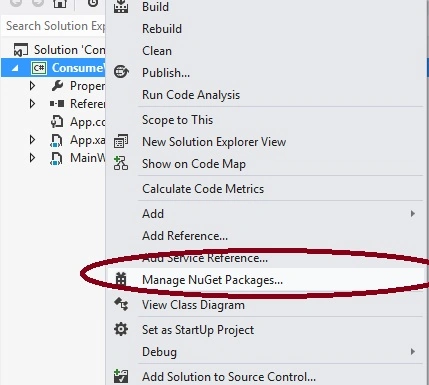
Image 2.
Search for HttpClient in the online packages and click "Install" for "Microsoft HTTP Client Libraries".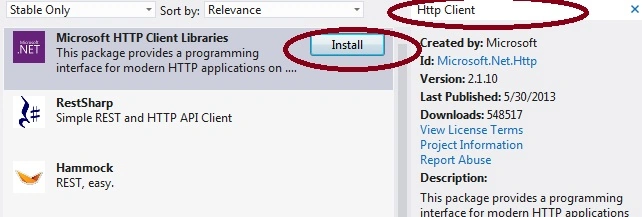
Image 3.
After installing you will see that there are a couple of assemblies that have been added to the project references.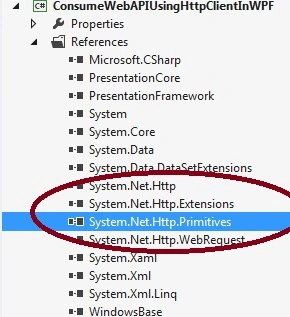
Image 4.
This is my Web API URL:
http://localhost:12789/api/employee
And this is the API result set.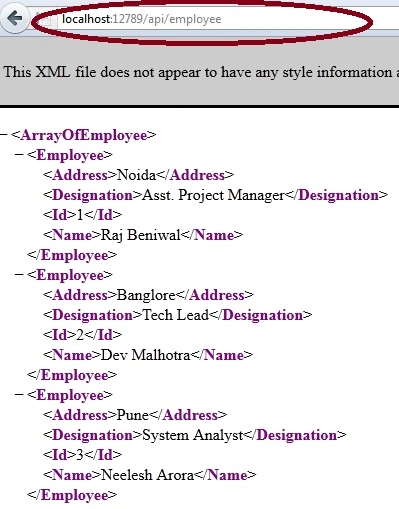
Image 5.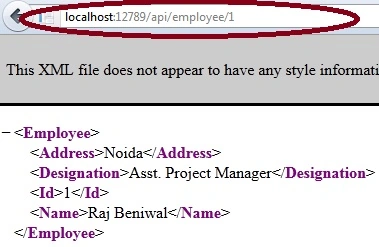
Image 6.
Now add one more reference using the NuGet package manager.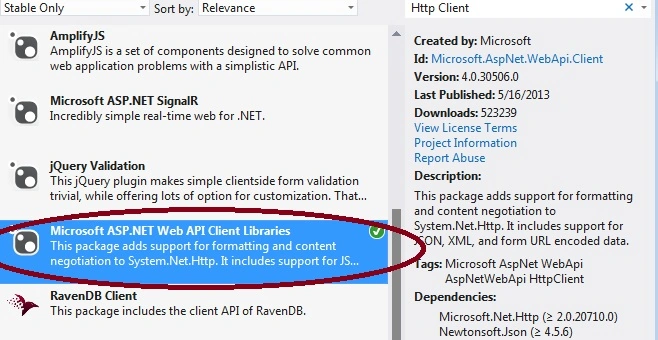
Image 7.
Now let's consume this Web API in the Data Grid and write code for adding a new record, searching and deleting.
First of all add a data grid control and a few labels, textboxes and buttons.
<Window x:Class="ConsumeWebAPIUsingHttpClientInWPF.MainWindow"
xmlns="http://schemas.microsoft.com/winfx/2006/xaml/presentation"
xmlns:x="http://schemas.microsoft.com/winfx/2006/xaml"
Title="MainWindow" Height="500" Width="525" Loaded="Window_Loaded">
<Grid Margin="10,0,2,289">
<DataGrid HorizontalAlignment="Left" VerticalAlignment="Top" x:Name="grdEmployee" />
<Label Content="Id" HorizontalAlignment="Left" VerticalAlignment="Top" Margin="18,203,0,-67"/>
<Label Content="Name" HorizontalAlignment="Left" VerticalAlignment="Top" Margin="18,245,0,-103" />
<Label Content="Address" HorizontalAlignment="Left" VerticalAlignment="Top" Margin="18,276,0,-136" />
<Label Content="Designation" HorizontalAlignment="Left" VerticalAlignment="Top" Margin="18,314,0,-176" />
<Button Content="Delete" HorizontalAlignment="Left" VerticalAlignment="Top" Width="75" Margin="342,203,0,-70" x:Name="btnDelete" Click="btnDelete_Click" />
<TextBox HorizontalAlignment="Left" TextWrapping="Wrap" VerticalAlignment="Top" Width="120" Margin="125,203,0,-56" x:Name="txtId" />
<TextBox HorizontalAlignment="Left" TextWrapping="Wrap" VerticalAlignment="Top" Width="120" Margin="125,234,0,-92" x:Name="txtName" />
<TextBox HorizontalAlignment="Left" TextWrapping="Wrap" VerticalAlignment="Top" Width="120" Margin="125,279,0,-136" x:Name="txtAddress" />
<TextBox HorizontalAlignment="Left" TextWrapping="Wrap" VerticalAlignment="Top" Width="120" Margin="125,316,0,-176" x:Name="txtDesignation" />
<Button Content="Search" HorizontalAlignment="Left" VerticalAlignment="Top" Width="75" x:Name="btnSearch" Click="btnSearch_Click" Margin="250,203,0,-59" Height="Auto" />
<Button Content="Add New" HorizontalAlignment="Left" VerticalAlignment="Top" Width="120" x:Name="btnAdd" Click="btnAdd_Click" Margin="125,363,0,-219" Height="Auto"/>
</Grid>
</Window>
Now let's work on the code behind. First we will fetch the all employees list from the Web API.
Add these are the namespaces.
using System.Net.Http;
using System.Net.Http.Headers;
private void BindEmployeeList()
{
HttpClient client = new HttpClient();
client.BaseAddress = new Uri("http://localhost:12789/");
//client.DefaultRequestHeaders.Add("appkey", "myapp_key");
client.DefaultRequestHeaders.Accept.Add(
new MediaTypeWithQualityHeaderValue("application/json"));
HttpResponseMessage response = client.GetAsync("api/employee").Result;
if (response.IsSuccessStatusCode)
{
var employees = response.Content.ReadAsAsync<IEnumerable<Employee>>().Result;
grdEmployee.ItemsSource = employees;
}
else
{
MessageBox.Show("Error Code" + response.StatusCode + " : Message - " + response.ReasonPhrase);
}
}
private void Window_Loaded(object sender, RoutedEventArgs e)
{
BindEmployeeList();
}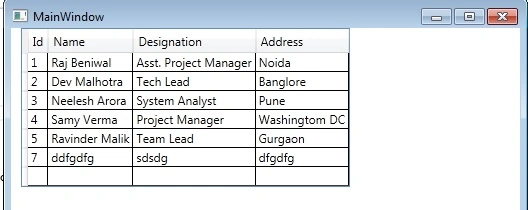
Image 8.
Now let's add a new employee.
private void btnAdd_Click(object sender, RoutedEventArgs e)
{
HttpClient client = new HttpClient();
client.BaseAddress = new Uri("http://localhost:12789/");
client.DefaultRequestHeaders.Accept.Add(
new MediaTypeWithQualityHeaderValue("application/json"));
var employee = new Employee();
employee.Id = int.Parse(txtId.Text);
employee.Name = txtName.Text;
employee.Address = txtAddress.Text;
employee.Designation = txtDesignation.Text;
var response = client.PostAsJsonAsync("api/employee", employee).Result;
if (response.IsSuccessStatusCode)
{
MessageBox.Show("Employee Added");
txtId.Text = "";
txtName.Text = "";
txtAddress.Text = "";
txtDesignation.Text = "";
BindEmployeeList();
}
else
{
MessageBox.Show("Error Code" + response.StatusCode + " : Message - " + response.ReasonPhrase);
}
}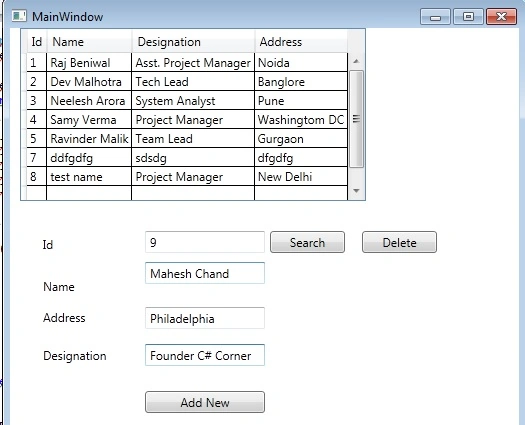
Image 9.
Fill in the information and click the "Add New" button.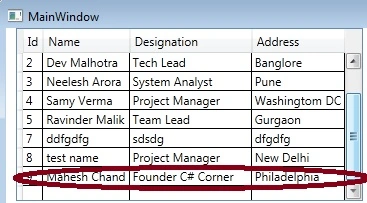
Image 10.
You will see that the record has been added to the data grid.
Now let's work on deleting a record.
private void btnDelete_Click(object sender, RoutedEventArgs e)
{
HttpClient client = new HttpClient();
client.BaseAddress = new Uri("http://localhost:12789/");
var id = txtId.Text.Trim();
var url = "api/employee/" + id;
HttpResponseMessage response = client.DeleteAsync(url).Result;
if (response.IsSuccessStatusCode)
{
MessageBox.Show("User Deleted");
BindEmployeeList();
}
else
{
MessageBox.Show("Error Code" + response.StatusCode + " : Message - " + response.ReasonPhrase);
}
}
Image 11.
Enter an id in the id TextBox and click the delete button.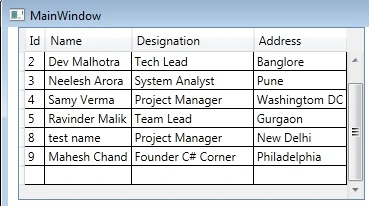
Image 12.
As you can see record number 7 has been deleted.
Now let's work on the search part.
private void btnSearch_Click(object sender, RoutedEventArgs e)
{
HttpClient client = new HttpClient();
client.BaseAddress = new Uri("http://localhost:12789/");
client.DefaultRequestHeaders.Accept.Add(
new MediaTypeWithQualityHeaderValue("application/json"));
var id = txtId.Text.Trim();
var url = "api/employee/" + id;
HttpResponseMessage response = client.GetAsync(url).Result;
if (response.IsSuccessStatusCode)
{
var employees = response.Content.ReadAsAsync<Employee>().Result;
MessageBox.Show("Employee Found : " + employees.Name + " " + employees.Address + " " + employees.Designation);
}
else
{
MessageBox.Show("Error Code" + response.StatusCode + " : Message - " + response.ReasonPhrase);
}
}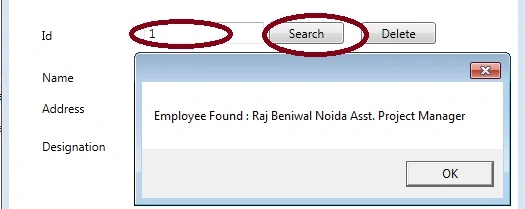
Image 13.
Enter an id in the text box and click the "Search" button.
Nur Izzah MohammadPosted Nov 7, 2019, 10:11 AM
Hi, I am new to WPF for c# and I am trying to do a project which creating simple WPF application by displaying list of items from API documented mock server. I am trying to do based on few sample available it but have no luck so far. If you have any resources or similar sample that can help me with that please let me know. Thank you
Ana StevanovicPosted Jul 28, 2019, 3:21 AM
Great article, very helpful! Thanks! :)
Ahmed HaddadPosted Jun 11, 2019, 6:22 PM
There is a problem in connection =>System.AggregateException HResult=0x80131500 Message=One or more errors occurred. Source=mscorlib StackTrace: at System.Threading.Tasks.Task.ThrowIfExceptional(Boolean includeTaskCanceledExceptions) at System.Threading.Tasks.Task`1.GetResultCore(Boolean waitCompletionNotification) at System.Threading.Tasks.Task`1.get_Result() at WpfApp1.MainWindow.BindEmployList() in C:\Users\Ahmed\source\repos\WpfApp1\WpfApp1\MainWindow.xaml.cs:line 44 at WpfApp1.MainWindow.Window_Loaded(Object sender, RoutedEventArgs e) in C:\Users\Ahmed\source\repos\WpfApp1\WpfApp1\MainWindow.xaml.cs:line 33 at System.Windows.RoutedEventHandlerInfo.InvokeHandler(Object target, RoutedEventArgs routedEventArgs) at System.Windows.EventRoute.InvokeHandlersImpl(Object source, RoutedEventArgs args, Boolean reRaised) at System.Windows.UIElement.RaiseEventImpl(DependencyObject sender, RoutedEventArgs args) at System.Windows.UIElement.RaiseEvent(RoutedEventArgs e) at System.Windows.BroadcastEventHelper.BroadcastEvent(DependencyObject root, RoutedEvent routedEvent) at System.Windows.BroadcastEventHelper.BroadcastLoadedEvent(Object root) at MS.Internal.LoadedOrUnloadedOperation.DoWork() at System.Windows.Media.MediaContext.FireLoadedPendingCallbacks() at System.Windows.Media.MediaContext.FireInvokeOnRenderCallbacks() at System.Windows.Media.MediaContext.RenderMessageHandlerCore(Object resizedCompositionTarget) at System.Windows.Media.MediaContext.RenderMessageHandler(Object resizedCompositionTarget) at System.Windows.Media.MediaContext.Resize(ICompositionTarget resizedCompositionTarget) at System.Windows.Interop.HwndTarget.OnResize() at System.Windows.Interop.HwndTarget.HandleMessage(WindowMessage msg, IntPtr wparam, IntPtr lparam) at System.Windows.Interop.HwndSource.HwndTargetFilterMessage(IntPtr hwnd, Int32 msg, IntPtr wParam, IntPtr lParam, Boolean& handled) at MS.Win32.HwndWrapper.WndProc(IntPtr hwnd, Int32 msg, IntPtr wParam, IntPtr lParam, Boolean& handled) at MS.Win32.HwndSubclass.DispatcherCallbackOperation(Object o) at System.Windows.Threading.ExceptionWrapper.InternalRealCall(Delegate callback, Object args, Int32 numArgs) at System.Windows.Threading.ExceptionWrapper.TryCatchWhen(Object source, Delegate callback, Object args, Int32 numArgs, Delegate catchHandler) at System.Windows.Threading.Dispatcher.LegacyInvokeImpl(DispatcherPriority priority, TimeSpan timeout, Delegate method, Object args, Int32 numArgs) at MS.Win32.HwndSubclass.SubclassWndProc(IntPtr hwnd, Int32 msg, IntPtr wParam, IntPtr lParam) Inner Exception 1: HttpRequestException: An error occurred while sending the request. Inner Exception 2: WebException: Unable to connect to the remote server Inner Exception 3: SocketException: No connection could be made because the target machine actively refused it
Burton RobertsPosted Nov 3, 2017, 12:44 PM
Still a great article. Short, to the point.
Tabarak HussainPosted Jul 23, 2017, 1:21 PM
Many many thanks for this valuable article
Jagan VenkatPosted Apr 18, 2017, 1:23 AM
Can you please send the code for login process for using login values gets from controllers using HTTP Client. Please help me out
Purushottam RathorePosted Jul 5, 2013, 12:34 AM
Thanks. Its really a great article for consume the web api.