

Introduction
This is a quick tutorial covering how to clear your SPD 2013 Cache. That is handy, especially when working with SPD 2010 and SPD 2013. Clearing the cache will remove any of your past connection history as well provide you a “clean slate” to work from. The cache is not even cleared after doing a reinstall, so this really is the only way to clear it.
Versioning with check-in/out are great but not always preferred, and certainly not infallible. As I learned on a project a few years ago that recently bit me again when my new machine was not similarly configured, SharePoint Designer has a dirty little habit of caching files, including say the XML/XSLT, JS and CSS you might be working with on your site.
No need to fret though; buried in the settings of each version is a toggle that will ensure SPD never sets you back by loading a cached file.
Procedure:
- Close SPD if it is open
- Open My Computer
a.Click the address bar
- Paste in:
%USERPROFILE%\AppData\Local\Microsoft\WebsiteCache
- Delete everything within this location
- Click the address bar
- Paste in:
%APPDATA%\Microsoft\Web Server Extensions\Cache
- Delete everything in this location
SharePoint Designer 2010 and 2013
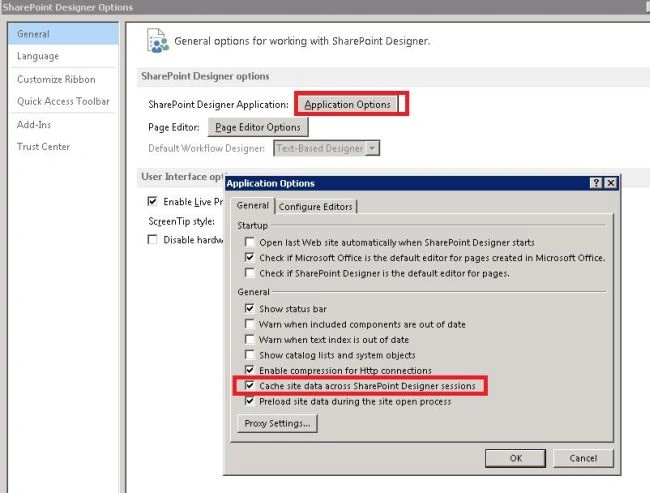
- Navigate to the "File" menu then select "Options" -> "General" -> "Application Options".
- On the “General” tab, under the “General” heading, uncheck “Cache site data across SharePoint Designer sessions”.
Akash KumharPosted Jul 26, 2017, 3:01 AM
Great Post, Very Helpful
Prashant NagoudaPosted Jul 25, 2017, 1:33 AM
Nice post... thanks sagar !!
Prashant KumarPosted Apr 14, 2017, 12:50 AM
This helps me a lot to get solution
kalu singh raoPosted Jul 6, 2016, 1:50 AM
Nice...
Prashant VermaPosted Mar 9, 2016, 10:06 AM
great
Glenda SegersPosted Aug 28, 2015, 4:05 AM
Awesome! Finally works. Thank you.
Kiran Kumar TalikotiPosted Jan 5, 2015, 5:52 AM
Hey Thanks Sagar :)
Himanshu MudgalPosted Sep 24, 2014, 5:26 AM
Hi, Very Nice
raju nandikollaPosted Aug 7, 2014, 8:00 AM
Hi Sagar, Thanks for sharing with us, but i am facing an issue related to this, while creating custom list form via SPD 2010 i.e., "Could not save the list changes to the server", to solve this issue i have deleted all the caches data what you have mentioned, previously this process works for me, and it allowed me to create a new custom list form via SPD 2010, now again i am getting the same issue but this time, deleting the SPD cache is not working ....... any ideas would be appreciated. thanks in advance
Lakshmanan Sethu SankaranarayanPosted Feb 25, 2014, 8:53 AM
Cool feature. Will try next time!!