

In a SharePoint Designer 2010 workflow HTML email I was frustrated because I was unable to add images and tables directly from the editor. I thought rich HTML is not supported with this version but I found a quick way to add rich HTML in an email body message.
Use the following procedure to add images in a SPD email body in 2010
- First create your HTML in Dreamweaver or Visual studio 2010 or any other HTML editing tool
- Then open your workflow in SPD 2010
- Add a “Send email” workflow action from the ribbon
- Keep the “Send Email” action selected/highlighted
- Then navigate to the ribbon and select the advanced properties
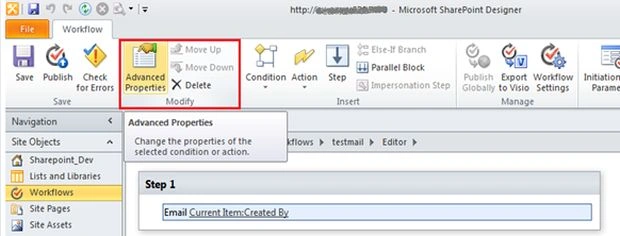
- Click advanced properties Select last option Body
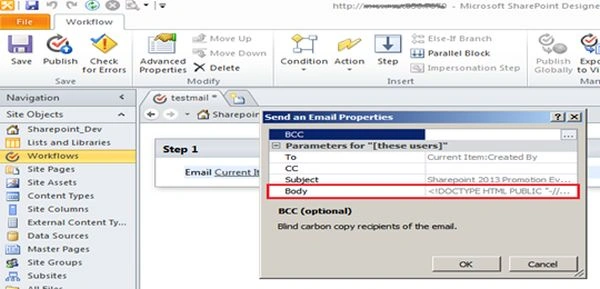
- Click on the button (...) to open the text pad
- Paste your HTML including head, body and HTML.
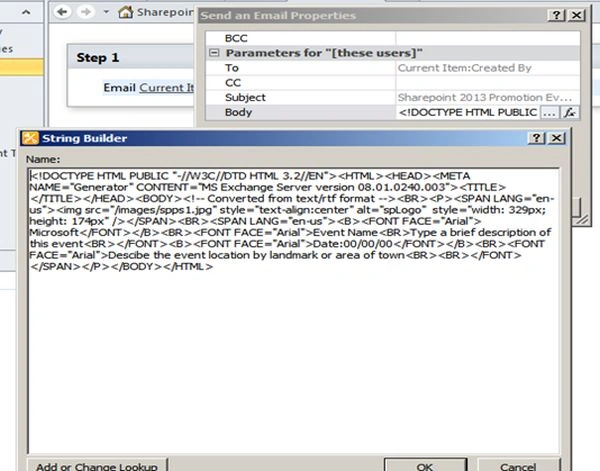
- Click "OK" and open the action from the workflow step.
- Done!

Note
If you edit the subject or To/CC/BCC then don’t edit the workflow; go to “advanced properties“.
Choose for example the third option, the subject line can be edited if we use an edit workflow then automatically disturb the HTML and <imp> tag to be converted into text.
jali pPosted Feb 1, 2021, 11:41 AM
Image not displaying in email
venkat KotaiahPosted Jan 7, 2019, 6:08 AM
Please help me on it
venkat KotaiahPosted Jan 7, 2019, 6:08 AM
Image not displaying in e mail
Viral NaikPosted Jun 26, 2017, 6:01 PM
Thank you :) you saved my time.
shahid hashmiPosted Apr 5, 2016, 2:31 AM
Good One.. Thanks Sagar...
Prashant VermaPosted Mar 9, 2016, 10:07 AM
nice