
Introduction: In this article we are going to discuss events and how to handle them by using an event handler in jQuery. As we all know events are the things which shows something is going to happen. So in this article we will explore these: how they occur and what the procedure is to handle them. We all know that GUI which is the basic part of the application whenever the application start it will come first and later we will discuss about it's functionality what is going when we click on different elements. First of all we will create a web application to implement that all let see how it looks like.
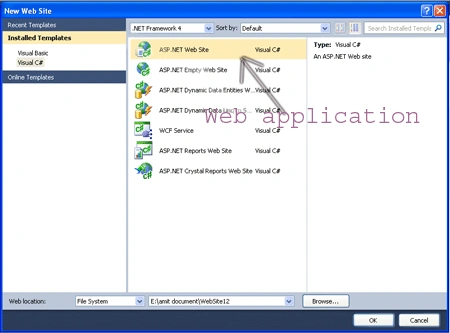
Step 1: Firstly we have to take a web Application.
- Go to Visual Studio 2010
- Open the web Application
- Click OK.
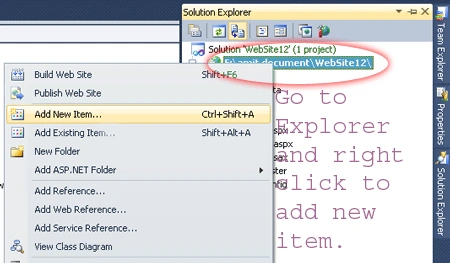
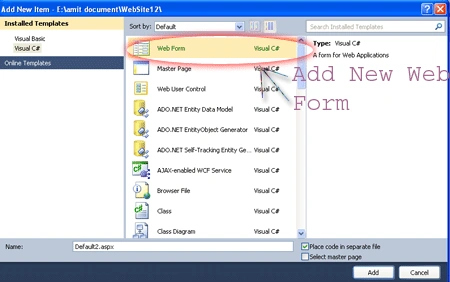
Step 2: Secondly you have to add a new page to the website let see how it will added.
- Go to the Solution Explorer.
- Right Click o Project name.
- Select add new item.
- Add new web page and give it a name.
- Click OK.
Step 3: Now we will discuss about the event how we will create event and later how to handle them. there are some points given below.
- First we will set up the user interface.
- Wait for something is going to happen.
- Thirdly react accordingly.
- At last repeat.
In the points given above we will showing that the first step sets up the display of the user interface; the others define its behavior. In web pages, the browser handles the setup of the display in response to the markup (HTML and CSS) that we send to it. Further the script which we include in the page defines the behavior of the interface. This script takes the form of event handlers, which is also known as listeners, that react to the various events that occur while the page is displayed. These events could be generated by the system (such as timers or the completion of asynchronous requests) but are most often the result of some user action (such as moving or clicking the mouse or entering text via the keyboard).
Browser Event Model: Firstly we will discuss about the browser level event model to understand that how a browser would handle events. Firstly a browser corporation named as Netscape Communications Corporation which had introduced an event-handling model in its Netscape Navigator browser; and all modern browsers still support this model, and probably easy to understood and most employed by the majority of page authors. Further it is known by a few names. Perhaps I think you may have heard it termed the Netscape Event Model, the Basic Event Model, or even the rather vague Browser Event Model; but most people have come to call it the DOM level 0 event model. Further The term DOM Level is used to indicate what level of requirements an implementation of the W3C DOM Specification meets. Later Internet Explorer continues to go its own way and supports a subset of the DOM Level 2 Event Model functionality, albeit using a proprietary interface.
- DOM Level 0 Model: In the DOM Level 0 Model, In which event handlers are declared by assigning a reference to a function instance to properties of the DOM elements. Further these properties are defined to handle a specific event type, let see the example given below how it will happens. a click event is handled by assigning a function to the onclick property, and a mouseover event by assigning a function to the onmouseover property of elements that support these event types.
Example: Let see the example which
is given below:
<%@
Page Language="C#"
AutoEventWireup="true"
CodeFile="Default2.aspx.cs"
Inherits="Default2"
%>
<!DOCTYPE
html PUBLIC
"-//W3C//DTD XHTML 1.0 Transitional//EN"
"http://www.w3.org/TR/xhtml1/DTD/xhtml1-transitional.dtd">
<html
xmlns="http://www.w3.org/1999/xhtml">
<head
runat="server">
<title>Simple
event demo</title>
<script
type="text/javascript"
src="Scripts/jquery-1.4.1.min.js"></script>
<script
type="text/javascript">
$(function () {
$('#plane')[0].onmouseover =
function (event) {
fgh('Welcome to Air India');
}
});
function fgh(text) {
$('#divtxt').append('<div>'
+ new Date() + ' '
+ text + '</div>');
}
</script>
</head>
<body>
<form
id="form1"
runat="server">
<div>
<img
id="plane"
src="image/plane.gif"
onclick="fgh('Hiii I m
Ready to fly!');" alt="Demoimage"/>
<div
id="divtxt"
style="font-family:
'Comic Sans MS'; color:
#CC0000"></div>
</div>
</form>
</body>
</html>
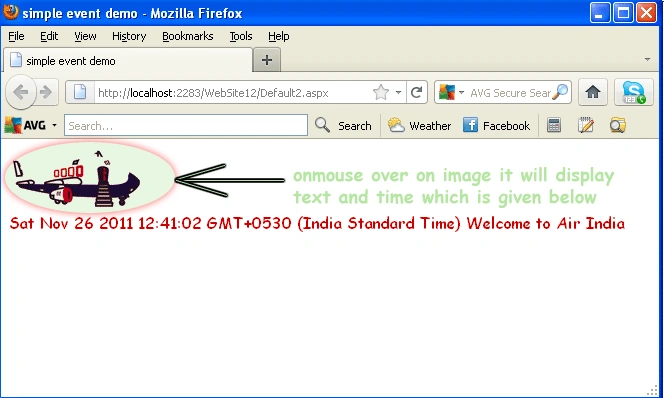
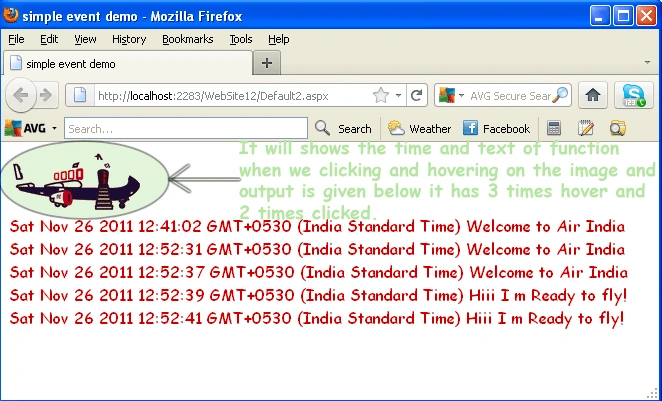
Explanation: In the above example let see the explanation that which thing we have taken and what's their working to generate an event or handle the events. First of all here page first declares a ready handler named as $(function(){}) in which a reference to the image element with the id of plane is obtained (using jQuery), and further we will set its onmouseover property is set to a function instance that we will declare inline. Now once by assigning these all this function becomes the event handler for the element when a mouseover event is triggered on it. and the function have the single parameter which is passed on it will be expecting only single parameter. Further above we also declare a small utility function, fgh() , that we use to emit text messages to a <div id="divtxt"></div> element on the page which is inside the body element. It is used to display alerts to indicate when things happen on our page. Inside the body of the page we define an image element inside the body tag on which we'll define event handlers. We have already seen how to define one under script control in the ready handler, but here we declare a handler for a click event using the onclick="fgh('Hiii I m Ready to fly!');" attribute of the <img> element.
Output 1:
Output 2:
Now we will see talk in deep about the event parameter
Event instance: First we would like to talk about the instance of the event in brief When an event handler is fired, an instance of a class named Event is passed to the handler as its first parameter in most browsers. Internet Explorer, always the life of the party, does things in its own proprietary way by tacking the Event instance onto a window property named event. In order to deal with this discrepancy we'll often see the following used as thefirst statement in an event handler: if (!event) event = window.event.
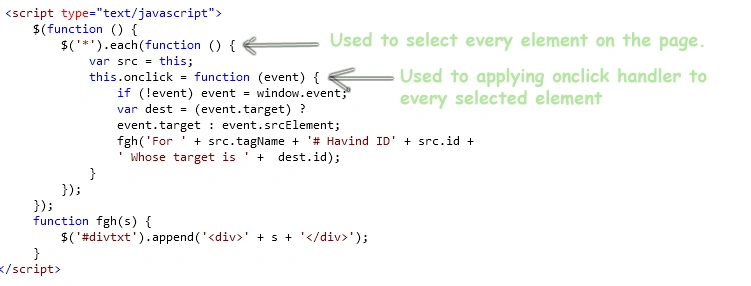
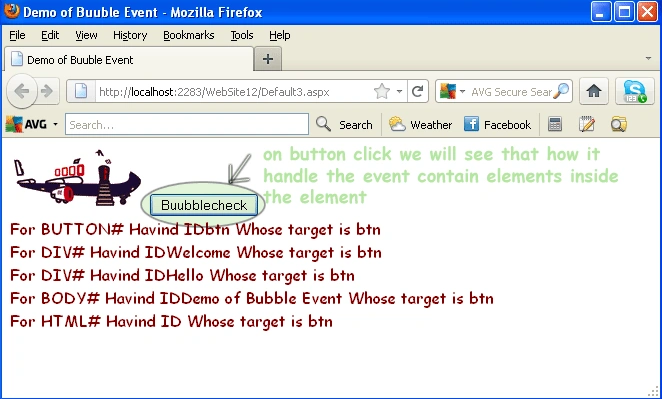
Event bubbling: Event bubbling is the concept that handle event which is inside the parent control to handle their child event through it's parent. Whenever an event is triggered on an element in the DOM tree, the mechanism of the event-handling of the browser checks to see if a handler has been established for that particular event on that element and, if so, invokes it. And further it see after the target element has had its chance to handle the event, the event model checks with the parent of that element to see if it has established a handler for the event type, and if so, it's also invoked after which its parent is checked, then its parent, then its parent, and so on. This process is termed event bubbling. Let's see the example about event bubble which is given below.
Example: Here we will show you only the script code given below:
Script Code:
Complete Code:
<%@
Page Language="C#"
AutoEventWireup="true"
CodeFile="Default3.aspx.cs"
Inherits="Default3"
%>
<!DOCTYPE
html PUBLIC
"-//W3C//DTD XHTML 1.0 Transitional//EN"
"http://www.w3.org/TR/xhtml1/DTD/xhtml1-transitional.dtd">
<html
xmlns="http://www.w3.org/1999/xhtml">
<head
runat="server">
<title>Demo
of Buuble Event</title>
<script
type="text/javascript"
src="Scripts/jquery-1.4.1.min.js"></script>
<script
type="text/javascript">
$(function () {
$('*').each(function
() {
var src =
this;
this.onclick =
function (event) {
if (!event) event = window.event;
var dest = (event.target) ?
event.target : event.srcElement;
fgh('For ' + src.tagName +
'# Havind ID' + src.id +
' Whose target is ' + dest.id);
}
});
});
function fgh(s) {
$('#divtxt').append('<div>'
+ s + '</div>');
}
</script>
<style type="text/css">
#btn
{
width: 110px;
}
</style>
</head>
<body
id="Demo of Bubble Event">
<div
id="Hello">
<div
id="Welcome">
<img
id="plane" src="image/plane.gif"
alt="image"
/>
<button
id="btn" name="bubble">Buubblecheck</button>
</div>
</div>
<div
id="divtxt" style="font-family:
'Comic Sans MS'; color:
#800000" ></div>
</body>
</html>
Bubble Output:
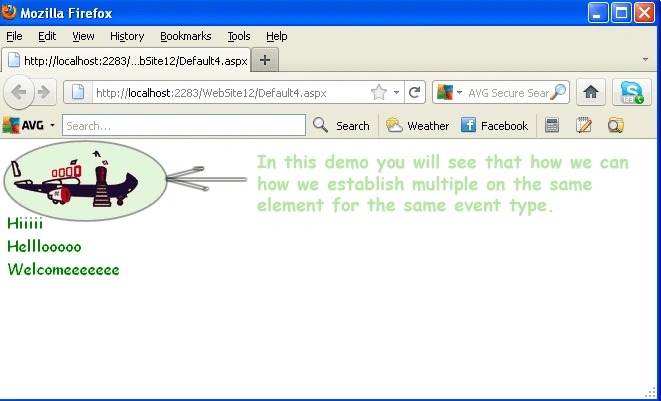
- DOM Level 2 Model: In this model we will discuss about the level 2 model there is the shortcoming of the DOM Level 0 Event Model is that, because a property is used to store a reference to a function that's to serve as an event handler, only one event handler per element can be registered for any specific event type at a time. Let see If we have two things that we want to do when an element is clicked, the following statements aren't going to let that happen: btn.onclick = dowork1; btn.onclick = dowork2; Because the second assignment replaces the previous value of the onclick property, only dowork2 is invoked when the event is triggered. Besides the establishment of a standard event model, the DOM Level 2 Event Model was designed to address these types of problems. Let's see how event handlers, even multiple handlers, are established on DOM elements under this more advanced model.
Establishing events: In this we wiil see that rather than assigning a
function reference to an element property, DOM Level 2 event handlers also
termed listeners are established via an element method. Each DOM element defines
a method named addEventListener() that's used to attach event handlers
(listeners) to the element. Let see the format of this method is as follows:
addEventListener(eventType, listener, useCapture) Here the first one parameter
whose named as eventType parameter is a string that identifies the type of event
to be handled such as click, mouseover, keydown. The second one named as listner
parameter which is a reference to the function (or inline function) and the last
one is the final parameter, named as useCapture, havint type is boolean.
Example Code:
<%@
Page Language="C#"
AutoEventWireup="true"
CodeFile="Default4.aspx.cs"
Inherits="Default4"
%>
<!DOCTYPE
html PUBLIC
"-//W3C//DTD XHTML 1.0 Transitional//EN"
"http://www.w3.org/TR/xhtml1/DTD/xhtml1-transitional.dtd">
<html
xmlns="http://www.w3.org/1999/xhtml">
<head
runat="server">
<title></title>
<script
type="text/javascript"
src="Scripts/jquery-1.4.1.min.js"></script>
<script
type="text/javascript">
$(function () {
var src = $('#img1')[0];
src.addEventListener('click',
function (event) {
fgh('Hiiiii');
}, false);
src.addEventListener('click',
function (event) {
fgh('Helllooooo');
}, false);
src.addEventListener('click',
function (event) {
fgh('Welcomeeeeeee');
}, false);
});
function fgh(s) {
$('#divtxt').append('<div>'
+ s + '</div>');
}
</script>
</head>
<body>
<form
id="form1"
runat="server">
<img
src="image/plane.gif"
alt="Image"
id="img1"
/>
<div
id="divtxt"
style="font-family:
'Comic Sans MS'; color:
#008000"></div>
</form>
</body>
Output Window DOM2:
Internet Explorer Event Model: In this model we will see that Internet Explorer both IE6 and, IE7 doesn't provide support for the DOM Level 2 Event Model. In this model Rather than using addEventListener(), there is the Internet Explorer Model defines a method named attachEvent() for each DOM element. This method, as follows, accepts two parameters similar to those of the standard model: attachEvent(eventName,handler) where the first parameter name is the eventName which is the string type which is attached and the second one parameter is the function to be established as the handler.
Gowtham RajamanickamPosted Apr 1, 2015, 4:34 AM
good
keyur soniPosted Sep 12, 2012, 2:34 AM
Good article.