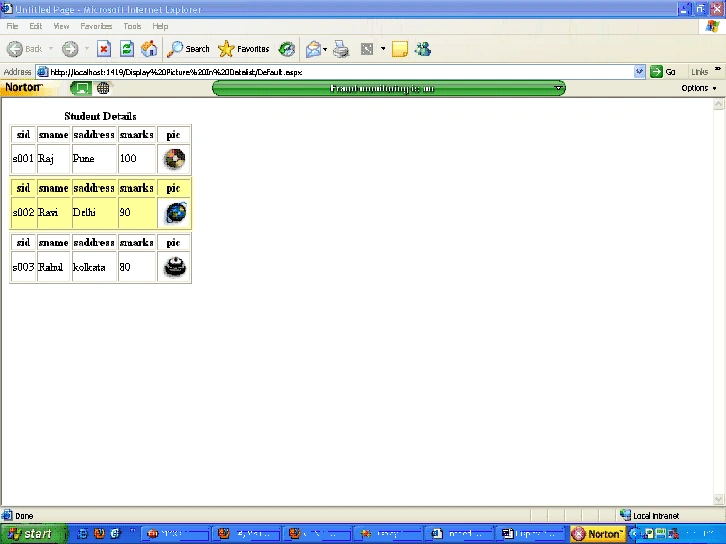
Here I will show you
how to display picture in DataList control along with data.
Program
First create a table
student
Create table student
(sid varchar(50),sname varchar(50),saddress varchar(50),
smarks int,pic varchar (50))
Store the picture in
the program folder and save there name in pic column of the table with there
extension like (.gif,.jpg,.bmp)
Default.aspx code
<%@ Page Language="VB" AutoEventWireup="false" CodeFile="Default.aspx.vb" Inherits="_Default"%>
<!DOCTYPE html PUBLIC "-//W3C//DTD
XHTML 1.0
Transitional//EN""http://www.w3.org/TR/xhtml1/DTD/xhtml1-transitional.dtd">
<html xmlns="http://www.w3.org/1999/xhtml">
<head runat="server">
<title>Untitled
Page</title>
</head>
<body>
<form id="form1" runat="server">
<div>
</div
<asp:DataList ID="DataList1" runat="server">
<FooterStyle BackColor="#FFCC00" ForeColor="#FF3300" />
<EditItemStyle BackColor="#FF8080" />
<AlternatingItemStyle BackColor="#FFFF99" />
<HeaderTemplate>
<center><b>Student
Details</b></center>
</HeaderTemplate>
<ItemTemplate>
<table border="1">
<tr>
<th>sid</th>
<th>sname</th>
<th>saddress</th>
<th>smarks</th>
<th>pic</th>
</tr>
<tr>
<td><%#Container.DataItem("sid")%></td>
<td><%#Container.DataItem("sname")%></td>
<td><%#Container.DataItem("saddress")%></td>
<td><%#Container.DataItem("smarks")%></td>
<td><asp:Image ID="Image1" ImageUrl='<%#container.dataitem("pic")%>'runat="server" /></td>
</tr>
</table>
</ItemTemplate>
</asp:DataList>
</form>
</body>
</html>
Default.aspx.vb code
Imports System.Data.SqlClient
Imports System.Data
Partial Class _Default
Inherits System.Web.UI.Page
Dim strConnString As String =
System.Configuration.ConfigurationManager.ConnectionStrings.Item("ConnectionString").ToString()
Dim con As New SqlConnection(strConnString)
Dim com As SqlCommand
Dim str As String
Protected Sub Page_Load(ByVal sender As Object, ByVal e As System.EventArgs) HandlesMe.Load
If Not IsPostBack Then
con.Open()
Str = "select
* from student"
com = New SqlCommand(Str,
con)
Dim reader As SqlDataReader
reader = com.ExecuteReader
DataList1.DataSource = reader
DataList1.DataBind()
reader.Close()
con.Close()
End If
End Sub
End Class
Output


Join the conversation! Your thoughts help the community grow.