

Introduction
In a certain cases, metadata embedded within your configuration file is sensitive. In fact, imagine that you develop an application that uses a data base as data source; all information about this data base is located in the configuration file. What if a hacker success to log into your configuration files and obtains the connection string and other metadata about your data base. It will be a catastrophe. To avoid such problems it is possible to encrypt data within the configuration file to render it more secure. In this article, I will give a trick of how to do that programmatically through a walkthrough.
Walkthrough
First, create and/or connect to a data base of your choice. For this walkthrough I will use an access data base with "C:\db.mdb" as full name.
I. Create a new windows application and name it EncryptConfigFile, Don't forget to add a reference to the System.Data.OleDb.
II. Now, go and select the project properties menu item under project menu
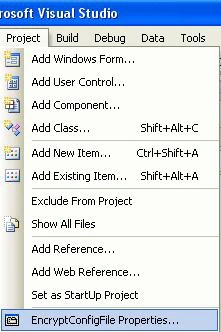
Figure 1
You do this in order to add some configuration settings into the configuration file. So select the settings tab, the following window appears:
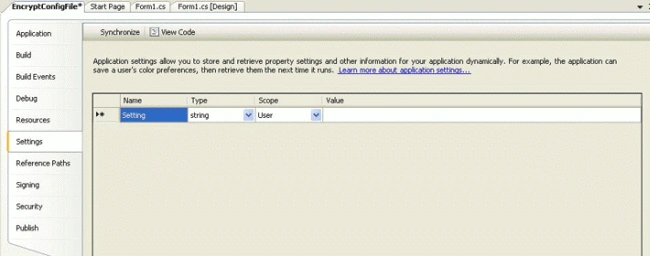
Figure 2
Select a data base provider:
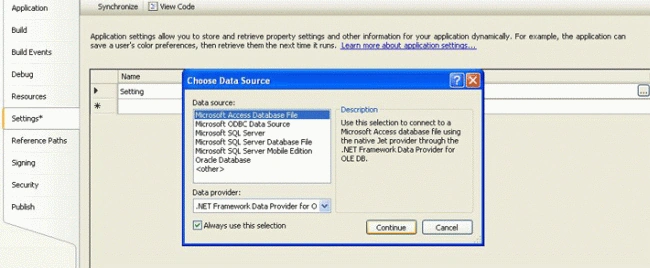
Figure 3
Then browse to the data base as follow:
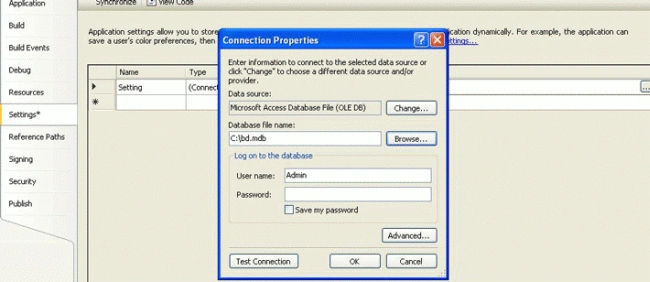
Figure 4
Finally click OK
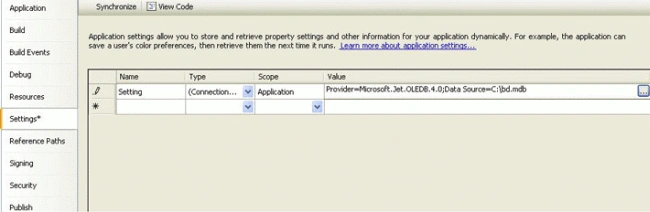
Figure 5
Now, browse to the application bin directory and open the configuration file

Figure 6
Witch looks like this  and has the same name as the exe file. Try to explore its contents:
<?xml version="1.0" encoding="utf-8" ?>
<configuration>
<configSections>
</configSections>
<connectionStrings>
<add name="EncryptConfigFile.Properties.Settings.Setting" connectionString="Provider=Microsoft.Jet.OLEDB.4.0;Data Source=C:\bd.mdb"
providerName="System.Data.OleDb" />
</connectionStrings>
</configuration>
As you remark, the information about the data base connection is embedded within the connection strings tags. The problem here is that each person how has access to this configuration file could access to those metadata and may use them for malicious purposes.
In fact, there are two ways to encrypt configuration section within a configuration file, an easy one and a hard one:
The easy one:
The easy one is create a class with two statics methods as follow:
using System;
using System.Collections.Generic;
using System.Text;
using System.IO;
using System.Security.Cryptography;
using System.Configuration;
using System.Windows.Forms;
namespace EncryptConfigurationFile
{
class ConfigurationSectionEncryptor
{
private ConfigurationSectionEncryptor() { }
/// <summary>
/// This static method helps encrypt the given data set
/// </summary>
/// <param name="ConfigurationFilePath">String : The configuration file path</param>
public static void Encrypt(string ConfigurationFilePath)
{
//Create a new ExeConfigurationFileMap
ExeConfigurationFileMap oFile = new ExeConfigurationFileMap();
//Precise its path
oFile.ExeConfigFilename = ConfigurationFilePath;
//Create a new configuration object related to the configuration file
Configuration oConfiguration = ConfigurationManager.OpenMappedExeConfiguration(oFile, ConfigurationUserLevel.None);
//Create a section and set it as the targeted section
ConnectionStringsSection oSection = oConfiguration.GetSection("connectionStrings") as ConnectionStringsSection;
//if the section is already encrypted dont ecrypt it again
if (oSection != null && !oSection.SectionInformation.IsProtected)
{
//The section ecryption
oSection.SectionInformation.ProtectSection("RsaProtectedConfigurationProvider");
//Update the configuration file
oConfiguration.Save();
MessageBox.Show("Connection string encrypted");
}
}
/// <summary>
/// This static method helps encrypt the given data set
/// </summary>
/// <param name="ConfigurationPath">String : The configuration file path</param>
public static void Decrypt(string ConfigurationPath)
{
//Create a new ExeConfigurationFileMap
ExeConfigurationFileMap oFile = new ExeConfigurationFileMap();
//Precise its path
oFile.ExeConfigFilename = Application.StartupPath + @"\EncryptConfigurationFile.exe.config";
//Create a new configuration object related to the configuration file
Configuration oConfiguration = ConfigurationManager.OpenMappedExeConfiguration(oFile, ConfigurationUserLevel.None);
//Create a section and set it as the targeted section
ConnectionStringsSection oSection = oConfiguration.GetSection("connectionStrings") as ConnectionStringsSection;
if (oSection != null && oSection.SectionInformation.IsProtected)
{
oSection.SectionInformation.UnprotectSection();
oConfiguration.Save();
MessageBox.Show("Connection string decrypted");
}
}
}
}
To consume this class services lets add a form to our project then add two buttons one to encrypt and the other to decrypt as bellow: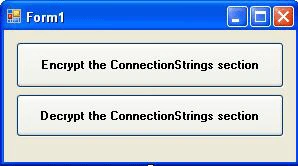
Figure 7
Then populate the both event handlers' methods according to the two buttons as follow:
string ConfigurationFilePath = "";
private void button1_Click(object sender, EventArgs e)
{
ConfigurationFilePath = Application.StartupPath + @"\EncryptConfigurationFile.exe.config";
ConfigurationSectionEncryptor.Encrypt(ConfigurationFilePath);
}
private void button2_Click(object sender, EventArgs e)
{
ConfigurationSectionEncryptor.Decrypt(ConfigurationFilePath);
}
Now, run the application and try to encrypt the decrypt the targeted section.
The hard one:
The other method consists on using a custom protection provider; In fact, the .Net Framework provides us a base class for this case, namely the ProtectedConfigurationProvider, which is an abstract class that enables developers to design their proper configuration section protection providers. So before plug into the development let's perform our design pattern concerning this custom protection provider. First, to be more methodic let's outline our new class by defining this interface: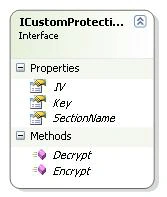
Figure 8
In this interface I propose the principals methods and properties that our custom provider is going to implement. I also give developers those use my proper solution the occasion to develop their custom provider according to my vision by implementing this interface. As second step, I introduce my custom provider witch I give it CustomProtectionProvider as name: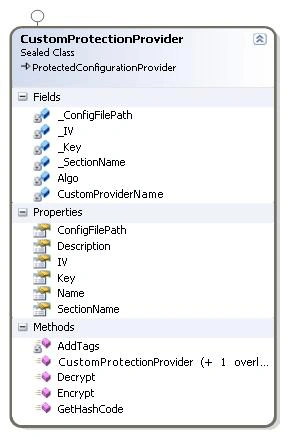
Figure 9
The CustomProtectionProvider inherits the base class ProtectedConfigurationProvider and implements the ICustomProtectionProvider interface.
Now, I try to introduce all the class members:
|
Name |
Type |
Description |
|
Private string CustomProviderName; |
Field |
Represents the name of your custom provider object, it is used to identify different objects of the same type |
|
private string _ConfigFilePath; |
Field |
Represents the configuration file path |
|
private string _SectionName; |
Field |
Represents the targeted configuration section name |
|
private byte[] _Key; |
Byte array |
Represents the key used to encrypt/decrypt data |
|
private byte[] _IV; |
Byte array |
Represents the initial vector value, also used to encrypt/decrypt data |
|
Public CustomProtectionProvider(string CustomProviderName, CryptAlgorythmToUse Algorithm[1][1][1], Generate Generate[2][2][2]) |
First constructor |
This constructor is overloaded by
|
|
public CustomProtectionProvider(string CustomProviderName, string ConfigFilePath, CryptAlgorythmToUse Algorithm, Generate Generate) |
Second constructor |
This constructor is overloaded by
|
|
public string ConfigFilePath |
Property |
This property enables user enter the configuration file path |
|
public override string Name |
Method |
This method returns the custom provider name |
|
public override string Description |
Method |
This method returns the custom provider description |
|
public byte[] Key |
Property |
This property enables user enter and retrieve the key value |
|
public byte[] IV |
Property |
This property enables user enter and retrieve the initial vector value |
|
public string SectionName |
Property |
This property enables user enter and retrieves the configuration section name |
|
public override XmlNode Encrypt(XmlNode node) |
Method |
This method encrypts the targeted configuration section |
|
public override XmlNode Decrypt(XmlNode node) |
Method |
This method decrypt the targeted configuration section |
|
public override int GetHashCode() |
Method |
This method returns a hash code of the base class |
|
private string AddTags(string input) |
Method |
This method wraps the encrypted configuration section in <EncryptedData></EncryptedData> |
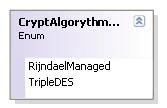
I provide an enumeration to enable the class user select witch encryption/decryption algorithm to use, he/she has choice between Rijndael and TripleDES
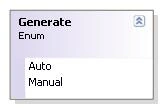
I give the user the choice the Generate enumeration whether, he lets the object generate the key and the IV values or he enters by him self the given values but be careful, first, the same key and IV values are used in encryption and decryption, second, the both key and IV must be saved in a safe place like and isolated storage for example.
And now here is the class implementation:
|
using System; using System.Xml; using System.Security.Cryptography; using System.IO; using System.Text; using System.Configuration.Provider; using System.Configuration; using System.Windows.Forms; namespace EncryptConfigurationFile { /// <summary> /// Enumeration : Helps to choose the right algorithm to use /// </summary> enum CryptAlgorythmToUse { RijndaelManaged,TripleDES } /// <summary> /// Enumeration : Helps to choose the key and IV generation mode /// </summary> enum Generate { Auto,Manual } /// <summary> /// Class that inherits form the abstract class ProtectedConfigurationProvider /// </summary> sealed class CustomProtectionProvider : ProtectedConfigurationProvider, EncryptConfigurationFile.ICustomProtectionProvider { //Used to precise the name of the current provider private string CustomProviderName; //Used to precise the configuration file path private string _ConfigFilePath; //Used to precise the configuration section to Encrypt/Decrypt private string _SectionName; //The key private byte[] _Key; //The initial vector private byte[] _IV; /// <summary> /// The first class constructor /// </summary> /// <param name="CustomProviderName">String: The provider name</param> /// <param name="Algorithm">Enum: The symmetric algorithm to use </param> /// <param name="Generate">Enum: Precise if the key and the initial vector /// are auto generated or given by the class user ///</param> public CustomProtectionProvider(string CustomProviderName, CryptAlgorythmToUse Algorithm, Generate Generate) { //Set the provider name this.CustomProviderName = CustomProviderName; //In this case the rijndael is selected if (Algorithm == CryptAlgorythmToUse.RijndaelManaged) { Algo = new RijndaelManaged(); //If the generation mode is auto means that algo generates the key and IV automatically if (Generate == Generate.Auto) { Algo.GenerateKey(); _Key = Algo.Key; Algo.GenerateIV(); _IV = Algo.IV; } } //In this case the TripleDES is selected if (Algorithm == CryptAlgorythmToUse.TripleDES) { Algo = new TripleDESCryptoServiceProvider(); if (Generate == Generate.Auto) { Algo.GenerateKey(); _Key = Algo.Key; Algo.GenerateIV(); _IV = Algo.IV; } } } /// <summary> /// The second class constructor /// </summary> /// <param name="CustomProviderName">String: The provider name</param> /// <param name="ConfigFilePath">String: The configuration file path</param> /// <param name="Algorithm">Enum: The symmetric algorithm to use</param> /// <param name="Generate">Enum: Precise if the key and the initial vector /// are auto generated or given by the class user</param> public CustomProtectionProvider(string CustomProviderName, string ConfigFilePath, CryptAlgorythmToUse Algorithm, Generate Generate) { //Set the provider name this.CustomProviderName = CustomProviderName; //Set the configuration path this.ConfigFilePath = ConfigFilePath; if (Algorithm == CryptAlgorythmToUse.RijndaelManaged) { Algo = new RijndaelManaged(); if (Generate == Generate.Auto) { Algo.GenerateKey(); _Key = Algo.Key; Algo.GenerateIV(); _IV = Algo.IV; } } if (Algorithm == CryptAlgorythmToUse.TripleDES) { Algo = new TripleDESCryptoServiceProvider(); if (Generate == Generate.Auto) { Algo.GenerateKey(); _Key = Algo.Key; Algo.GenerateIV(); _IV = Algo.IV; } } } /// <summary> /// String: Get and set the configuration file path /// </summary> public string ConfigFilePath { get { return _ConfigFilePath; } set { _ConfigFilePath = value; } } /// <summary> /// String : Get the custom provider name /// </summary> public override string Name { get { return "EncryptConfigurationFile.CustomProtectionProvider: " + CustomProviderName; } } /// <summary> /// String : Get the custom provider description /// </summary> public override string Description { get { return "This is a customized protection provider to encrypt/decrypt configurations sections"; } } /// <summary> /// Byte array : Get and set the algorithm key /// </summary> public byte[] Key { get {return _Key;} set {_Key = value;} } /// <summary> /// Byte array : Get and set the algorithm initial vector /// </summary> public byte[] IV { get { return _IV; } set { _IV = value; } } /// <summary> /// String : Get and set the configuration section name /// </summary> public string SectionName { get { return _SectionName; } set { _SectionName = value; } } /// <summary> /// XmlNode : Function that returns an encrypted xml node /// </summary> /// <param name="node">XmlNode : Xml node that could be null</param> /// <returns></returns> public override XmlNode Encrypt(XmlNode node) { //Create a new xml document XmlDocument myDoc = new XmlDocument(); //Then load it, the configuration file path has to be precised myDoc.Load(ConfigFilePath); //If you leave the argument as null you have toprecise at least the configuration section name if (node == null) { XmlNodeList myXmlNodeList = myDoc.GetElementsByTagName(SectionName); node = myXmlNodeList[0] as XmlNode; } //This option lets you precise the xml node to encrypt outside the class scoop if (node != null) { XmlNodeList myXmlNodeList = myDoc.GetElementsByTagName(node.Name); node = myXmlNodeList[0] as XmlNode; } //Encode the configuration section contents to bytes byte[] nodeContentInByte = Encoding.Unicode.GetBytes(node.InnerXml); //This byte array is used to contain the output after encryption byte[] outPutContentInByte = new byte[nodeContentInByte.Length]; //I choose the file stream instead of the memory stream using (FileStream oStream = new FileStream(@"C:\temp\inout.txt", FileMode.Create,FileAccess.Write)) { //Create an encryptor using (ICryptoTransform oTransform = Algo.CreateEncryptor(Algo.Key, Algo.IV)) { using (CryptoStream crStream = new CryptoStream(oStream, oTransform, CryptoStreamMode.Write)) { try { crStream.Write(nodeContentInByte, 0, nodeContentInByte.Length); crStream.Flush(); } catch (ArgumentException caught) { MessageBox.Show(caught.Message); } } } } //The ouput as string string output = Convert.ToBase64String(outPutContentInByte); //Set the new node content node.InnerXml = AddTags(output); MessageBox.Show(node.InnerXml); //Update the configuration file myDoc.Save(ConfigFilePath); return node; } public override XmlNode Decrypt(XmlNode node) { XmlDocument myDoc = new XmlDocument(); myDoc.Load(ConfigFilePath); string output =""; if (node == null) { XmlNodeList myXmlNodeList = myDoc.GetElementsByTagName(SectionName); node = myXmlNodeList[0] as XmlNode; } if (node != null) { XmlNodeList myXmlNodeList = myDoc.GetElementsByTagName(node.Name); node = myXmlNodeList[0] as XmlNode; } using (FileStream oStream = new FileStream(@"C:\temp\inout.txt", FileMode.Open, FileAccess.Read)) { using (BinaryReader oBinaryReader = new BinaryReader(oStream)) { long Max = oBinaryReader.BaseStream.Length; //Put the file content into an array of bytes byte[] ContentToByte = oBinaryReader.ReadBytes(Convert.ToInt32(Max)); //Encode the bytes to chars char[] ContentToChar = Encoding.Unicode.GetChars(ContentToByte); //Transform the char array to string string inputstring = new string(ContentToChar); //Set the current position of this stream oStream.Seek(0, SeekOrigin.Begin); using (ICryptoTransform oTransform = Algo.CreateDecryptor(Key, IV)) { using(CryptoStream crStream = new CryptoStream(oStream,oTransform, CryptoStreamMode.Read)) { //Read the data within the crypto stream using a stream reader instance using(StreamReader oReader = new StreamReader(crStream,new UnicodeEncoding())) { output = oReader.ReadToEnd(); } crStream.Flush(); } } } } //Update the node conetent node.InnerXml = output; MessageBox.Show(node.InnerXml); //Update the configuration file myDoc.Save(ConfigFilePath); return node; } /// <summary> /// int: Get the hash code /// </summary> /// <returns></returns> public override int GetHashCode() { return base.GetHashCode(); } /// <summary> /// String : Adds tags to indicate that the current string is a ecrypted /// </summary> /// <param name="input">String: The string going to be tagged</param> /// <returns>String : Tagged encrypted string</returns> private string AddTags(string input) { return "<EncryptedData>" + input + "</EncryptedData>"; } } } |
In order to use this class I propose to use the same form used in the first case but by implementing differently the both click event handlers as bellow:
|
//Define a new cutom provider object CustomProtectionProvider myProvider; private void button1_Click(object sender, EventArgs e) { //Instanciate it, for this I use the first constructor myProvider = new CustomProtectionProvider("myProvider", CryptAlgorythmToUse.RijndaelManaged, Generate.Auto); //Precise the configuration file path myProvider.ConfigFilePath = Application.StartupPath + @"\EncryptConfigurationFile.exe.config"; //Precise the targeted configuration section myProvider.SectionName = "connectionStrings"; //Protect the configuration section XmlNode myNode = myProvider.Encrypt(null); } private void button2_Click(object sender, EventArgs e) { //Unprotect the confguration section XmlNode myNode = myProvider.Decrypt(null); }
Good Dotneting!!! |
Join the conversation! Your thoughts help the community grow.