

Introduction and Goal
In this article we will try to understand the 4
important steps to consume web service directly in Ajax. In this sample we will
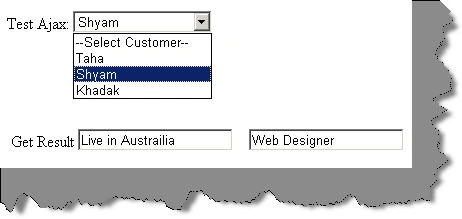
create a simple customer combo box as shown in the figure below. This customer
combo box will be filled by calling the web service methods directly of the
customer web service.
Here's my small gift for all my .NET friends , a complete 400 pages FAQ Ebook
which covers various .NET technologies like Azure , WCF , WWF , Silverlight ,
WPF , SharePoint and lot more http://www.questpond.com/SampleDotNetInterviewQuestionBook.zip
Video tutorial
This whole article is also demonstrated in video format which you can view from here http://www.youtube.com/watch?v=FvpXZdRTr4Q .
Introduction
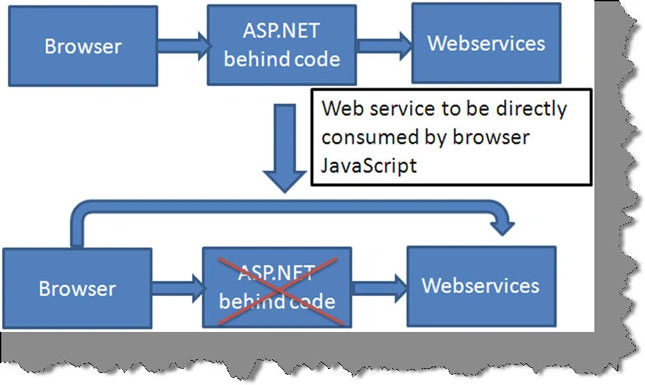
Normally consumption of web services happens as shown in the below figure. The browser Ajax controls calls the ASP.NET code and the ASP.NET code consumes the web service. But there are scenarios where you would like to call the web services directly from the ajax javascript functions rather than calling via the behind code. This article will demonstrate how we can achieve the same.
Step 1 Create your customer class
The first step is to create the customer class as
shown below. So our customer class has 4 properties on customer id, first name,
address and designation.
public class Customers
{
private int
_intCustomerID;
private string
_strFirstName;
private string
_strAddress;
private string
_strDesignation;
public int CustomerID
{
get
{
return _intCustomerID;
}
set
{
_intCustomerID = value;
}
}
public string
FirstName
{
get
{
return _strFirstName;
}
set
{
_strFirstName = value;
}
}
public string Address
{
get
{
return _strAddress;
}
set
{
_strAddress
= value;
}
}
public string
Designation
{
get
{
return _strDesignation;
}
set
{
_strDesignation = value;
}
}
}
Step 2:- Create your web service
The next step is we need to create the web service
which exposes the customer class to our UI. Below is a simple web service which
has encapsulated customer collection. In the constructor we are loading some
dummy data in to the list of customer as shown in the below code snippet.
[System.Web.Script.Services.ScriptService]
public class Customer : System.Web.Services.WebService
{
// Customer collection
List<Customers> listcust = new List<Customers>();
public Customer()
{
//Load some dummy data in to customer collection.
listcust.Clear();
Customers cust
= new Customers();
cust.CustomerID
= 1;
cust.FirstName
= "Taha";
cust.Address = "Live in India";
cust.Designation = "Software
Developer";
listcust.Add(cust);
cust = new Customers();
cust.CustomerID
= 2;
cust.FirstName
= "Shyam";
cust.Address = "Live in Austrailia";
cust.Designation = "Web Designer";
{
private int _intCustomerID;
private string _strFirstName;
private string _strAddress;
private string _strDesignation;
{
get
{
return _intCustomerID;
}
set
{
_intCustomerID = value;
}
}
{
get
{
return _strFirstName;
}
set
{
_strFirstName = value;
}
}
{
get
{
return _strAddress;
}
set
{
_strAddress = value;
}
}
public string Designation
{
get
{
return _strDesignation;
}
set
{
_strDesignation = value;
}
}
}
Join the conversation! Your thoughts help the community grow.