

Introduction
When we develop any application, performance plays a very important role . When users interact with an application, they expect it to respond quickly and provide a smooth experience. If an application becomes slow or unresponsive, it can create a negative impression and affect the overall user experience.
In this article, we will discuss a few important points that we should consider while developing an ASP.NET Core Web API to improve its performance.
The concepts discussed here are not limited to ASP.NET Core Web APIs. Similar principles can be applied to other types of applications as well, although the implementation may differ depending on the technology and application architecture.
To keep the examples simple and practical, we will use an Employee and Compensation example throughout the article.
Example
Throughout this article, we will use the Employee and Compensation example to understand five practical ways to improve API performance.
An employee can have basic information such as name, department, and email. Each employee can also have compensation information such as salary, bonus, and the effective date.
For simplicity, we will consider a one-to-many relationship between Employee and Compensation: one employee can have multiple compensation record:
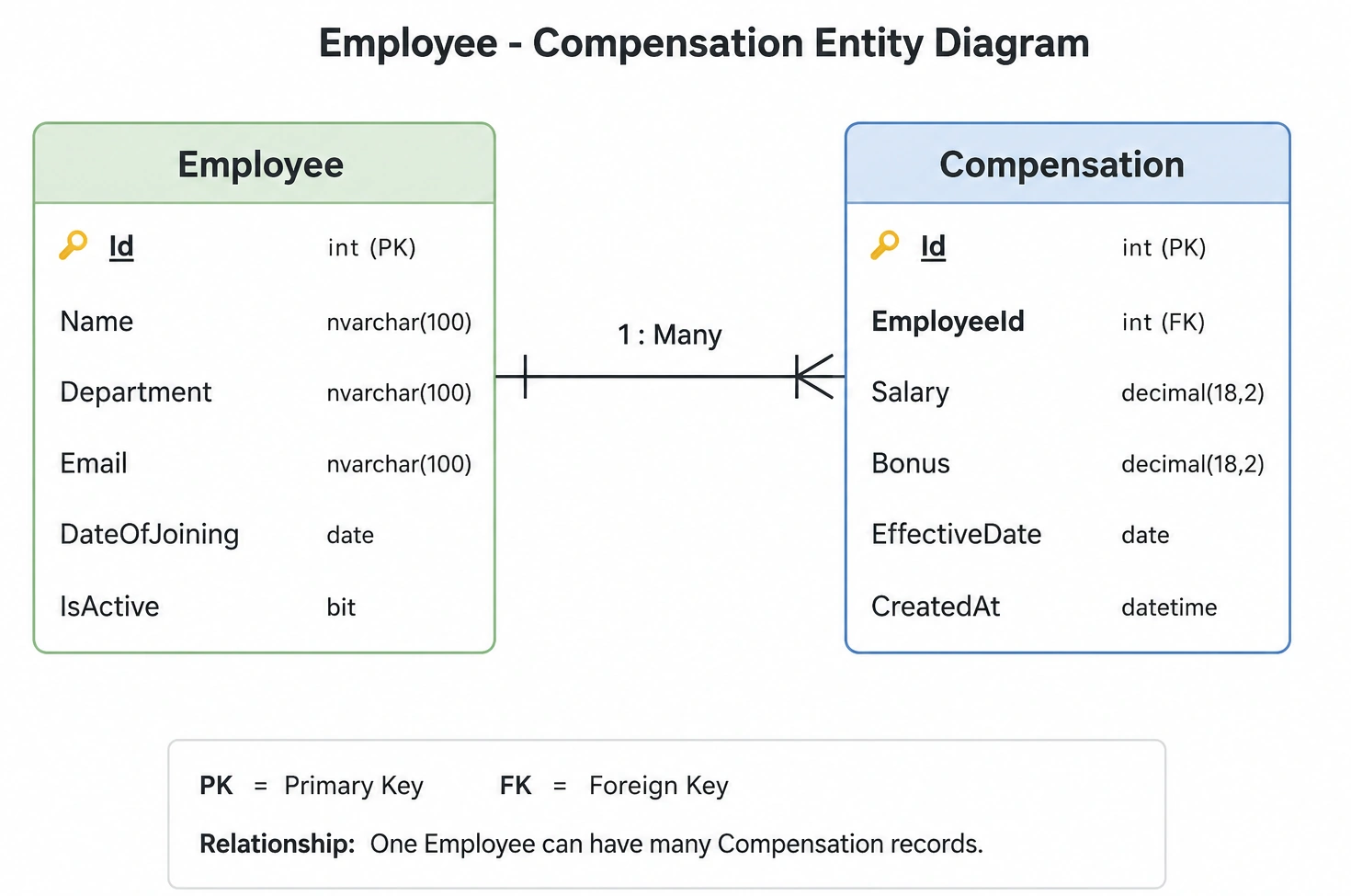
Assume our API is exposing endpoints such as:
GET /api/employees
GET /api/employees/{id}
GET /api/employees/{id}/compensation
When Performance Problems Occur
Initially, our API may work perfectly when the application has a small amount of data. However, as the number of employees and compensation records grows, some APIs may become slower.
For example, imagine that our database contains 500,000 employees and several million compensation records.
This is where performance optimization becomes important.
In the following sections, we will look at five practical techniques that can help us address these performance problems.
1. Database Query Optimization
In almost every real-world application, data is fetched from a database, so writing efficient database queries is very important.
Avoid selecting all columns (SELECT *) from a table. Select only the columns you actually need. This reduces the amount of data transferred from the database and can reduce memory usage and query processing time.
For example, following query retrieves the entire Employee entity and it is not recommended when you don't need all columns:
var employees = await _context.Employees.ToListAsync(); Instead, select only the required fields:
var employees = await _context.Employees
                             .Select(e => new EmployeeDto
                             {
                                Id = e.Id,
                                Name = e.Name,
                                Department = e.Department
                             })
                             .ToListAsync();
This is generally better because the database only needs to return the columns required for the API response.
2. Pagination
Suppose we have 500,000 employees . Instead of returning everything in one sort we can return data in chunks which will improve performance.
var employees = await _context.Employees .ToListAsync(); we return 20 employees:
var employees = await _context.Employees .Skip((pageNumber - 1) * pageSize).Take(pageSize).ToListAsync(); 3 . Async/Await and Task
In an ASP.NET Core Web API, database calls and other I/O operations can take some time. For example, retrieving an employee's compensation from the database may take several milliseconds or longer.
We should use async/await for these I/O-bound operations so that the request thread is not blocked while waiting for the database to respond.
var compensation = await _context.Compensations.FirstOrDefaultAsync(c => c.EmployeeId == employeeId); Here:
FirstOrDefaultAsync() starts the database operation.
await says: "Wait for the result, but don't block the current thread while waiting."
Once the database returns the result, the method continues.
This is better for handling many concurrent API requests.
Avoid using .Result, .GetAwaiter(), .GetResult(); in ASP.NET Core request code:
var compensation = _context.Compensations.FirstOrDefaultAsync(c => c.EmployeeId == employeeId).Result; Here:
FirstOrDefaultAsync() starts the database operation.
.Result blocks the current thread until the database operation finishes.
The thread is sitting there doing nothing while waiting.
4. AsNoTracking()
AsNoTracking() is used when you only want to read data and don't need EF Core to track the returned entities for updates. By default, EF Core tracks entities returned from a query.
Suppose your API retrieves 10,000 employees just to display them .
Without AsNoTracking():
var employees = await _context.Employees .ToListAsync(); With AsNoTracking():
var employees = await _context.Employees.AsNoTracking().ToListAsync(); EF Core doesn't need to maintain that tracking information.
This can reduce:
Memory usage
Change-tracking overhead
CPU overhead
It is particularly useful for read-only queries returning many records .
5. Caching
Caching improves application performance by storing frequently accessed data in a fast storage layer such as application memory or a distributed cache. Instead of querying the database for every request, the application first checks the cache.
For example, if an API frequently retrieves compensation for employee Id 101, following will be the flow:
Without caching:
First request → API → Database → Compensation
Next requests → API → Database → Compensation
With caching:
First request → API → Cache Miss → Database → Cache
Next requests → API → Cache Hit → Compensation
This reduces database calls, improves response time, and reduces database load.
Simple implementation using IMemoryCache, register the cache in Program.cs:
builder.Services.AddMemoryCache(); Then write code in controller:
private readonly IMemoryCache _cache;
 public EmployeeController(IMemoryCache cache)
 {
   _cache = cache;
 }

[HttpGet("{employeeId}/compensation")]
public async Task<IActionResult> GetCompensation(int employeeId)
{
    string cacheKey = $"compensation_{employeeId}";

   if (!_cache.TryGetValue(cacheKey, out Compensation? compensation))
          compensation = await _context.Compensations.AsNoTracking()
          .FirstOrDefaultAsync(c => c.EmployeeId == employeeId);
        if (compensation == null)
      return NotFound();
    _cache.Set(cacheKey, compensation, TimeSpan.FromMinutes(10));
}
    return Ok(compensation);
}
Conclusion
Improving ASP.NET Core Web API performance is not about applying a single optimization technique. In a real-world application, performance comes from making several small but meaningful improvements across the entire request pipeline.
In this article, we explored five practical approaches using an Employee & Compensation example:
Use async/await to avoid blocking threads during I/O operations.
Use AsNoTracking() for read-only Entity Framework Core queries.
Select only the required columns instead of loading unnecessary data.
Use pagination when returning large collections.
Use caching to reduce repeated database calls and improve response time.
The key is to first measure and identify the actual bottleneck, rather than optimizing code unnecessarily. A well-designed API should balance performance, readability, maintainability, and scalability.
These techniques are simple to implement, but when combined effectively, they can significantly improve the responsiveness and scalability of an ASP.NET Core Web API.
Jasen FiciPosted Aug 24, 2026, 12:10 PM
We featured this in our DotNetNews issue here: https://dotnetnews.co/archive/the-net-news-daily-issue-525/