

This is beginners tutorial of how to deploy a WebPart in SharePoint. It is a 6 step procedure and this tutorial will walk through the same. In case you are fresher to SharePoint you can read my FAQ articles listed below. I am sure within an hour you can get acquainted to SharePoint and get started.
Quick Start FAQ Part I :- 11 basic FAQ questions , must for every new comer.It's a the basic Quick Start FAQ tutorial which talks about What is SharePoint, WSS, MOSS, Site/Site collection, Virtual Path provider and then ends with explaining SitePages and Application pages SharePoint FAQ: Part I
Quick Start FAQ part II:- This is the second part in the series which explains the ready made functionalities,custom pages,deploying/activating/deactivating features and lot. SharePoint FAQ: Part II
Quick Start FAQ Part III:- This covers page templates , page instances , WSS model , understand safe mode processing , deploy custom controls and understand WebParts. So let's drink the SharePoint wine series by series, slowly, maintain the hangover and enjoy this great product. SharePoint FAQ: Part III
Step 1:- Create the Webpart
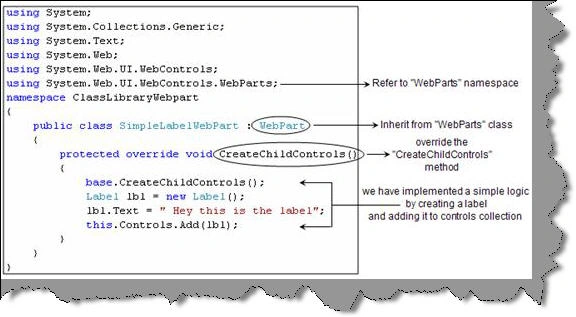
The first step is to create the WebPart. Below is the code snippet of a webPart. So we need to reference the 'WebParts', the custom webpart class should inherit from 'WebPart' class and finally we need to override the 'CreateChildControls' method with our custom implementation.
Step 2 :- Copy the compile DLL to the virtual directory in the BIN folder.
The second step is to copy the compiled DLL in the virtual directory of the sharepoint site.
You can get the virtual directory from the IIS from home directory tab in IIS. For instance the current website is hosted on the sharepoint 80 virtual site which is actually located at 'C: \Inetpub\wwwroot\wss\VirtualDirectories\80'.
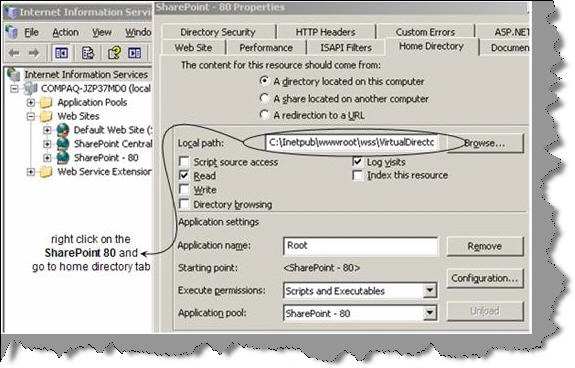
So now let's browse to 'C: \Inetpub\wwwroot\wss\VirtualDirectories\80\bin' directory and copy the DLL in the bin folder.
Raja SekarPosted May 9, 2012, 2:19 AM
thanks....