

Every developer builds a login screen at some point, and almost every developer copy-pastes an auth solution without really knowing what's happening under the hood. I did it too and dropped in a JWT library, saw the green checkmark, and moved on.
The problem is that authentication isn't one thing. It's a stack of related-but-different concepts, and mixing them up is exactly how security bugs sneak into production. So this article walks through the seven concepts that, once they click, make the entire login/token/session/SSO landscape make sense. I've kept the explanations practical, added a real diagram for every concept, and called out the design trade-offs you actually need to think about when you're the one building the system and not just using someone else's library.
Let's start with the one question that sits underneath everything else.
1. Authentication vs. Authorization
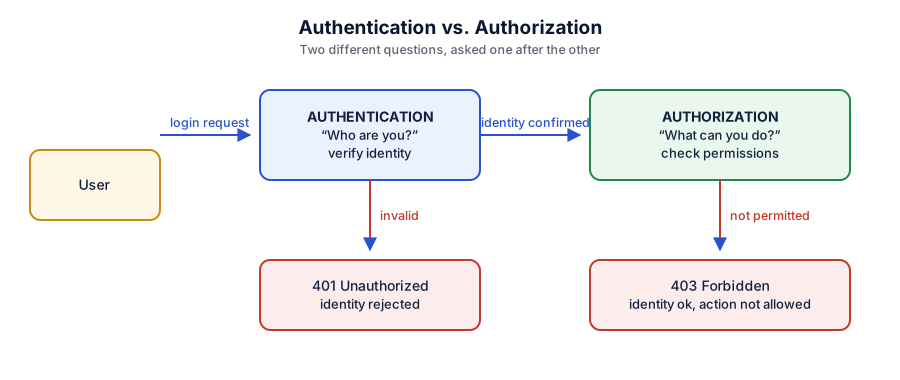
Authentication answers one simple question: who is this user? When a login request comes in from a person or from another service, this is the step where the system confirms identity.
If the credentials check out, access is granted. If they don't, the system rejects the request, typically with a 401 Unauthorized response.
Authorization is a completely different question that comes after authentication: what is this user allowed to do? A user can be authenticated (the system knows exactly who they are) and still be denied a specific action that's a 403 Forbidden, not a 401.
Keeping these two separate in your head (and in your code) matters, because a lot of real-world security bugs come from developers conflating "logged in" with "allowed to do this."
Design factors to consider
Return the correct status code — a
401tells the client "log in again," a403tells it "you're logged in, but no." Mixing these up confuses client-side error handling.Authentication should be a single, well-tested chokepoint in your system. Authorization checks, on the other hand, usually need to happen closer to each resource or action.
Never let a successful authentication implicitly mean "authorized for everything." Every sensitive action deserves its own permission check.
2. Basic Authentication
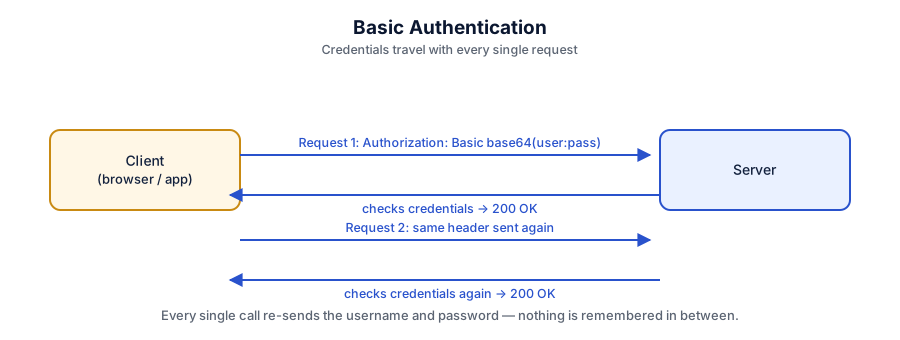
Basic Authentication is the oldest, simplest method still in use. The client sends a username and password, Base64-encoded, in the Authorization header — and it does this on every single request, not just at login.
Base64 is encoding, not encryption. Anyone who intercepts the header can decode the credentials instantly. That's why Basic Auth is only acceptable over HTTPS, and even then, it's a blunt instrument.
Design factors to consider
Transport security is non-negotiable. Without HTTPS, Basic Auth is sending passwords in the clear.
No session lifecycle. There's no built-in concept of "logging out" or expiring access — the client either keeps sending the header or it doesn't.
Credentials repeated everywhere. Every request re-exposes the password to the network, to logs, to any proxy in between. That's a lot of surface area for a leak.
Where it still makes sense: quick internal tools, admin scripts, or systems already sitting behind another security layer (a VPN, for instance) where convenience outweighs the risk.
3. Session-Based Authentication
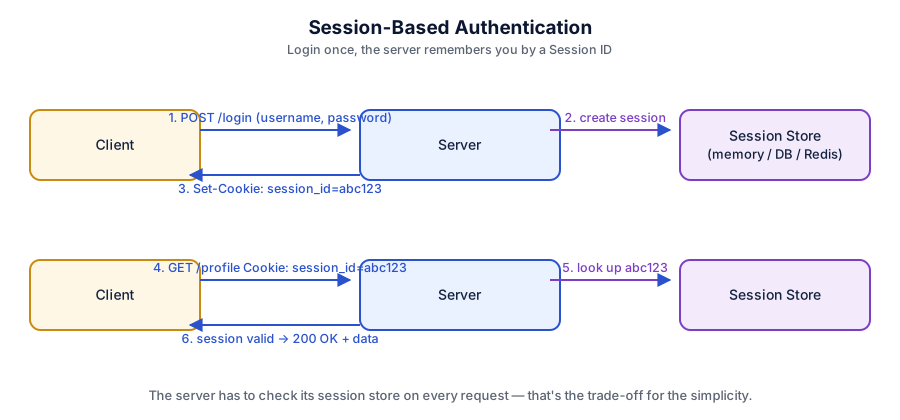
Session-based authentication fixes the "resend credentials every time" problem. The user logs in once, the server creates a session record (in memory, a database, or something like Redis), and hands the client a session ID — usually stored in a cookie.
From that point on, the client just sends the session ID, and the server looks it up to confirm the user is still valid.
Design factors to consider
The server has to remember something. This is called being "stateful" — every request needs a lookup against the session store, which is fine at small scale but becomes a real bottleneck as traffic grows across multiple servers.
Revocation is easy. Because the server owns the session record, killing a session (forcing a logout) is as simple as deleting that record. This is a genuine advantage over some token-based approaches.
Cookie security matters. Session cookies should be marked
HttpOnlyandSecure, and protected against CSRF, or the whole scheme falls apart.Where it still makes sense: traditional server-rendered web apps where the client and server are tightly coupled and horizontal scaling isn't a major concern.
4. Token-Based Authentication (Bearer Tokens & JWT)
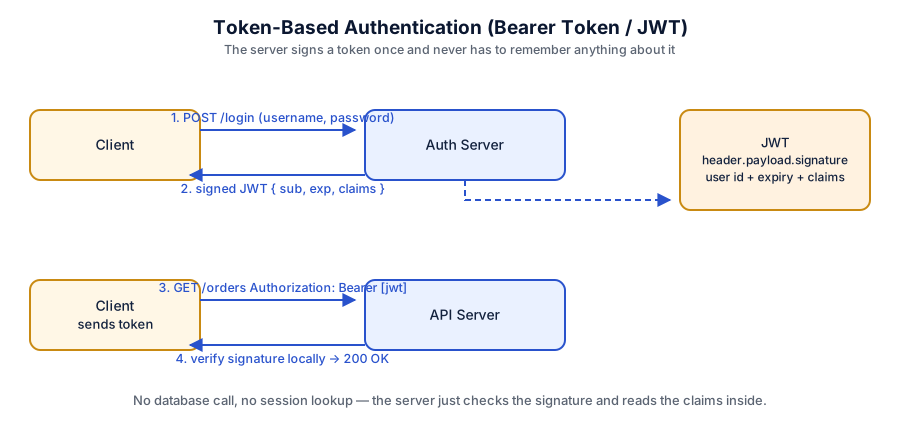
This is where modern systems diverge from the session model. Instead of a session ID that means nothing without a server-side lookup, the client is given a token — a self-contained piece of data.
A Bearer token is a pattern, not a specific technology: it simply means "whoever holds this token gets access." The most common implementation of a bearer token is the JWT (JSON Web Token) — a signed JSON object containing the user's ID, an expiration time, and other claims.
The key property of a JWT is that it's stateless. The API doesn't need to check a database or a session store — it just verifies the token's signature locally and reads the data already sitting inside it.
Design factors to consider
Statelessness is a trade-off, not a free win. It removes the database lookup on every request (great for scaling across many servers), but it also means you can't simply "delete" a token the way you delete a session record — a valid, unexpired JWT stays valid until it expires.
Keep the payload small and non-sensitive. JWTs are signed, not encrypted by default — anyone can decode and read the payload, they just can't alter it without invalidating the signature.
Expiration is your safety valve. Because tokens can't be easily revoked, short expiration windows are what actually keep a stolen token from being useful for long.
Where it fits: APIs, mobile apps, and any system where multiple independent services need to validate identity without sharing a session store.
5. Access Tokens and Refresh Tokens
Short-lived tokens are more secure, but nobody wants to log in every five minutes. That's the exact problem access and refresh tokens are designed to solve.
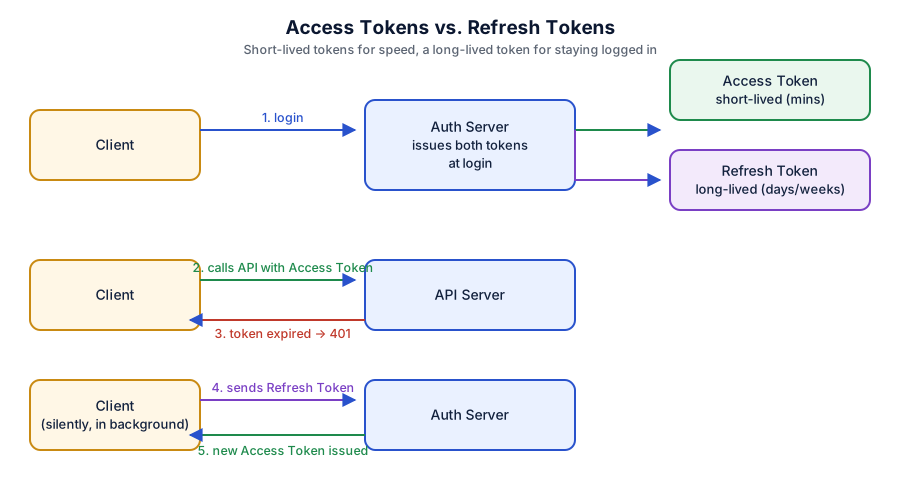
Modern systems issue two tokens at login:
An access token — short-lived (often just minutes), used for actual API calls.
A refresh token — long-lived (days or weeks), used only to obtain a new access token.
When the access token expires, the application quietly uses the refresh token behind the scenes to get a fresh one — the user never notices. This keeps the system secure, because access tokens expire quickly and limit the damage if one leaks, while users still stay logged in without constant interruptions.
Design factors to consider
Store refresh tokens more carefully than access tokens. Since a refresh token can mint new access tokens indefinitely (until it expires or is revoked), it's the more valuable target for an attacker.
Refresh tokens should be revocable. Unlike a stateless access token, refresh tokens are usually tracked server-side specifically so they can be invalidated — for example, on logout or a suspected compromise.
Rotate refresh tokens where possible. Issuing a new refresh token each time one is used (and invalidating the old one) limits how long a stolen refresh token stays useful.
Balance the expiration windows. Too short an access token lifetime means constant background refresh calls; too long defeats the purpose of having a short-lived token at all.
6. OAuth2 — The Authorization Framework
Here's a distinction that trips up a lot of developers: OAuth2 is an authorization framework, not an authentication protocol. It answers the question "what is this application allowed to access on behalf of the user?" — not "who is this user?"
Think of the classic "connect your Google Calendar" flow: your app never sees the user's Google password. Instead, the user is redirected to Google, approves the specific access being requested (say, read-only calendar access), and Google hands your app a token scoped to exactly that permission — nothing more.
Design factors to consider
Scope things narrowly. OAuth2's whole value proposition is granting the minimum access needed for the task — don't request broader scopes than your app actually uses.
OAuth2 alone tells you nothing about identity. An access token proves your app can call an API on the user's behalf; it does not, by itself, prove who that user is. That gap is exactly what the next concept fills.
7. OpenID Connect (OIDC) — Authentication on Top of OAuth2
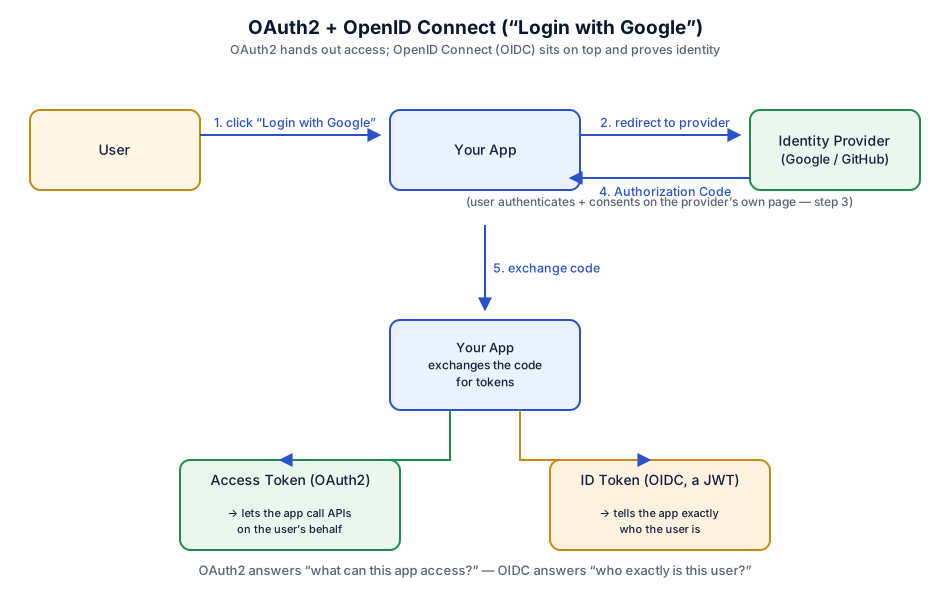
If OAuth2 is about access, OpenID Connect adds the missing identity layer on top of it. Any time you click "Log in with Google" or "Log in with GitHub," you're using OIDC.
The flow starts the same way as OAuth2 — redirect to the provider, the user signs in and consents, and an authorization code comes back. But alongside the access token, the provider also returns an ID token, formatted as a JWT. Your app reads that ID token to know exactly who the user is — their email, their name, their unique identifier at that provider.
So the two work together: OIDC is the authentication layer, and OAuth2 underneath it is the authorization layer. This combination is also the backbone of most Single Sign-On (SSO) systems — log in once with an identity provider, and every connected app trusts that same ID token instead of asking you to log in again.
Design factors to consider
Don't build your own OAuth2/OIDC client from scratch. These flows have subtle security requirements (state parameters, PKCE, redirect URI validation) that are easy to get wrong — use a well-maintained library or an established identity provider.
Validate the ID token properly. Check the signature, the issuer, the audience, and the expiration — not just that "a token showed up."
Separate what you use each token for. Use the ID token to establish identity in your own session or JWT; use the access token only for calling the provider's API. Don't mix the two up.
SSO increases blast radius. If the central identity provider is compromised, every connected app is exposed — which is a trade-off for the convenience of one login everywhere.
Bringing it all together
Laid end to end, the seven concepts tell a single story of an industry solving one problem at increasing scale:
Authentication vs. Authorization - the two questions every access-control system has to answer, in that order.
Basic Authentication - the simplest way to prove identity, and the least suited to the modern web.
Session-Based Authentication - the server remembers you, which is simple and easy to revoke, but doesn't scale effortlessly.
Token-Based Authentication (JWT) - the server doesn't have to remember anything, which scales beautifully, but is harder to revoke.
Access & Refresh Tokens - a compromise that keeps tokens short-lived and safe, without logging users out constantly.
OAuth2 - lets an app act on a user's behalf without ever touching their password, scoped to exactly what's needed.
OpenID Connect - the identity layer that finally answers "who is this user?" on top of OAuth2's access model, and powers SSO.
None of these methods is universally "best" - each one is a different answer to the same underlying trade-off between simplicity, security, statelessness, and scale. The job of a developer designing an auth system isn't to pick the trendiest option; it's to understand exactly what each method is optimizing for, and choose the one that fits what you're actually building.
Join the conversation! Your thoughts help the community grow.