
Introduction
Today I am going through the new features of ASP.NET 4.5. I have seen som fantastic features for Web Developers. Previously there was plenty of trouble when binding any data controls from a data source. If you are using an item template with any Model, then that Model was not tightly coupled with the Data Control.
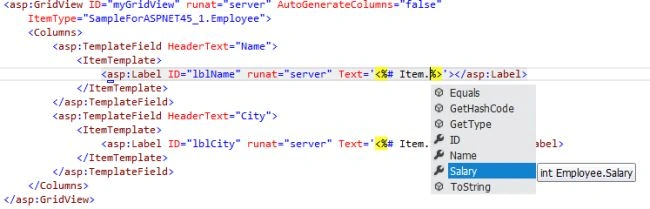
But now in ASP.NET 4.5 we have a very good feature; now we can map a Data Control with a Strongly Typed Data Model. Microsoft exposes one new property for all Data Controls, called ItemType.
Code: Let's see a sample use for the ItemType and Data Controls. In my example I am using a GridView control; you can use any Data Control like DataList, Repeater etc.
Step 1: First we will create a Model Class.
namespace SampleForASPNET45_1
{
public class Employee
{
public int ID { get; set; }
public string Name { get; set; }
public int Salary { get; set; }
}
}
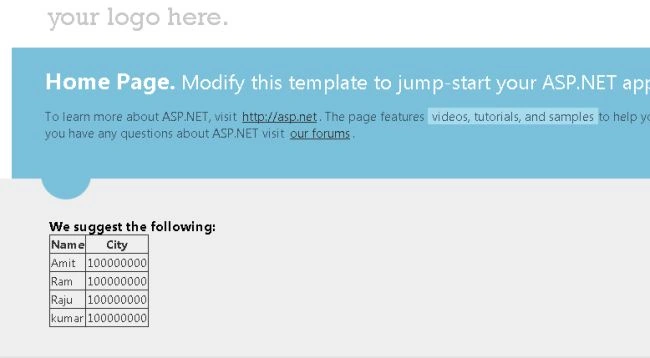
Step 2: Now we will take a GridView control in the ASPX page:
<asp:GridView ID="myGridView" runat="server" AutoGenerateColumns="false" ItemType="SampleForASPNET45_1.Employee">
<Columns>
<asp:TemplateField HeaderText="Name">
<ItemTemplate>
<asp:Label ID="lblName" runat="server" Text='<%# Item.Name %>'></asp:Label>
</ItemTemplate>
</asp:TemplateField>
<asp:TemplateField HeaderText="City">
<ItemTemplate>
<asp:Label ID="lblCity" runat="server" Text='<%# Item.Salary%>'></asp:Label>
</ItemTemplate>
</asp:TemplateField>
</Columns>
</asp:GridView>

ASP.NET 4.5 Strongly Type Data With Data Controls
Join the conversation! Your thoughts help the community grow.
Sign in to leave a comment
It is the same account you read, post and publish with — and you will come straight back to this page.
ivan lewisPosted Oct 18, 2016, 11:14 AM
How to bind foreign key dropdown in gridview?
kalu singh raoPosted Jul 1, 2016, 8:25 AM
Nice...