
If vNext or .Net 5 sounds new to you (which of course I believe it is not) or you want to read about the basics of these then please go through the following articles that I posted earlier:
Install Visual Studio 2015 Ultimate Preview
I recommend that you install VS2015 to explore all these utilities and the awesome features provided with ASP.Net 5. To read more about the installation of VS2015, please go through my article: Setup Visual Studio 2015 Preview Quickly Via Azure.
(This was also chosen by ASP.Net as the article of the day.)
ASP.Net 5 Redesign
ASP.Net 5 has undergone a major redesign from existing frameworks. Now we have three choices for choosing the framework: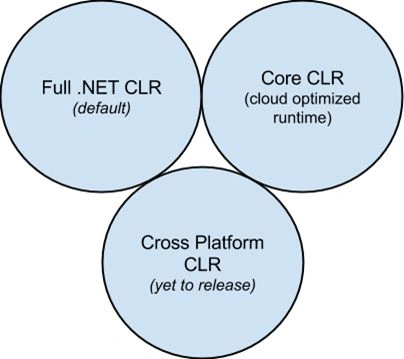
Let's look at these runtime environments.
- Create a new ASP.Net Web Application.
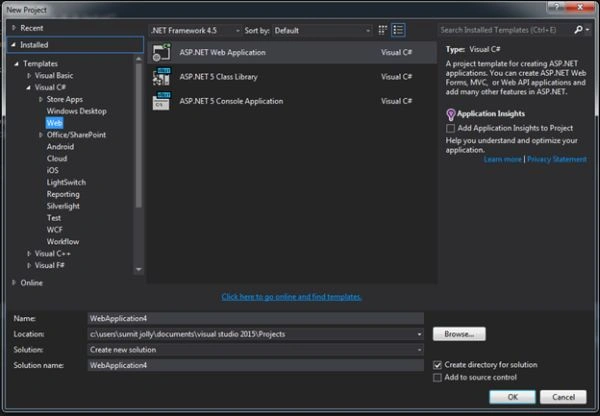
- Select ASP.NET 5 Starter Web
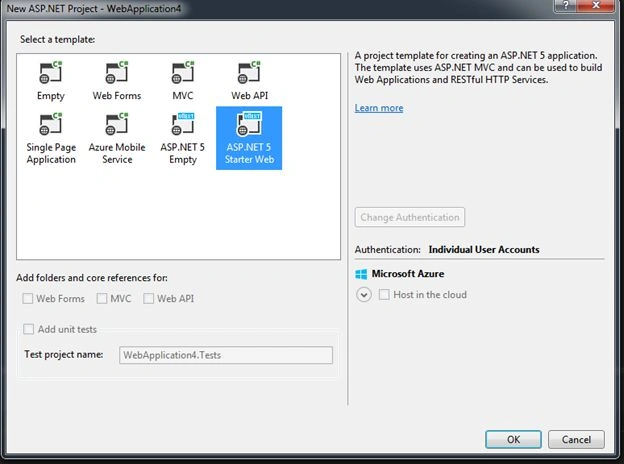
Click OK and the project structure is ready. The project structure contains MVC folders and configuration files. Let's have a look at these configuration files.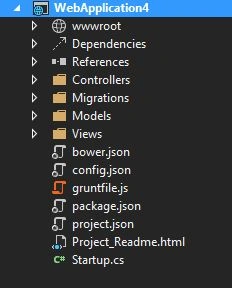
- Project.json. The main project file lists the dependencies, frameworks, modules and so on needed for your application.
 Traverse the following link for more details on Project.json: https://github.com/aspnet/Home/wiki/Project.json-file
- package.json. Lists npm packages.
- bower.json. Lists Bower packages.
- gruntfile.js. Configures Grunt tasks.
wwwroot folder
This promotes a separation of code, since your code behind files are separate from the static client files. This new wwwroot folder contains assets that the app will serve directly to clients, including HTML, CSS, image and JavaScript.
Choice of framework
Now that we have an idea of the folder structure and files, it's time to see the effect of these new configuration files:
- Go to the Project.json file and you'll find two frameworks:
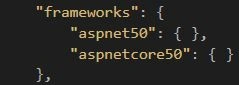
- aspnet50: The full .NET CLR is the default runtime for projects in Visual Studio.
- aspnetcore50: The Core CLR is a lean and completely modular runtime for ASP.NET 5 projects. It's 11MB vis-a-vis 200MB size of the full .NET CLR.
You can select / switch among frameworks after selecting Project > Properties…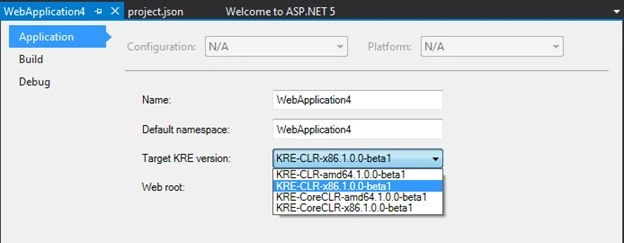
Other tools/utilities:
These new configuration files use other platform/tools also, let's understand them. Node.js® is a platform built on Chrome's JavaScript runtime for easily building fast, scalable network applications. Node.js uses an event-driven, non-blocking I/O model that makes it lightweight and efficient, perfect for data-intensive real-time applications that run across distributed devices.
Definition by: NodeJS.
You can install Node.Js from the site or I prefer using: Chocolatey.
- - Install chocolatey using the following command.
- @powershell -NoProfile -ExecutionPolicy unrestricted -Command "iex ((new-object net.webclient).DownloadString('https://chocolatey.org/install.ps1'))" && SET PATH=%PATH%;%ALLUSERSPROFILE%\chocolatey\bin.
- choco install nodejs.
- After node is installed, you can validate whether npm (the package manager) is installed successfully or not.
npm --version

 Bower, manages all these things for you. The web sites are made of many things, frameworks, libraries, assets, utilities and rainbows.
Install bower
npm install -g bower Grunt is the JS taskrunner. The need to use Grunt is to do automation, it helps in automating many tasks, like minification, compilation, unit testing, linting, and so on, the easier your job becomes. If you visit the site you'll find many plugins available: Gruntjs.
Run the following command to install Grunt.
- - npm install -g grunt-cli
Demo of bower
If you want to install any dependency that you want to use in your project, for example AngularJS, then go to bower.json and add AngularJS. For example:
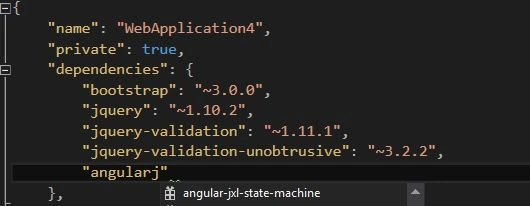
The full code will look like:
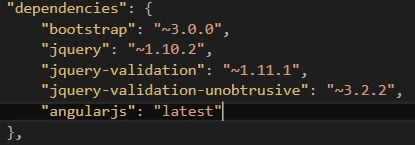
Now, we've given the reference, you can view this by expanding Solution Explorer Dependencies > Bower.
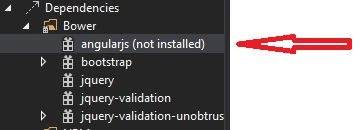
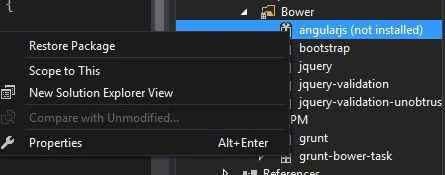
It says that AngularJS is not installed. There are two ways to install AngularJS in the project:
- Right-click and fire the command Restore Package.
- Go to the command prompt and run the bower update.
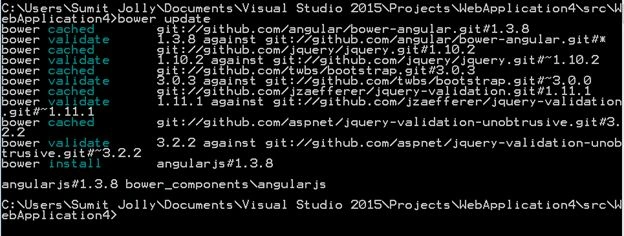
The output of both commands will add AngularJS to your project.
Demo of Grunt
As we know Grunt is a taskrunner and this demo will show you the task grunt-contrib-copy.
- console.log('hello VS2015');
- copy: {
- main: {
- src: ‘library/custom.js',
- dest: 'wwwroot/',
- },
- },
- grunt.loadNpmTasks('grunt-contrib-copy');
- // This file in the main entry point for defining grunt tasks and using grunt plugins.
- // Click here to learn more. http://go.microsoft.com/fwlink/?LinkID=513275&clcid=0x409
- module.exports = function (grunt) {
- grunt.initConfig({
- copy: {
- main: {
- src: 'library/custom.js',
- dest: 'wwwroot/',
- },
- },
- bower: {
- install: {
- options: {
- targetDir: "wwwroot/lib",
- layout: "byComponent",
- cleanTargetDir: false
- }
- }
- }
- });
- // This command registers the default task which will install bower packages into wwwroot/lib
- grunt.registerTask("default", ["bower:install"]);
- // The following line loads the grunt plugins.
- // This line needs to be at the end of this this file.
- grunt.loadNpmTasks("grunt-bower-task");
- grunt.loadNpmTasks('grunt-contrib-copy');
- };
- Go to package.json and add the NPN grunt package grunt-contrib-copy.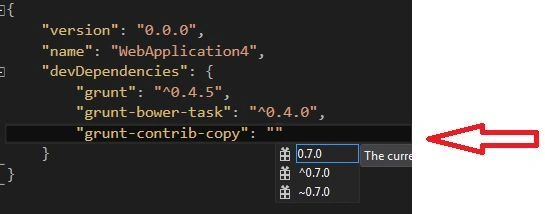
- Expand Dependencies and you'll reference to this npm package.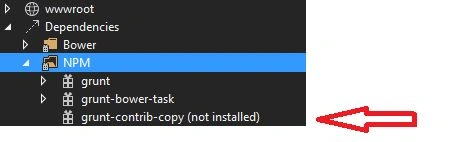
- Right-click grunt-contrib-copy and Restore package.
or
- Go to a command prompt and run the command:
npm install grunt-contrib-copy.
Good, now this plugin is available in your project. You can read more details regarding this plugin at: grunt-contrib-copy.
- Create a folder library and add custom.js as in the following:
We're all set to use this plugin. You can leverage VS2015.
- Right-click on gruntfile.js and run Task Runner Explorer.
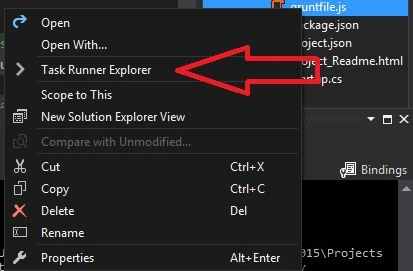
You'll notice there are two tasks now: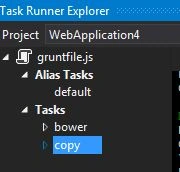
Bower the default one provided by scaffold and copy that that we created in gruntfile.js. Double-click on the copy task to run it and it'll copy the Library>Custom.js file to the destination folder wwwrrroot.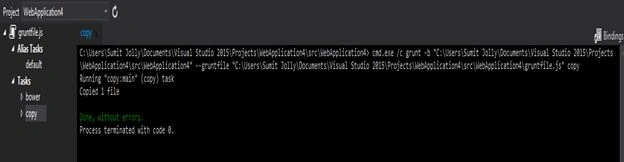
- You can do the same operation via command prompt by firing grunt copy.

Validate the tree structure or look into Windows Explorer and you'll find the following pattern: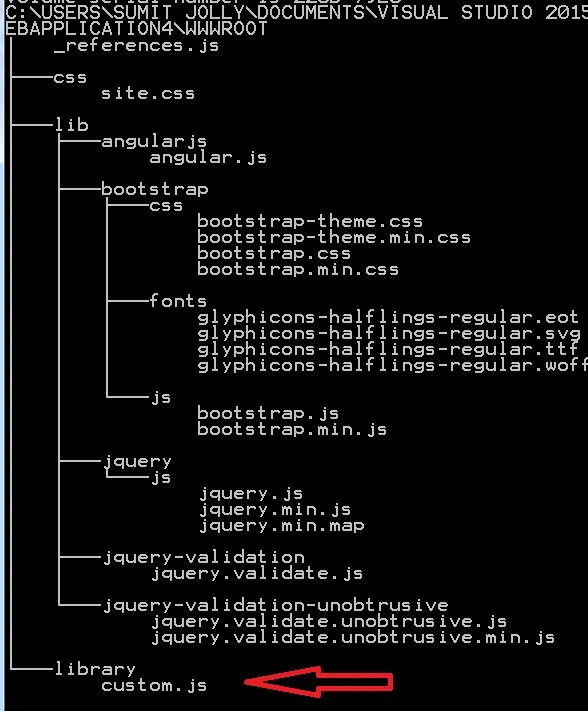
Summary
ASP.Net 5.0 is really powerful and has capabilities of other tools and frameworks too. We've unleashed the power of NPM, bower and grunt. There are many Grunt plugins available that make your life easy, for examle the common tasks linting, minification and obfuscation can be handled easily via Grunt plugins.
Guest UserPosted Mar 30, 2015, 6:31 AM
I think it's more like convention, so your FrontEnd files goes into wwwroot folder. However if you wish you can delete it
Jasminder SinghPosted Mar 29, 2015, 10:43 AM
hello Sumit Jolly sir, Just a question out of curiosity. Can we use the files like css and scripts in normal folder and remove the wwwroot folder, or this folder use is must.
Guest UserPosted Mar 2, 2015, 6:55 AM
Thanks Dinesh Beniwal!
Dinesh BeniwalPosted Mar 2, 2015, 12:49 AM
Finally Article of the day on ASP.NET Sumit Jolly
Guest UserPosted Jan 8, 2015, 2:45 AM
Please let me know Shivanand Arur if you still have any questions. I'm happy to answer or improve my article. Thanks again!
Guest UserPosted Jan 8, 2015, 2:44 AM
Hi Shivanand Arur, thanks for feedback. If you see Venn diagram that I published it mention Cross platform (yet to release). You can validate this at Microsoft Asp.Net site also under "Why redesign ASP.NET?" section: http://www.asp.net/vnext/overview/aspnet-vnext/aspnet-5-overview
Shivanand ArurPosted Jan 8, 2015, 2:29 AM
Sumit are you sure there are 3 CLR's as you have shown in the first image of this article? As per my knowledge there are 2 (i. .Net CLR which has been already available in all .Net Versions so far) and (ii. Core CLR which is Cloud Optimized and also used for Cross Platform scenarios). This is just a feedback. So can you please re-check and correct if required. This might confuse new devs. Good Luck!
Guest UserPosted Jan 8, 2015, 2:27 AM
Thanks Vithal Wadje!
Vithal WadjePosted Jan 8, 2015, 2:20 AM
outstanding Keep it up
Guest UserPosted Jan 7, 2015, 9:57 PM
Thanks Ramchand Repalle & KP Singh Chundawat!!
K P Singh ChundawatPosted Jan 7, 2015, 10:47 AM
Nice Article Sumit Jolly sir ....Great Series ....learn lot of from ur articles ...thanks for sharing ...
Ramchand RepallePosted Jan 7, 2015, 5:07 AM
Great Article...
Guest UserPosted Jan 7, 2015, 2:21 AM
Let me know what you guys would like to read more in Asp.Net5, so I can prepare well for next ones.
Guest UserPosted Jan 7, 2015, 2:20 AM
Thanks Gaurav Kumar Arora!
Gaurav Kumar AroraPosted Jan 7, 2015, 2:06 AM
Good detailed explanation
Guest UserPosted Jan 7, 2015, 2:02 AM
sure, take it easy, whenever you find time to study it
Guest UserPosted Jan 7, 2015, 1:52 AM
Thanks Michal Habalcik! I have been following vNext since inception, and MSFT dev team is making it really awesome. But it's your choice to wait n watch till final release.
Michal HabalcikPosted Jan 7, 2015, 1:42 AM
Great article. Even though I won't touch vNext till the final release, I will definitely take a closer look at Chocolatey, Bower and Grunt.
Rizwan AliPosted Jan 7, 2015, 1:35 AM
awsome information
Rahul SinghPosted Jan 7, 2015, 12:59 AM
Good one Sumit!
Guest UserPosted Jan 6, 2015, 9:42 AM
Hi Sam Hobbs, how are you? I would like to take your expert opinion on my article. Please share your feedback, I appreciate it!
Guest UserPosted Jan 6, 2015, 8:11 AM
Thanks Praveen Kumar!
Praveen KumarPosted Jan 6, 2015, 7:45 AM
It's a fabulous feature with VS 2015