

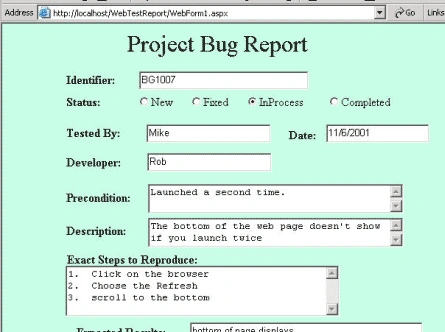
Figure 1 - 1st Bug Logging Screen
In any project I've ever been on, there was some technique or method used to log bugs. Usually it was done in Excel or on paper .NET and web services makes it easy to log bugs over the web! This simple application uses an access database (although it could just as easily be switched over to Sql Server) to log bugs from a web page. The application also allows you to view a report of all the bugs that have been entered. This particular Bug Report form was copied from an article by Ellen Whitney in Code Magazine titled Effective Testing Strategies.
The design of the database for capturing the Bug Report is shown below:
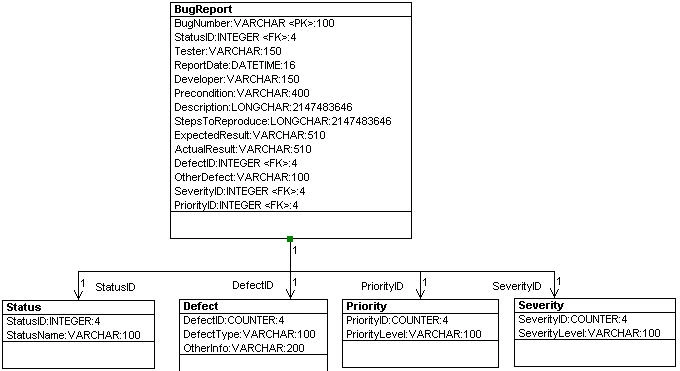
The BugReport table contains a majority of the data. The other auxiliary tables are simply lookups for enumerations of particular fields in the BugReport.
This application has two web forms and a single web service. The first web form is the bug report entry form (above) and the second web form allows you to view the bug reports in a datagrid shown below:
Figure 3:
private void ProcessFormInput() { localhost.BugTestService bts = new localhost.BugTestService(); string[] dataArray = new string[14] { "-", "-", "-", "-", "-", "-", "-", "-", "-", "-", "-", "-", "-", "-" }; HttpRequest rq = this.Request; // Cycke through all the key-value pairs and fill a string array with the entered values for (int i = 0; i < rq.Form.Keys.Count; i++) { string theKey = rq.Form.Keys[i]; string theValue = rq.Form.Get(i); switch (theKey) { case "BugID": dataArray[0] = theValue; break; case "StatusRadioList": dataArray[1] = theValue[theValue.Length - 1].ToString(); break; case "TesterTextBox": dataArray[2] = theValue; break; case "DateTextBox": dataArray[3] = theValue; break; case "DeveloperTextBox": dataArray[4] = theValue; break; case "PreconditionTextBox": dataArray[5] = theValue; break; case "DescriptionTextBox": dataArray[6] = theValue; break; case "StepsTextBox": dataArray[7] = theValue; break; case "ExpectedResultsTextBox": dataArray[8] = theValue; break; case "ActualResultsTextBox": dataArray[9] = theValue; break; case "DefectRadioList": dataArray[10] = theValue[theValue.Length - 1].ToString(); break; case "OtherDefectTextBox": dataArray[11] = theValue; break; case "SeverityRadioList": dataArray[12] = theValue[theValue.Length - 1].ToString(); break; case "PriorityRadioList": dataArray[13] = theValue[theValue.Length - 1].ToString(); break; default: break; } // end switch } // end for loop // Call the web service that places the bug report into the database bts.InsertBugReportUsingArray(dataArray);
}
[WebMethod] public DataSet InsertBugReportUsingArray(string[] s) { // make sure no 0 length strings FillBlankElements(s); // Fill a dataset with the existing bug report DataSet ds = new DataSet(); this.BugReportAdapter.MissingSchemaAction = MissingSchemaAction.AddWithKey; this.BugReportAdapter.Fill(ds, "BugReport"); DataTable BugTable = ds.Tables["BugReport"]; // Create a new row in the dataset and fill it with the form data DataRow dr = BugTable.NewRow(); dr["BugNumber"] = s[0]; dr["Status"] = Convert.ToInt32(s[1]); dr["Tester"] = s[2]; dr["ReportDate"] = Convert.ToDateTime(s[3]); dr["Developer"] = s[4]; dr["Precondition"] = s[5]; dr["Description"] = s[6]; dr["StepsToReproduce"] = s[7]; dr["ExpectedResult"] = s[8]; dr["ActualResult"] = s[9]; dr["TypeOfDefect"] = Convert.ToInt32(s[10]); dr["OtherDefect"] = s[11]; dr["Severity"] = Convert.ToInt32(s[12]); dr["Priority"] = Convert.ToInt32(s[13]); BugTable.Rows.Add(dr); // Update the DataSource with the new row BugReportAdapter.Update(ds, "BugReport"); return ds;
}
private void Page_Load(object sender, System.EventArgs e) { // Put user code to initialize the page here // create the web service so we can get a range of bug reports from the database localhost.BugTestService theService = new localhost.BugTestService(); DataSet ds = theService.GetBugReports("BG0000", "BG2000"); DataGrid1.DataSource = ds.Tables["BugReport"]; // Bind the filled dataset to the DataGrid so it shows up on the web page this.DataGrid1.DataBind(); // change the cells with integer indexes to actual strings mapping to the foreign keys in the // Lookup Tables in the Database for (int i = 0; i < DataGrid1.Items.Count; i++) { DataGrid1.Items[i].Cells[3].Text = theService.GetPriority(Convert.ToInt32(DataGrid1.Items[i].Cells[3].Text)); DataGrid1.Items[i].Cells[4].Text = theService.GetStatus(Convert.ToInt32(DataGrid1.Items[i].Cells[4].Text)); DataGrid1.Items[i].Cells[5].Text = theService.GetSeverity(Convert.ToInt32(DataGrid1.Items[i].Cells[5].Text)); DataGrid1.Items[i].Cells[7].Text = theService.GetDefect(Convert.ToInt32(DataGrid1.Items[i].Cells[7].Text)); }
} Conclusion
Well now you have a way to log your bugs even if your test team and development team are on opposite sides of the planet. This application was written fairly quickly, so it lacks many nice features of existing test tools such as tracing and updating of existing bug reports, but for someone who doesn't want to spend a fortune on an expensive bug logging tool, this may do the trick. In the next version, we'll look into creating an Update button, so you can edit an existing Bug Report.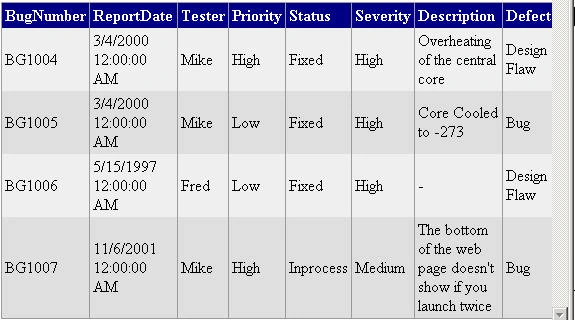
Join the conversation! Your thoughts help the community grow.