

Here I am making a dependency of a child window on a parent and a parent window on a child. In other words when I open a child window (Modal window) then I will read some values from the parent window and will pass it on a modal window. And after performing operations on the child window, in ther words modal window, I will refresh the parent window with an updated database.
The following is my scenario.
I have an Employee Table and I am showing and adding a new employee from a screen. When adding a new employee I need to select a Manager (Project Leader) and project. And suppose I want to add a new project under the selected manager then I am opening a modal window and adding a new manager.
The following are my 2 tables:
1. Employee Table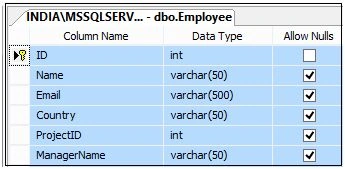
Figure 1.
The following is the script of the Employee table:
- CREATETABLE [dbo].[Employee](
- [ID] [int] IDENTITY(1,1)NOTNULL,
- [Name] [varchar](50)NULL,
- [Email] [varchar](500)NULL,
- [Country] [varchar](50)NULL,
- [ProjectID] [int] NULL,
- [ManagerName] [varchar](50)NULL,
- CONSTRAINT [PK_Employee] PRIMARYKEYCLUSTERED
- (
- [ID] ASC
- )WITH (PAD_INDEX=OFF,STATISTICS_NORECOMPUTE=OFF,IGNORE_DUP_KEY=OFF,ALLOW_ROW_LOCKS=ON,ALLOW_PAGE_LOCKS=ON)ON [PRIMARY]
- )ON [PRIMARY]
- GO
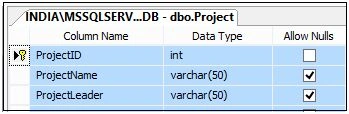
Figure 2.
The following is the script of the Project table:
- CREATETABLE [dbo].[Project](
- [ProjectID] [int] IDENTITY(1,1)NOTNULL,
- [ProjectName] [varchar](50)NULL,
- [ProjectLeader] [varchar](50)NULL,
- CONSTRAINT [PK_Project] PRIMARYKEYCLUSTERED
- (
- [ProjectID] ASC
- )WITH (PAD_INDEX=OFF,STATISTICS_NORECOMPUTE=OFF,IGNORE_DUP_KEY=OFF,ALLOW_ROW_LOCKS=ON,ALLOW_PAGE_LOCKS=ON)ON [PRIMARY]
- )ON [PRIMARY]
- GO
Here add a jQuery reference with the following aspx code:
- <%@PageLanguage="C#"AutoEventWireup="true"CodeBehind="ManageEmployee.aspx.cs"Inherits="jQueryPopUp.ManageEmployee"EnableEventValidation="false"%>
- <!DOCTYPEhtml>
- <html
- xmlns="http://www.w3.org/1999/xhtml">
- <headrunat="server">
- <title>jQuery Modal PopUp</title>
- <scriptsrc="Scripts/jquery-2.1.4.min.js">
- </script>
- <linkhref="R-ModalPopUp.css"rel="stylesheet"/>
- <scriptsrc="Scripts/jquery-ui.min.js">
- </script>
- <styletype="text/css">
- .auto-style1 {
- width: auto;
- position: relative;
- left: 20px;
- width: 100%;
- }
- </style>
- <scripttype="text/javascript">
- $(document).ready(function () {
- $("#ddlProject").append($("
- <option></option>").val('0').html("--Select Project--"));
- //Filling Manager Drop Down List
- $.ajax({
- type: "POST",
- contentType: "application/json; charset=utf-8",
- url: "ManageEmployee.aspx/BindManager",
- data: "{}",
- dataType: "json",
- success: function (data) {
- $("#ddlManager").append($("
- <option></option>").val('0').html("--Select Manager--"));
- $.each(data.d, function (key, value) {
- $("#ddlManager").append($("
- <option></option>").val(value.ManagerName).html(value.ManagerName));
- });
- },
- error: function (result) {
- alert("Error");
- }
- });
- $('#ddlManager').change(function () {
- varSelectedText = $(this).find(":selected").text();
- varSelectedValue = $(this).val();
- varJSONObject = { "ManagerID": SelectedText };
- varjsonData = JSON.stringify(JSONObject);
- $.ajax({
- type: "POST",
- contentType: "application/json; charset=utf-8",
- url: "ManageEmployee.aspx/BindManagerProject",
- data: jsonData,
- dataType: "json",
- success: function (data) {
- $('#ddlProject').empty();
- $("#ddlProject").append($("
- <option></option>").val('0').html("--Select Project--"));
- $.each(data.d, function (key, value) {
- $("#ddlProject").append($("
- <option></option>").val(value.ProjectID).html(value.ProjectName));
- });
- },
- error: function (result) {
- alert("Error");
- }
- });
- });
- $('#gvData').empty();
- $.ajax({
- type: "POST",
- contentType: "application/json; charset=utf-8",
- url: "ManageEmployee.aspx/BindEmployees",
- data: "{}",
- dataType: "json",
- success: function (result) {
- $("#gvData").append("
- <tr style='background-color:red; color:white; font-weight:bold;'>
- <td style='text-align:left;'>ID</td>
- <td style='text-align:left;'>Name</td>
- <td style='text-align:left;'>Email</td>
- <td style='text-align:left;'>Country</td>
- <td style='text-align:left;'>Project name</td>
- <td style='text-align:left;'>Manager Name</td>
- </tr>");
- for (var i = 0; i
- <result.d.length; i++) {
- if (i % 2 == 0) {
- $("#gvData").append("
- <tr style='background-color:#F5FBEF; font-family:Verdana; font-size:10pt ;'>
- <td style='text-align:left;'>" + result.d[i].ID + "</td>
- <td style='text-align:left;'>" + result.d[i].Name + "</td>
- <td style='text-align:left;'>" + result.d[i].Email + "</td>
- <td style='text-align:left;'>" + result.d[i].Country + "</td>
- <td style='text-align:left;'>" + result.d[i].ProjectID + "</td>
- <td style='text-align:left;'>" + result.d[i].ManagerName + "</td>
- </tr>");
- }
- else {
- $("#gvData").append("
- <tr style='background-color:skyblue; font-family:Verdana; font-size:10pt ;'>
- <td style='text-align:left;'>" + result.d[i].ID + "</td>
- <td style='text-align:left;'>" + result.d[i].Name + "</td>
- <td style='text-align:left;'>" + result.d[i].Email + "</td>
- <td style='text-align:left;'>" + result.d[i].Country + "</td>
- <td style='text-align:left;'>" + result.d[i].ProjectID + "</td>
- <td style='text-align:left;'>" + result.d[i].ManagerName + "</td>
- </tr>");
- }
- }
- },
- error: function (result) {
- alert("Error");
- }
- });
- $('#btnAddProject').click(function () {
- var id = '#dialog';
- varManagerName = $('#ddlManager').val();
- varManagerText = $('#ddlManager :selected').text();
- $("#lblManagerName").text(ManagerName);
- varmaskHeight = $(document).height();
- varmaskWidth = $(document).width();
- $('#mask').css({ 'width': maskWidth, 'height': maskHeight });
- //transition effect
- $('#mask').fadeIn(1000);
- $('#mask').fadeTo("slow", 0.8);
- //Get the window height and width
- varwinH = $(window).height();
- varwinW = $(window).width();
- //Set the popup window to center
- $(id).css('top', winH / 2 - $(id).height() / 2);
- $(id).css('left', winW / 2 - $(id).width() / 2);
- //transition effect
- $(id).fadeIn(2000);
- returnfalse;
- //if close button is clicked
- });
- $('.window .close').click(function (e) {
- e.preventDefault();
- $('#mask').hide();
- $('.window').hide();
- });
- $('#btnUpdate').click(function (e) {
- var Manager = $('#lblManagerName').text();
- var Project = $('#txtProjectName').val();
- varJSONObject = { "Manager": Manager, "Project": Project };
- varjsonData = JSON.stringify(JSONObject);
- $.ajax({
- type: "POST",
- contentType: "application/json; charset=utf-8",
- url: "ManageEmployee.aspx/AddProjectWithManager",
- data: jsonData,
- dataType: "json",
- success: function (data) {
- },
- error: function (result) {
- alert("Error");
- }
- });
- varJSONObject = { "ManagerID": $("#lblManagerName").text() };
- varjsonData = JSON.stringify(JSONObject);
- $.ajax({
- type: "POST",
- contentType: "application/json; charset=utf-8",
- url: "ManageEmployee.aspx/BindManagerProject",
- data: jsonData,
- dataType: "json",
- success: function (data) {
- $('#ddlProject').empty();
- $("#ddlProject").append($("
- <option></option>").val('0').html("--Select Project--"));
- $.each(data.d, function (key, value) {
- $("#ddlProject").append($("
- <option></option>").val(value.ProjectID).html(value.ProjectName));
- });
- },
- error: function (result) {
- alert("Error");
- }
- });
- e.preventDefault();
- $('#mask').hide();
- $('.window').hide();
- });
- //Add Employee
- $('#btnAddEmployee').click(function (e) {
- debugger;
- varempName = $('#txtName').val();
- var email = $('#txtEmail').val();
- var country = $('#ddlCountry').val();
- var project = $('#ddlProject').val();
- var manager = $('#ddlManager').val();
- varJSONObject = { "Name": empName, "Email": email, "Country": country, "Project": project, "Manager": manager };
- varjsonData = JSON.stringify(JSONObject);
- $.ajax({
- type: "POST",
- contentType: "application/json; charset=utf-8",
- url: "ManageEmployee.aspx/AddNewEmployee",
- data: jsonData,
- dataType: "json",
- success: function (data) {
- },
- error: function (result) {
- alert("Error");
- }
- });
- $('#gvData').empty();
- $.ajax({
- type: "POST",
- contentType: "application/json; charset=utf-8",
- url: "ManageEmployee.aspx/BindEmployees",
- data: "{}",
- dataType: "json",
- success: function (result) {
- for (var i = 0; i
- <result.d.length; i++) {
- $("#gvData").append("
- <tr>
- <td>" + result.d[i].ID + "</td>
- <td>" + result.d[i].Name + "</td>
- <td>" + result.d[i].Email + "</td>
- <td>" + result.d[i].Country + "</td>
- <td>" + result.d[i].ProjectID + "</td>
- <td>" + result.d[i].ManagerName + "</td>
- </tr>");
- }
- },
- error: function (result) {
- alert("Error");
- }
- });
- });
- });
- </script>
- </head>
- <body>
- <formid="form1"runat="server">
- <div>
- <tablestyle="width: 100%; text-align: center; border: solid5pxred; background-color: yellow; vertical-align: top;">
- <tr>
- <td>
- <div>
- <fieldsetstyle="width: 99%;">
- <legendstyle="font-size: 20pt; color: red; font-family: Verdana">jQuery Modal Popup Show with (Parent - Child window) Value dependency
- </legend>
- <tablestyle="width: 100%;">
- <tr>
- <tdstyle="vertical-align: top; width: 20%;">
- <tablestyle="background-color: skyblue; width: 100%; text-align: left;">
- <tr>
- <tdcolspan="2"style="background-color: #DF0101; color: white; border: 1pxsolidred; font-weight:bold; padding-left: 5px;">Add New Employee
- </td>
- </tr>
- <tr>
- <tdstyle="text-align: left; padding-left: 5px;">
- <asp:LabelID="lblName"runat="server"Text="Name:"Width="80px">
- </asp:Label>
- </td>
- <tdstyle="text-align: left;">
- <asp:TextBoxID="txtName"runat="server">
- </asp:TextBox>
- </td>
- </tr>
- <tr>
- <tdstyle="text-align: left; padding-left: 5px;">
- <asp:LabelID="Label1"runat="server"Text="Email:"Width="80px">
- </asp:Label>
- </td>
- <tdstyle="text-align: left;">
- <asp:TextBoxID="txtEmail"runat="server">
- </asp:TextBox>
- </td>
- </tr>
- <tr>
- <tdstyle="text-align: left; padding-left: 5px;">
- <asp:LabelID="Label2"runat="server"Text="Country:"Width="80px">
- </asp:Label>
- </td>
- <tdstyle="text-align: left;">
- <asp:DropDownListID="ddlCountry"runat="server">
- <asp:ListItemText="India"Value="India">
- </asp:ListItem>
- <asp:ListItemText="USA"Value="USA">
- </asp:ListItem>
- <asp:ListItemText="South Africa"Value="South Africa">
- </asp:ListItem>
- <asp:ListItemText="Singapore"Value="Singapore">
- </asp:ListItem>
- </asp:DropDownList>
- </td>
- </tr>
- <tr>
- <tdstyle="text-align: left; padding-left: 5px;">
- <asp:LabelID="Label3"runat="server"Text="Manager:"Width="80px">
- </asp:Label>
- </td>
- <tdstyle="text-align: left;">
- <asp:DropDownListID="ddlManager"runat="server">
- </asp:DropDownList>
- </td>
- </tr>
- <tr>
- <tdstyle="text-align: left; padding-left: 5px;">
- <asp:LabelID="Label4"runat="server"Text="Project:"Width="80px">
- </asp:Label>
- </td>
- <tdstyle="text-align: left;">
- <asp:DropDownListID="ddlProject"runat="server">
- </asp:DropDownList>
- <br/>
- <inputid="btnAddProject"type="submit"value="Add Project"style="width: 100px;"class="btnbtn-info"/>
- </td>
- </tr>
- <tr>
- <td></td>
- <td>
- <inputid="btnAddEmployee"type="submit"value="Add Employee"style="width: 140px;"class="btnbtn-info"/>
- </td>
- </tr>
- </table>
- </td>
- <tdstyle="vertical-align: top; background-color: green; text-align: center;">
- <asp:GridViewID="gvData"runat="server"CellPadding="4"ShowHeaderWhenEmpty="True"BackColor="White"BorderColor="#CC9966"BorderStyle="None"Width="100%"BorderWidth="1px">
- <FooterStyleBackColor="#FFFFCC"ForeColor="#330099"/>
- <HeaderStyleBackColor="#990000"Font-Bold="True"ForeColor="#FFFFCC"/>
- <PagerStyleBackColor="#FFFFCC"ForeColor="#330099"HorizontalAlign="Center"/>
- <RowStyleBackColor="White"ForeColor="#330099"/>
- <SelectedRowStyleBackColor="#FFCC66"Font-Bold="True"ForeColor="#663399"/>
- <SortedAscendingCellStyleBackColor="#FEFCEB"/>
- <SortedAscendingHeaderStyleBackColor="#AF0101"/>
- <SortedDescendingCellStyleBackColor="#F6F0C0"/>
- <SortedDescendingHeaderStyleBackColor="#7E0000"/>
- </asp:GridView>
- </td>
- </tr>
- </table>
- </fieldset>
- </div>
- </td>
- </tr>
- </table>
- </div>
- <divid="boxes">
- <divid="mask">
- <divid="dialog"class="window">
- <divid="headerBorder">
- Add New Project #
- <divid="close"class="close">[X]
- </div>
- </div>
- <tableclass="auto-style1">
- <tr>
- <tdstyle="text-align: left;">Manager Name:
- </td>
- <td>
- <asp:LabelID="lblManagerName"runat="server">
- </asp:Label>
- </td>
- </tr>
- <tr>
- <tdstyle="text-align: left;">Project Name:
- </td>
- <td>
- <inputtype="text"style="width: 300px;"id="txtProjectName"/>
- </td>
- </tr>
- <tr>
- <td></td>
- </tr>
- <tr>
- <td></td>
- <td>
- <buttonid="btnUpdate">Submit
- </button>
- <inputtype="reset"/>
- </td>
- </tr>
- </table>
- </div>
- </div>
- </div>
- </form>
- </body>
- </html>
- using System;
- usingSystem.Collections.Generic;
- usingSystem.Data;
- usingSystem.Data.SqlClient;
- usingSystem.Linq;
- usingSystem.Web;
- usingSystem.Web.Services;
- usingSystem.Web.UI;
- usingSystem.Web.UI.WebControls;
- namespacejQueryPopUp {
- publicpartialclassManageEmployee: System.Web.UI.Page {
- protectedvoidPage_Load(object sender, EventArgs e) {
- if (!Page.IsPostBack) {
- BindGridWithDummyRow();
- }
- }
- publicvoidBindGridWithDummyRow() {
- DataTabledt = newDataTable();
- dt.Columns.Add("ID");
- dt.Columns.Add("Name");
- dt.Columns.Add("Email");
- dt.Columns.Add("Country");
- dt.Columns.Add("ProjectID");
- dt.Columns.Add("ManagerName");
- gvData.DataSource = dt;
- gvData.DataBind();
- }
- [WebMethod]
- publicstaticEmployee[] BindEmployees() {
- stringconnectionString = @
- "Data Source=INDIA\MSSQLServer2k8; Initial Catalog= TestDB; Integrated Security=true;";
- DataTabledt = newDataTable();
- List < Employee > employeeList = newList < Employee > ();
- using(SqlConnection con = newSqlConnection(connectionString)) {
- using(SqlCommand command = newSqlCommand("select e.ID, e.Name,e.Email,e.Country,p.ProjectName,e.ManagerName from Employee as e Inner join project as p on e.ProjectID=p.ProjectID", con)) {
- con.Open();
- SqlDataAdapter da = newSqlDataAdapter(command);
- da.Fill(dt);
- foreach(DataRowdtrowindt.Rows) {
- Employeeemployee = newEmployee();
- employee.ID = Convert.ToInt32(dtrow["ID"].ToString());
- employee.Name = dtrow["Name"].ToString();
- employee.Email = dtrow["Email"].ToString();
- employee.Country = dtrow["Country"].ToString();
- employee.ProjectID = dtrow["ProjectName"].ToString();
- employee.ManagerName = dtrow["ManagerName"].ToString();
- employeeList.Add(employee);
- }
- }
- }
- returnemployeeList.ToArray();
- }
- [WebMethod]
- publicstaticEmployee[] BindManager() {
- stringconnectionString = @
- "Data Source=INDIA\MSSQLServer2k8; Initial Catalog= TestDB; Integrated Security=true;";
- DataTabledt = newDataTable();
- List < Employee > employeeList = newList < Employee > ();
- using(SqlConnection con = newSqlConnection(connectionString)) {
- using(SqlCommand command = newSqlCommand("SELECT DISTINCT ProjectLeader from Project", con)) {
- con.Open();
- SqlDataAdapter da = newSqlDataAdapter(command);
- da.Fill(dt);
- foreach(DataRowdtrowindt.Rows) {
- Employeeemployee = newEmployee();
- employee.ManagerName = dtrow["ProjectLeader"].ToString();
- employeeList.Add(employee);
- }
- }
- }
- returnemployeeList.ToArray();
- }
- [WebMethod]
- publicstaticEmployee[] BindManagerProject(stringManagerID) {
- stringconnectionString = @
- "Data Source=INDIA\MSSQLServer2k8; Initial Catalog= TestDB; Integrated Security=true;";
- DataTabledt = newDataTable();
- List < Employee > employeeList = newList < Employee > ();
- using(SqlConnection con = newSqlConnection(connectionString)) {
- using(SqlCommand command = newSqlCommand("SELECT ProjectID, ProjectName from Project WHERE ProjectLeader='" + ManagerID + "'", con)) {
- con.Open();
- SqlDataAdapter da = newSqlDataAdapter(command);
- da.Fill(dt);
- foreach(DataRowdtrowindt.Rows) {
- Employeeemployee = newEmployee();
- employee.ProjectID = dtrow["ProjectID"].ToString();
- employee.ProjectName = dtrow["ProjectName"].ToString();
- employeeList.Add(employee);
- }
- }
- }
- returnemployeeList.ToArray();
- }
- [WebMethod]
- publicstaticvoidAddProjectWithManager(string Manager, string Project) {
- stringconnectionString = @
- "Data Source=INDIA\MSSQLServer2k8; Initial Catalog= TestDB; Integrated Security=true;";
- DataTabledt = newDataTable();
- List < Employee > employeeList = newList < Employee > ();
- using(SqlConnection con = newSqlConnection(connectionString)) {
- using(SqlCommand command = newSqlCommand("INSERT INTO Project (ProjectName, ProjectLeader) VALUES ('" + Project + "' , '" + Manager + "')", con)) {
- con.Open();
- SqlDataAdapter da = newSqlDataAdapter(command);
- da.Fill(dt);
- }
- }
- }
- [WebMethod]
- publicstaticvoidAddNewEmployee(string Name, string Email, string Country, string Project, string Manager) {
- stringconnectionString = @
- "Data Source=INDIA\MSSQLServer2k8; Initial Catalog= TestDB; Integrated Security=true;";
- DataTabledt = newDataTable();
- List < Employee > employeeList = newList < Employee > ();
- using(SqlConnection con = newSqlConnection(connectionString)) {
- using(SqlCommand command = newSqlCommand("INSERT INTO Employee (Name, Email, Country, ProjectID, ManagerName) VALUES ('" + Name + "' , '" + Email + "' , '" + Country + "' , '" + Project + "' , '" + Manager + "')", con)) {
- con.Open();
- SqlDataAdapter da = newSqlDataAdapter(command);
- da.Fill(dt);
- }
- }
- }
- }
- }
- using System;
- usingSystem.Collections.Generic;
- usingSystem.Linq;
- usingSystem.Web;
- namespacejQueryPopUp {
- publicclassEmployee {
- publicint ID {
- get;
- set;
- }
- publicstring Name {
- get;
- set;
- }
- publicstring Email {
- get;
- set;
- }
- publicstring Country {
- get;
- set;
- }
- publicstringProjectID {
- get;
- set;
- }
- publicstringProjectName {
- get;
- set;
- }
- publicstringManagerName {
- get;
- set;
- }
- }
- }
Here this screen will show the entire employee list and you can add a new employee from here:
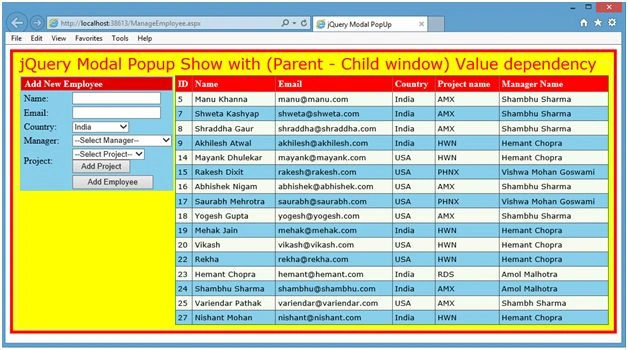
Figure 3.
Now when adding a new employee we need to select a manager as in the following:
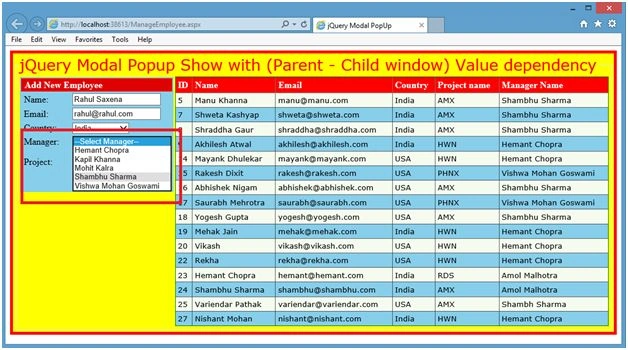
Figure 4.
On selecting a manager a Project drop down will fill:
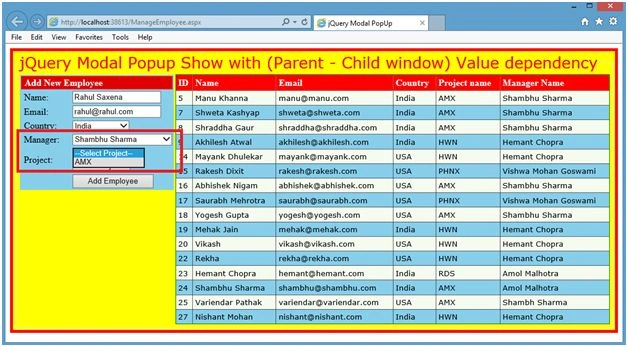
Figure 5.
If you want to add a new project under the selected manager then click on the Add Project button. You will see a child window showing the value from the parent window, Manager Name.
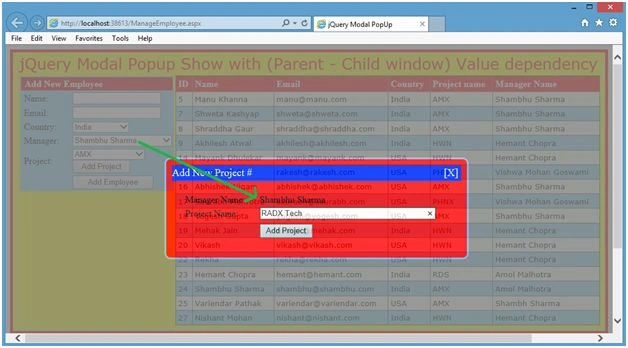
Figure 6.
Now add a new project and you will see this new project is showing in the project drop down. In other words after adding a project I am refresing the parent window with the current values in the database as in the following:
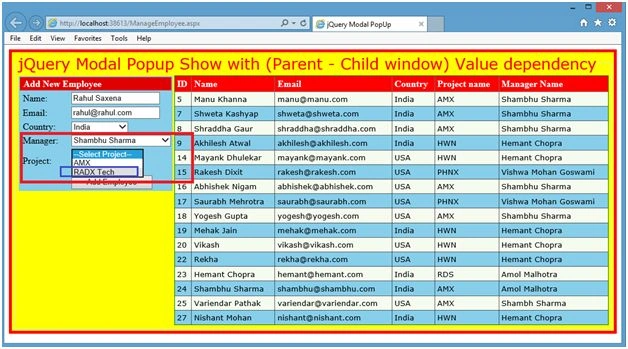
Figure 7.
Now add an employee and it will show in the grid:
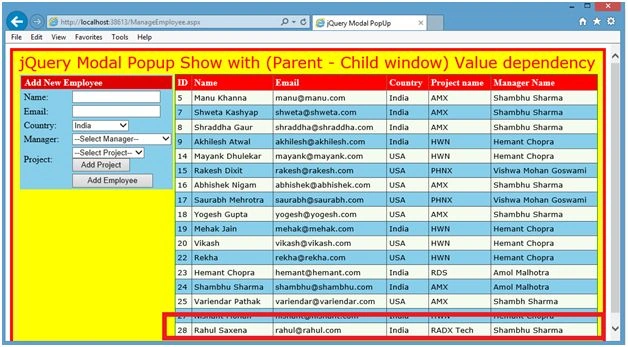
Figure 8.
Rahul Kumar SaxenaPosted Jul 18, 2015, 7:31 AM
Thanks 2 All
Rahul Kumar SaxenaPosted Jul 12, 2015, 11:22 PM
Thanks Rohan Pandey
Rahul Kumar SaxenaPosted Jul 12, 2015, 11:21 PM
thanks Narasimha Reddy Chennupalli
Rahul Kumar SaxenaPosted Jul 12, 2015, 11:21 PM
Thanks Neeraj Kumar
Rohan PandeyPosted Jul 12, 2015, 10:48 AM
nice
Narasimha Reddy ChennupalliPosted Jul 12, 2015, 10:10 AM
Good one
Neeraj KumarPosted Jul 12, 2015, 9:33 AM
Good
Rahul Kumar SaxenaPosted Jul 12, 2015, 8:47 AM
ThanksSibeesh Venu
Rahul Kumar SaxenaPosted Jul 12, 2015, 8:46 AM
Thanks Gopi Chand
Rahul Kumar SaxenaPosted Jul 12, 2015, 8:46 AM
Thanks Rakesh Kalluri
Rahul Kumar SaxenaPosted Jul 12, 2015, 8:46 AM
Thanks Santhakumar Munuswamy
Rahul Kumar SaxenaPosted Jul 12, 2015, 8:46 AM
Thanks Rakesh Chavda
Sibeesh VenuPosted Jul 12, 2015, 8:12 AM
Nice share
Gopi ChandPosted Jul 12, 2015, 5:37 AM
Nice effort
Rakesh KalluriPosted Jul 12, 2015, 2:48 AM
Nice work sir..
Santhakumar MunuswamyPosted Jul 12, 2015, 1:22 AM
Great article! Thanks for sharing
RakeshPosted Jul 12, 2015, 12:55 AM
Nice article sir