The project shown in this article shows user login, user registration and how to upload and display images in ASP.Net MVC in C#.
First we will do a user login and then maintain a photo gallery. That is, the user uploads multiple images at once and those images will be added to a photo gallery. We can divide the user photo gallery functionality into the following 3 processes:
- User Login (if one does not exist then register).
- User uploads images to create a new photo gallery. Store the gallery details into the database.
- Display uploaded images.
Now first create the user table in the database.
- CREATE TABLE tbl_User(UserId int IDENTITY(1,1) NOT NULL,UserName varchar(100) NOT NULL, Email varchar(100) NOT NULL,Password varchar(50) NOT NULL)
-
- CREATE TABLE tbl_Gallery(ImageId int IDENTITY(1,1) NOT NULL, ImageName varchar(50) NOT NULL, Photo image NOT NULL, Fk_UserId int NOT NULL)
After creating table create the application. New -> website.
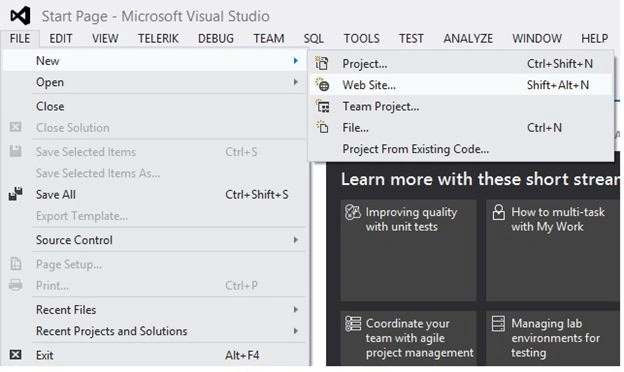
Provide the name “PhotoGalleryofUserInMVC”.
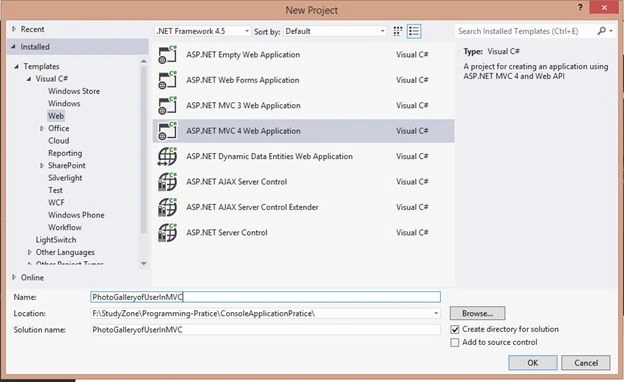
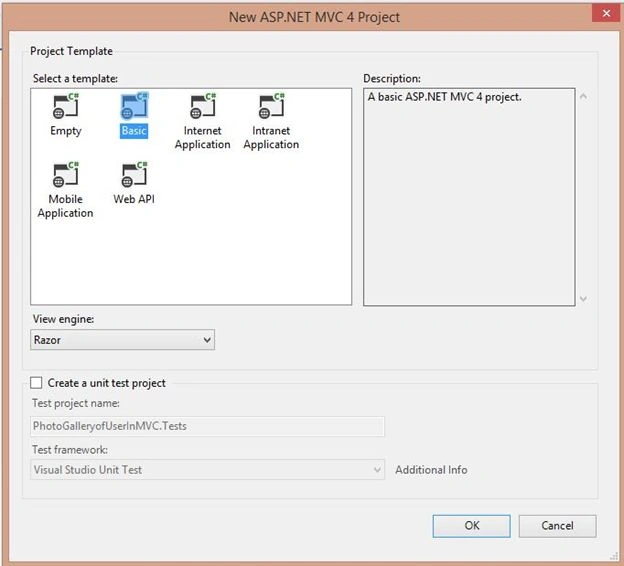
Now create a
UserPhotoGalleryMaster Class by right-clicking on the
Models folder then select Add a New Item.
- public class UserPhotoGalleryMaster
- {
-
- [Required]
- public string UserName { get; set; }
-
- [Required]
- [Display(Name = "Email")]
- public string Email { get; set; }
-
- [Required]
- [DataType(DataType.Password)]
- [Display(Name = "Password")]
- public string Password { get; set; }
-
-
- public int ImageId { get; set; }
- public string ImageName { get; set; }
- public byte[] Image { get; set; }
- public int Fk_UserId { get; set; }
- }
Now create a
UserPhotoGalleryService class by right-clicking on the
Models folder as Add a New Item for doing the ADO.Net database operation of user login, registration and photo gallery.
- namespace PhotoGalleryofUserInMVC.Models
- {
- public class UserPhotoGalleryService
- {
- }
- }
Now create a controller user by right-clicking on the controller folder and select add as controller.
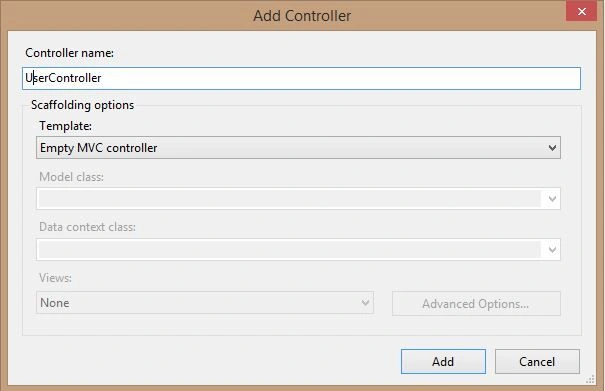
Now right-click on the
ActionResult method in the controller, to create a View for User login. Create a view as a strongly typed view and choose the
UserPhotoGalleryMaster model class from the list. It is shown as in the following figure. If the
UserPhotoGalleryMaster model class is not in the list, then you should build the application. Then do the preceding process.
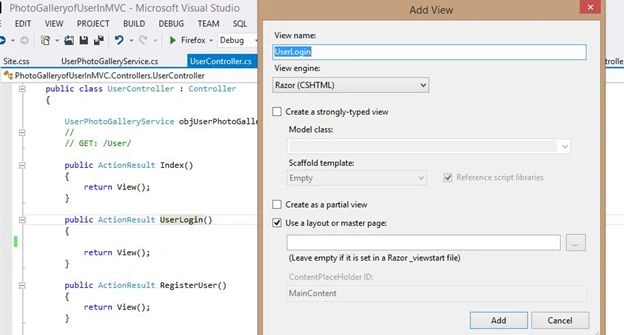
Now this is the User Login view.
- @model PhotoGalleryofUserInMVC.Models.UserPhotoGalleryMaster
-
- @{
- ViewBag.Title = "UserLogin";
- }
-
- <html>
- <head id="Head1" runat="server">
- <title>Userlogin</title>
-
-
- <link href="~/Content/Site.css" rel="stylesheet" />
-
- <script type="text/javascript">
-
- function ValidateForm() {
- var txt1 = document.getElementById('Email');
- if (txt1.value == '') {
- alert("Enter Email !")
- document.getElementById("Email").focus();
- return false;
- }
-
- var txtPwd = document.getElementById('Password');
- if (txtPwd.value == '') {
- alert("Enter Password !")
- document.getElementById("Password").focus();
- return false;
- }
- }
-
-
- </script>
- </head>
- <body>
- @using (Html.BeginForm("UserLogin", "User", FormMethod.Post))
- {
- @Html.AntiForgeryToken()
- @Html.ValidationSummary(true)
- <div id="login">
- <header>
-
- <!--/logo-->
- <!--Div to display time.START-->
- <div id="time2"></div>
- <!--Div to display time.END-->
- <div class="clearfix"></div>
- <div style="text-align: center">
- <label id="lblMsg" class="errMsg" ></label>
- </div>
- <div class="clearfix"></div>
- </header>
- <div id="login-container">
- <div class="login-left">
- <h1>Login</h1>
-
- @Html.LabelFor(l => l.Email) :
- @Html.TextBoxFor(l => l.Email)
- @Html.ValidationMessageFor(l => l.Email)
-
- <div class="clearfix"></div>
-
- @Html.LabelFor(l => l.Password)
- @Html.TextBoxFor(l => l.Password)
- @Html.ValidationMessageFor(l => l.Password)
- <div class="clearfix"></div>
- <div class="row1-button7">
- <input type="submit" class="login-btn" value="Submit" onclick="return ValidateForm()" />
-
- </div>
- <div class="row1-button9">
- @Html.ActionLink("Register User", "RegisterUser", "User")
- </div>
- </div>
- <div class="clearfix"></div>
- </div>
- </div>
- }
- </body>
- </html>
Use the same process for the registration page. First write the following action result.
- public ActionResult RegisterUser()
- {
- return View();
- }
Now right-click on the
ActionResult method in the controller, to create a View for User Registration.
Now this is User Registration view.
- @model PhotoGalleryofUserInMVC.Models.UserPhotoGalleryMaster
-
- @{
- ViewBag.Title = "RegisterUser";
- }
-
- <!DOCTYPE html>
-
- <html>
- <head id="Head1" runat="server">
- <title>Regitration</title>
-
- <link href="~/Content/Site.css" rel="stylesheet" />
-
- <script type="text/javascript">
-
- function ValidateForm() {
- var txt1 = document.getElementById('Email');
- if (txt1.value == '') {
- alert("Enter Email !")
- document.getElementById("Email").focus();
- return false;
- }
-
- var txtPwd = document.getElementById('Password');
- if (txtPwd.value == '') {
- alert("Enter Password !")
- document.getElementById("Password").focus();
- return false;
- }
-
- var txtUser = document.getElementById('UserName');
- if (txtUser.value == '') {
- alert("Enter User Name !")
- document.getElementById("UserName").focus();
- return false;
- }
-
- alert("Register sucessfully");
- }
-
-
- </script>
- </head>
- <body>
- @using (Html.BeginForm("RegisterUser", "User", FormMethod.Post ))
- {
- <div id="login">
- <header>
-
- <!--/logo-->
- <!--Div to display time.START-->
- <div id="time2"></div>
- <!--Div to display time.END-->
- <div class="clearfix"></div>
- <div style="text-align: center">
- <label id="lblMsg" class="errMsg" ></label>
- </div>
- <div class="clearfix"></div>
- </header>
- <div id="login-container">
- <div class="login-left">
- <h1>Register</h1>
- @Html.LabelFor(l => l.UserName) :
- @Html.TextBoxFor(l => l.UserName)
- @Html.ValidationMessageFor(l => l.UserName)
-
- @Html.LabelFor(l => l.Email) :
- @Html.TextBoxFor(l => l.Email)
- @Html.ValidationMessageFor(l => l.Email)
-
- <div class="clearfix"></div>
-
- @Html.LabelFor(l => l.Password)
- @Html.TextBoxFor(l => l.Password)
- @Html.ValidationMessageFor(l => l.Password)
- <div class="clearfix"></div>
- <div class="row1-button7">
- <input type="submit" class="login-btn" value="Register" onclick="return ValidateForm()" />
-
- </div>
- <div class="row1-button9">
- @Html.ActionLink("Register User", "RegisterUser", "User")
- </div>
- @ViewBag.Msg
- </div>
- <div class="clearfix"></div>
- </div>
- </div>
- }
- </body>
- </html>
Our Login and Registration should be such as shown below.

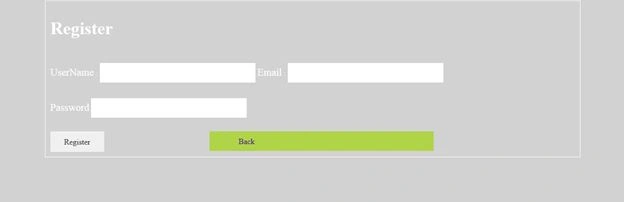
Now create a controller
ManagePhotoGallery by right-clicking on the controller folder and select Add as controller.
Than follow the same process for creating view as above.
The ManagePhotoGallery view is as in the following:
Now add some lines of code in
UserPhotoGalleryService for performing user login,
Registration and manage photo gallery.
- namespace PhotoGalleryofUserInMVC.Models
- {
- public class UserPhotoGalleryService
- {
-
- SqlConnection scon = new SqlConnection(ConfigurationManager.ConnectionStrings["DbConnection"].ToString());
-
-
- public int UploadAlbums(UserPhotoGalleryMaster objUserPhotoGalleryMaster)
- {
- using (SqlCommand scmd = new SqlCommand())
- {
- scmd.Connection = scon;
- scmd.CommandType = CommandType.Text;
- scmd.CommandText = "INSERT INTO tbl_Gallery(ImageName,Photo, Fk_Userid) VALUES(@ImageName,@Photo, @Fk_Userid)";
- scmd.Parameters.AddWithValue("@ImageName", objUserPhotoGalleryMaster.ImageName);
- scmd.Parameters.AddWithValue("@Photo", objUserPhotoGalleryMaster.Image);
- scmd.Parameters.AddWithValue("@Fk_Userid", objUserPhotoGalleryMaster.Fk_UserId);
- scon.Open();
- int status = scmd.ExecuteNonQuery();
- scon.Close();
- return status;
- }
- }
-
-
- public int RegisterUser(UserPhotoGalleryMaster objUserPhotoGalleryMaster)
- {
- using (SqlCommand scmd = new SqlCommand())
- {
- scmd.Connection = scon;
- scmd.CommandType = CommandType.Text;
- scmd.CommandText = "INSERT INTO tbl_User(UserName,Email, Password) VALUES(@UserName,@Email, @Password)";
- scmd.Parameters.AddWithValue("@UserName", objUserPhotoGalleryMaster.UserName);
- scmd.Parameters.AddWithValue("@Email", objUserPhotoGalleryMaster.Email);
- scmd.Parameters.AddWithValue("@Password", objUserPhotoGalleryMaster.Password);
- scon.Open();
- int status = scmd.ExecuteNonQuery();
- scon.Close();
- return status;
- }
- }
-
-
- public int LoginUser(UserPhotoGalleryMaster objUserPhotoGalleryMaster,out int userid, out string username)
- {
- using (SqlCommand scmd = new SqlCommand())
- {
- int ret = 0;
- userid = 0;
- username = "";
- scmd.Connection = scon;
- scmd.CommandType = CommandType.Text;
- scmd.CommandText = "Select Userid, UserName from tbl_User where Email=@Email and Password=@Password";
- scmd.Parameters.AddWithValue("@Email", objUserPhotoGalleryMaster.Email);
- scmd.Parameters.AddWithValue("@Password", objUserPhotoGalleryMaster.Password);
- scon.Open();
- SqlDataReader sdr = scmd.ExecuteReader();
- while (sdr.Read())
- {
- userid =Convert.ToInt32(sdr.GetValue(0));
- username = sdr.GetString(1);
- ret = 1;
- }
- if (sdr != null)
- {
- sdr.Dispose();
- sdr.Close();
- }
-
- return ret;
- }
- }
-
-
- public IList<UserPhotoGalleryMaster> GetAlbums(int userid)
- {
- List<UserPhotoGalleryMaster> objUserPhotoGalleryMaster = new List<UserPhotoGalleryMaster>();
- using (SqlCommand scmd = new SqlCommand())
- {
- scmd.Connection = scon;
- scmd.CommandType = CommandType.Text;
- scmd.CommandText = "SELECT * FROM tbl_Gallery where Fk_Userid=@userid";
- scmd.Parameters.AddWithValue("@userid", userid);
- scon.Open();
- SqlDataReader sdr = scmd.ExecuteReader();
- while (sdr.Read())
- {
- UserPhotoGalleryMaster objAlbumMaster = new UserPhotoGalleryMaster();
- objAlbumMaster.ImageId = Convert.ToInt32(sdr["ImageId"]);
- objAlbumMaster.ImageName = sdr["ImageName"].ToString();
- objAlbumMaster.Image = (byte[])sdr["Photo"];
- objUserPhotoGalleryMaster.Add(objAlbumMaster);
- }
-
- if (sdr != null)
- {
- sdr.Dispose();
- sdr.Close();
- }
- scon.Close();
- return objUserPhotoGalleryMaster.ToList(); ;
- }
- }
-
-
- public byte[] GetImageFromDataBase(int id)
- {
- using (SqlCommand scmd = new SqlCommand())
- {
- scmd.Connection = scon;
- scmd.CommandType = CommandType.Text;
- scmd.CommandText = "SELECT Photo FROM tbl_Gallery where ImageId=@ImageId";
- scmd.Parameters.AddWithValue("@ImageId", id);
- scon.Open();
- SqlDataReader sdr = scmd.ExecuteReader();
- UserPhotoGalleryMaster objUserPhotoGalleryMaster = new UserPhotoGalleryMaster();
- while (sdr.Read())
- {
- objUserPhotoGalleryMaster.Image = (byte[])sdr["Photo"];
- }
- return objUserPhotoGalleryMaster.Image;
- }
- }
-
- }
- }
User Controller
- public class UserController : Controller
- {
-
- UserPhotoGalleryService objUserPhotoGalleryService = new UserPhotoGalleryService();
-
-
-
- public ActionResult Index()
- {
- return View();
- }
-
- public ActionResult UserLogin()
- {
-
- return View();
- }
-
- public ActionResult RegisterUser()
- {
- return View();
- }
-
-
- [HttpPost]
- public ActionResult RegisterUser(FormCollection collection)
- {
- UserPhotoGalleryMaster objUserPhotoGalleryMaster = new UserPhotoGalleryMaster();
- objUserPhotoGalleryMaster.UserName = collection["Username"].ToString();
- objUserPhotoGalleryMaster.Email = collection["Email"].ToString();
- objUserPhotoGalleryMaster.Password = collection["Password"].ToString();
-
- objUserPhotoGalleryService.RegisterUser(objUserPhotoGalleryMaster);
- return View();
- }
-
-
- [HttpPost]
- public ActionResult UserLogin(FormCollection collection)
- {
- if (ModelState.IsValid)
- {
- int ret = 0;
- int userid = 0;
- string username = "";
- UserPhotoGalleryMaster objUserPhotoGalleryMaster = new UserPhotoGalleryMaster();
- objUserPhotoGalleryMaster.Email = collection["Email"].ToString();
- objUserPhotoGalleryMaster.Password = collection["Password"].ToString();
- ret = objUserPhotoGalleryService.LoginUser(objUserPhotoGalleryMaster, out userid, out username);
-
-
- if (ret > 0)
- {
- Session["Userid"]=userid;
- Session["UserName"] = username;
- return RedirectToAction("Index", "ManagePhotoGallery");
- }
- else
- {
- ViewBag.Msg = "Invalid login Details";
- }
- }
- return View();
- }
-
-
- }
ManagePhotoGallery Controller
- public class ManagePhotoGalleryController : Controller
- {
- UserPhotoGalleryService objUserPhotoGalleryService = new UserPhotoGalleryService();
-
-
- [HttpGet]
- [OutputCache(Duration = 60, VaryByParam = "None")]
- public ActionResult Index()
- {
- if (Session["Userid"] != null)
- {
- string userid = Session["Userid"].ToString();
-
- ViewBag.total = objUserPhotoGalleryService.GetAlbums(Convert.ToInt32(userid)).ToList().Count;
- return View(objUserPhotoGalleryService.GetAlbums(Convert.ToInt32(userid)).ToList());
- }
- else
- {
- return RedirectToAction("UserLogin", "User");
- }
- }
-
-
- [HttpPost]
- public ActionResult Index(FormCollection collection)
- {
- string userid = Session["Userid"].ToString();
- HttpPostedFileBase file = Request.Files["ImageData"];
- UserPhotoGalleryMaster objUserPhotoGalleryMaster = new UserPhotoGalleryMaster();
- objUserPhotoGalleryMaster.ImageName = collection["ImageName"].ToString();
- objUserPhotoGalleryMaster.Fk_UserId = Convert.ToInt32(userid);
- objUserPhotoGalleryMaster.Image = ConvertToBytes(file);
- objUserPhotoGalleryService.UploadAlbums(objUserPhotoGalleryMaster);
- return View(objUserPhotoGalleryService.GetAlbums(Convert.ToInt32(userid)).ToList());
- }
-
-
- public byte[] ConvertToBytes(HttpPostedFileBase image)
- {
- byte[] imageBytes = null;
- BinaryReader reader = new BinaryReader(image.InputStream);
- imageBytes = reader.ReadBytes((int)image.ContentLength);
- return imageBytes;
- }
-
- public ActionResult RetrieveImage(int id)
- {
- byte[] cover = objUserPhotoGalleryService.GetImageFromDataBase(id);
- if (cover != null)
- {
- return File(cover, "image/jpg");
- }
- else
- {
- return null;
- }
- }
- }
Test the project
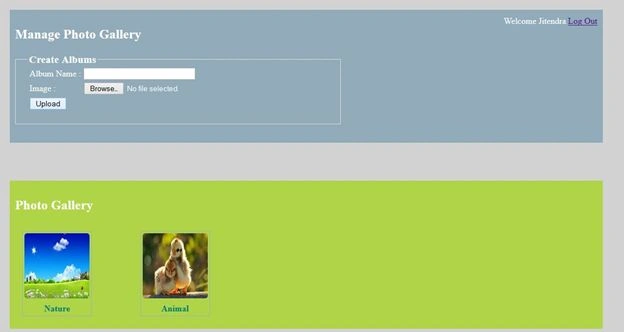
I created a project in ASP.NET MVC of User Photo Gallery. I hope this article is useful for everybody. Any suggestion for updating and improving the project is welcome. I hope to see some good comments.


Tebo MalebanaPosted Nov 19, 2019, 5:48 PM
Where do I create the database and link it to my program
suman rayabharapuPosted Nov 14, 2017, 10:49 AM
Nice article Jitendra!!
Manish Kumar ChoudharyPosted Jan 24, 2015, 9:26 AM
Nicd one..