

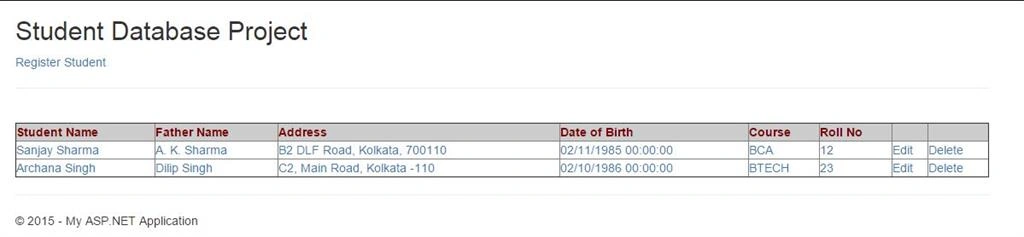
In my previous article ASP.NET MVC 5 - First Web Application: Part 1, I demonstrated how to develop a simple student registration form in MVC based web application. The only drawback of that application is that same data is not saved in the database. So we can’t get the student list from the database already saved. In this article, we will just expand the work to save the student registration data into the database and in the index page, populate the student list from database when view is loading.
For doing this, we need to create two new projects in the same solution.
Create project for the model structure
Create project for the model structure
For this click on File, New, then Project and select Class Library project. After that provide the project name MVCDataModel and click on OK button.

Similarly, we create another class library projects name MVCDataService. The purpose of this class is to communicate with the database objects for database operations.
Now first thing, is to create a Model class under the new data model projects. For it, add a class file named Student.cs and write the following code:
- using System;
- using System.Collections.Generic;
- using System.Linq;
- using System.Web;
- namespace MVCDataModel
- {
- public class Student
- {
- public int StudentId { get; set; }
- public string StudentName { get; set; }
- public string FatherName { get; set; }
- public DateTime DateOfBirth { get; set; }
- public string Address { get; set; }
- public string Class { get; set; }
- public int RollNo { get; set; }
- }
- }
Now add another new class under the MVCDataService project named BaseService.cs. This class is used as a base class for the base service of database operations.
- using System;
- using System.Collections.Generic;
- using System.Data;
- using System.Data.SqlClient;
- using System.Linq;
- using System.Text;
- using System.Threading.Tasks;
- namespace MVCDataService
- {
- public class BaseService
- {
- public string DBConnection { get; set; }
- public BaseService(string connString)
- {
- this.DBConnection = connString;
- }
- public int InsertUpdateDeleteData(string commandText)
- {
- using (SqlConnection conn = new SqlConnection(this.DBConnection))
- {
- conn.Open();
- SqlCommand myCommand = new SqlCommand(commandText, conn);
- int status = myCommand.ExecuteNonQuery();
- conn.Close();
- return status;
- }
- }
- public DataTable FetchData(string commandText)
- {
- using (SqlConnection conn = new SqlConnection(this.DBConnection))
- {
- conn.Open();
- SqlCommand myCommand = new SqlCommand(commandText, conn);
- SqlDataReader reader = myCommand.ExecuteReader();
- DataTable dtData = new DataTable();
- dtData.Load(reader);
- conn.Close();
- return dtData;
- }
- }
- }
- }
- using MVCDataModel;
- using System;
- using System.Collections.Generic;
- using System.Data;
- using System.Data.SqlClient;
- using System.Linq;
- namespace MVCDataService
- {
- public class StudentService : BaseService
- {
- public StudentService(string conString)
- : base(conString)
- {
- }
- public bool InsertStudentData(Student objStudent)
- {
- string strUrl = "Insert Into Student(StudentName,FatherName,DOB,Address,Class,RollNo) values (";
- strUrl += "'" + objStudent.StudentName + "',";
- strUrl += "'" + objStudent.FatherName + "',";
- strUrl += "'" + objStudent.DateOfBirth + "',";
- strUrl += "'" + objStudent.Address + "',";
- strUrl += "'" + objStudent.Class + "',";
- strUrl += "" + Convert.ToString(objStudent.RollNo) + ")";
- int iStatus = base.InsertUpdateDeleteData(strUrl);
- return true;
- }
- public List<Student> GetStudentList()
- {
- List<Student> lstData = new List<Student>();
- DataTable dtData = base.FetchData("Select * from Student");
- lstData = (from dr1 in dtData.AsEnumerable()
- select new Student
- {
- StudentId = dr1.Field<Int32>("StudentId"),
- StudentName = dr1.Field<string>("StudentName"),
- FatherName = dr1.Field<string>("FatherName"),
- Address = dr1.Field<string>("Address"),
- Class = dr1.Field<string>("Class"),
- RollNo = dr1.Field<Int32>("RollNo"),
- DateOfBirth = dr1.Field<DateTime>("DOB")
- }).ToList();
- return lstData;
- }
- }
- }
- <connectionStrings>
- <add name="conn" connectionString="Data Source=DEB;Initial Catalog=ProjectSample;Password=abc;Integrated Security=True" providerName="System.Data.SqlClient" />
- </connectionStrings>
- using System;
- using System.Collections.Generic;
- using System.Configuration;
- using System.Linq;
- using System.Web;
- using System.Web.Mvc;
- namespace MVC_Article.Controllers
- {
- public class BaseController : Controller
- {
- public string ConnectionString { get; set; }
- public void setConnectionString()
- {
- ConnectionString = ConfigurationManager.ConnectionStrings["conn"].ConnectionString;
- }
- }
- }
- using MVCDataModel;
- using MVCDataService;
- using System.Collections.Generic;
- using System.Web.Mvc;
- namespace MVC_Article.Controllers
- {
- public class StudentController : BaseController
- {
- public StudentController()
- {
- base.setConnectionString();
- }
- // GET: Student
- public ViewResult Index()
- {
- StudentService objStudentService = new StudentService(base.ConnectionString);
- List<Student> lstData = objStudentService.GetStudentList();
- return View(lstData);
- }
- [HttpGet]
- public ViewResult StudentAdd()
- {
- return View();
- }
- [HttpPost]
- public ViewResult StudentAdd(Student studentData)
- {
- StudentService objStudentService = new StudentService(base.ConnectionString);
- if (objStudentService.InsertStudentData(studentData))
- {
- return View("ConfirmStudent", studentData);
- }
- else
- {
- return View(studentData);
- }
- }
- }
- }
Sr KarthigaPosted Apr 19, 2016, 11:00 PM
Nice explanation
Anish AnsariPosted Nov 12, 2015, 8:41 AM
Very good
Santhakumar MunuswamyPosted Nov 11, 2015, 4:42 AM
Good One
Harshad PansuriyaPosted Nov 8, 2015, 11:05 PM
Nice one
Mukesh KumarPosted Nov 8, 2015, 12:30 PM
Great Job