Here I will describe how to post a collection in ASP.Net MVC 3 using a sample application. The basic idea behind posting (passing HTML field values from view to controller) is by matching the name field of the rendered HTML control with receiving parameters in the Controller's action method.
Suppose I have a field in my Razor view as @Html.TextBox("myName","Fawas") inside a form tag, then while submitting the form I can receive the value "Fawas" from the variable "myName" in the action method of the Controller as in the following:
- [HttpPost]
- public ActionResult ReceveMyName(string myName)
- {
- }
So in the following section I will describe how to post a collection from the view to the controller by a sample application using MVC-3 razor view.
In the sample application we have the screen (Fig-1), where we can "Add" the status/comments in the text area. Once we "Add" the status, the same will be reflected in the down portion.
We have a "Save" button at the down that will save the entire collection to the database.
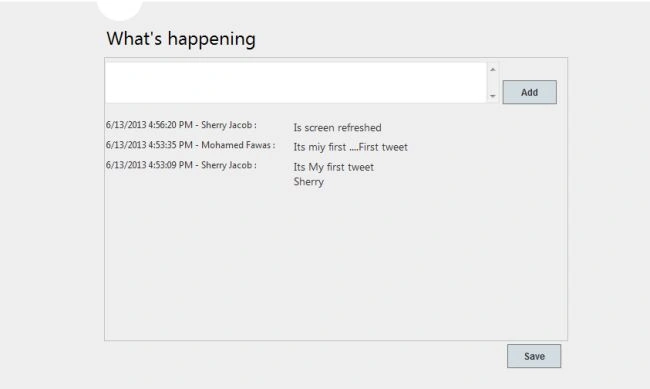
Fig. 1
Here the content we are updating in text area is a "Tweet" model.
Tweet Model
- public class Tweet
- {
- public Tweet()
- {
- Date = DateTime.UtcNow;
- }
- private DateTime date;
- public int Id { get; set; }
- public string UserName { get; set; }
- public string Text { get; set; }
- public DateTime Date
- {
- get { return date.ToLocalTime(); }
- set { date = value; }
- }
- }
Once we add the comments we need to post the entire "Collection of Tweets" and "Tweet" to the controller action. In other words in Fig-1, textarea refers to a single Tweet by the user and the down shows the list of tweets provided by all the followers and the user.
View Model
So our view model will be as in the following:
- public class TwitterViewModel
- {
- public Tweet Tweet { get; set; }
- public IList<Tweet> Tweets { get; set; }
- }
Views
Our main view is "Tweets.cshtml" as in the following and which will render another partial view "_Alltweets.cshtml" by passing the model.
Tweets.cshtml
- @model MongoTwitter.ViewModels.TwitterViewModel
- @{
- ViewBag.Title = "Twitter";
- }
- <hgroup class="title">
- <h2>What's happening</h2>
- </hgroup>
- <div style="width: 600px; border: 1px solid silver">
- @using (Ajax.BeginForm("AddTweet", "Home", new AjaxOptions { UpdateTargetId = "AllTweets" }))
- {
- <div style="width: 600px; border-width: 1px">
- @Html.TextAreaFor(md => md.Tweet.Text)
- <input type="submit" value="Add" style="width: 70px; font-size: 12px" />
- </div>
- <div id="AllTweets">
- @Html.Partial("_AllTweets", Model)
- </div>
- }
- </div>
_AllTweets.cshtml
- @model MongoTwitter.ViewModels.TwitterViewModel
- @using (Html.BeginForm("SaveTweet", "Home"))
- {
- <div style="height: 300px; width: 600px; overflow-y: auto">
- <table border="1">
- @if (Model != null && Model.Tweets != null)
- {
- for (int i = 0; i < Model.Tweets.Count; i++)
- {
-
- <tr style="vertical-align: top">
- <td style="font-size: 12px; padding-left: 2px">
- @Html.DisplayFor(modelItem => Model.Tweets[i].Date) -
- @Html.DisplayFor(modelItem => Model.Tweets[i].UserName) :
- </td>
- <td>
- @Html.Raw(Model.Tweets[i].Text.Replace("\r\n", "<br />"))
- </td>
- </tr>
- @Html.HiddenFor(modelItem => Model.Tweets[i].Id)
- @Html.HiddenFor(modelItem => Model.Tweets[i].Date)
- @Html.HiddenFor(modelItem => Model.Tweets[i].Text)
- @Html.HiddenFor(modelItem => Model.Tweets[i].UserName)
- }
- }
- </table>
- </div>
- <input type="submit" value="Save" style="float: right; width: 70px; font-size: 12px" />
- }
The main things to note about "AllTweets.cshtml" is that, we have used a for loop to loop through all the items in the Tweets Collection for (int i = 0; i < Model.Tweets.Count; i++).
Here by using developer tools if we inspect the rendered HTML, we will see that the name field of the entire collection matches what needs to be posted for that collection, like Tweets[1].Id, Tweets[2].Id etc.
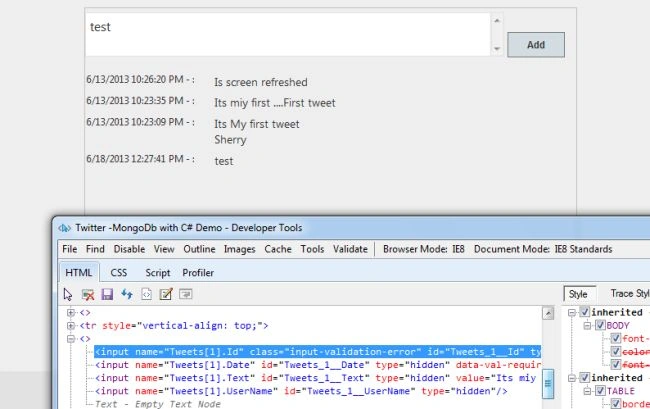
Fig. 2 - HTML rendered using For Loop
If we use a foreach loop instead of a for loop then the collection won't post because if we use a foreach loop then the name field for each item in the rendered HTML will be as in the following Fig. 3.
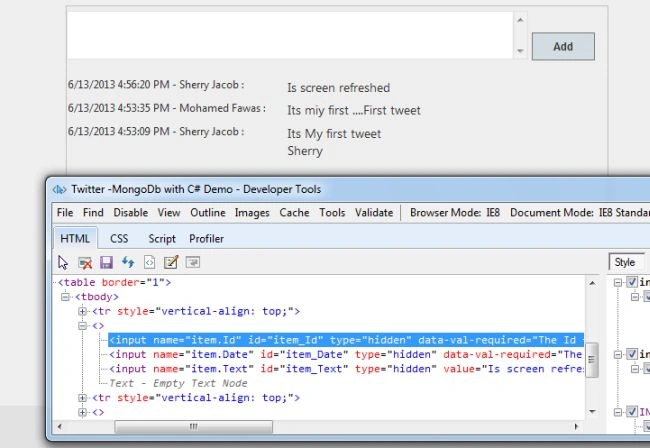
Fig. 3 HTML rendered using foreach loop.
Another important thing to note in "_AllTweets.cshtml" is that we have used @Html.HiddenFor() for the fields like id, Date and Text, that are displayed using @Html.DisplayFor() just above. Since DisplayFor() won't post a value to the controller we use @Html.HiddenFor(). By clicking the "Add" button in "_AllTweets.cshtml" the following action will be called. Since the entire collection is posted back in "viewModel.Tweets", we will add the new Tweet into that collection and return the view with updated Model.
-
-
-
-
-
- [HttpPost]
- public ActionResult AddTweet(TwitterViewModel viewModel)
- {
- try
- {
- viewModel.Tweets.Add(viewModel.Tweet);
- return PartialView("_AllTweets", viewModel);
- }
- catch
- {
- return View();
- }
- }
}
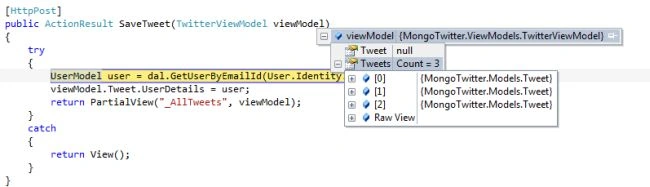
Fig. 4
In Fig. 4 above we can see the SaveTweet() post action, where "TwitterViewModel" is posted back, that has the value for all Tweets collections.


Sirch SarsoPosted Nov 7, 2023, 2:57 AM
Can you post your actual project file? I replicated this project but it didn't trigger the SaveTweet, it's always the AddTweet action when you press the save button.
Facu SolerPosted Nov 14, 2021, 10:06 AM
This was a very detailed and well explained post, it worked ! Thank you Mohamed !
senthil kumarPosted Nov 18, 2018, 5:52 AM
I m getting error
Shrinithi SadagopanPosted Aug 30, 2018, 11:58 AM
When I click the save button it keeps hitting the main view action method looks like nested forms cannot be used in HTML?
amit vermaPosted Jul 5, 2016, 5:10 AM
Thanks a lot.. i was stuck on one scenario where i have to preserve the collection while post and i am using AjaxHelper(hence couldn't use jquery), so this is the only and the easiest way to do that.. Thanks again.
Yusuf KaratoprakPosted Nov 1, 2013, 10:46 AM
Good article!
Cesar VelazquezPosted Aug 21, 2013, 1:21 PM
Why I always receive null in my list property?
saravanan mahalingamPosted Jun 19, 2013, 11:15 AM
Such A Good Article!!!!!!!!
Nilesh BhandarwarPosted Jun 18, 2013, 1:08 PM
Very Good Artical
sailaja cherlaPosted Jun 18, 2013, 6:04 AM
Very useful tips provided to understand the basics.
suhel zamaPosted Jun 18, 2013, 6:04 AM
So Easy to Understand...for a beginner..Well done bro..