This article explains the basics of ASP.NET MVC server-side validation using the Data Annotation API. The ASP.NET MVC Framework validates any data passed to the controller action that is executing, It populates a ModelState object with any validation failures that it finds and passes that object to the controller. Then the controller actions can query the ModelState to discover whether the request is valid and react accordingly.
I will use two approaches in this article to validate a model data. One is to manually add an error to the ModelState object and another uses the Data Annotation API to validate the model data.
Approach 1: Manually Add Error to ModelState object
I create a User class under the Models folder. The User class has two properties "Name" and "Email". The "Name" field has required field validations while the "Email" field has Email validation. So let's see the procedure to implement the validation. Create the User Model as in the following:
- namespace ServerValidation.Models
- {
- public class User
- {
- public string Name { get; set; }
- public string Email { get; set; }
- }
- }
After that I create a controller action in User Controller (UserController.cs under Controllers folder). That action method has logic for the required validation for Name and Email validation on the Email field. I add an error message on ModelState with a key and that message will be shown on the view whenever the data is not to be validated in the model.
- using System.Text.RegularExpressions;
- using System.Web.Mvc;
- namespace ServerValidation.Controllers
- {
- public class UserController : Controller
- {
- public ActionResult Index()
- {
- return View();
- }
- [HttpPost]
- public ActionResult Index(ServerValidation.Models.User model)
- {
- if (string.IsNullOrEmpty(model.Name))
- {
- ModelState.AddModelError("Name", "Name is required");
- }
- if (!string.IsNullOrEmpty(model.Email))
- {
- string emailRegex = @"^([a-zA-Z0-9_\-\.]+)@((\[[0-9]{1,3}" +
- @"\.[0-9]{1,3}\.[0-9]{1,3}\.)|(([a-zA-Z0-9\-]+\" +
- @".)+))([a-zA-Z]{2,4}|[0-9]{1,3})(\]?)$";
- Regex re = new Regex(emailRegex);
- if (!re.IsMatch(model.Email))
- {
- ModelState.AddModelError("Email", "Email is not valid");
- }
- }
- else
- {
- ModelState.AddModelError("Email", "Email is required");
- }
- if (ModelState.IsValid)
- {
- ViewBag.Name = model.Name;
- ViewBag.Email = model.Email;
- }
- return View(model);
- }
- }
- }
Thereafter I create a view (Index.cshtml) for the user input under the User folder.
- @model ServerValidation.Models.User
- @{
- ViewBag.Title = "Index";
- }
- @using (Html.BeginForm()) {
- if (@ViewData.ModelState.IsValid)
- {
- if(@ViewBag.Name != null)
- {
- <b>
- Name : @ViewBag.Name<br />
- Email : @ViewBag.Email
- </b>
- }
- }
- <fieldset>
- <legend>User</legend>
- <div class="editor-label">
- @Html.LabelFor(model => model.Name)
- </div>
- <div class="editor-field">
- @Html.EditorFor(model => model.Name)
- @if(!ViewData.ModelState.IsValid)
- {
- <span class="field-validation-error">@ViewData.ModelState["Name"].Errors[0].ErrorMessage</span>
- }
- </div>
- <div class="editor-label">
- @Html.LabelFor(model => model.Email)
- </div>
- <div class="editor-field">
- @Html.EditorFor(model => model.Email)
- @if (!ViewData.ModelState.IsValid)
- {
- <span class="field-validation-error">@ViewData.ModelState["Email"].Errors[0].ErrorMessage</span>
- }
- </div>
- <p>
- <input type="submit" value="Create" />
- </p>
- </fieldset>
- }
Run the application and test in various ways
- When all fields are empty:
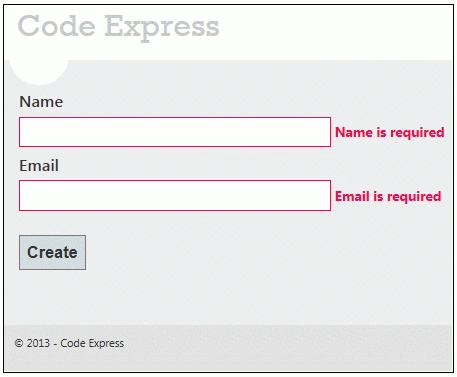
Figure 1.1: Validation Message when both fields are empty
- When the Name field is empty but Email is not valid:
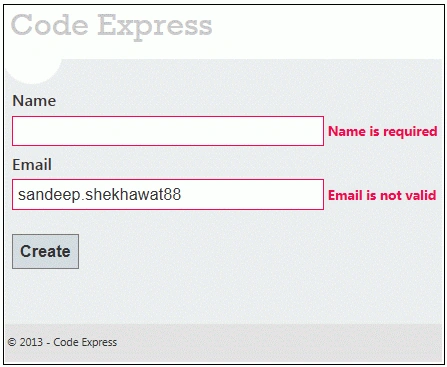
Figure 1.2 : Validation Message when Email is not valid
- When both fields are valid:
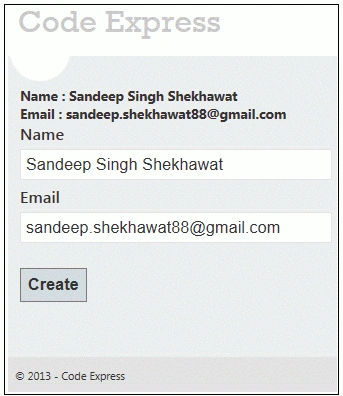
Figure 1.3 All Fields are valid
Approach 2: Specifying Business Rules with Data Annotation
While the first approach works quite well, it does tend to break the application's separation of concerns. Namely, the controller should not contain business logic such as, the business logic belongs in the model.
Microsoft provides an effective and easy-to-use data validation API called Data Annotation in the core .NET Framework. It provides a set of attributes that we can apply to the data object class properties. These attributes offer a very declarative way to apply validation rules directly to a model.
First create a model named Student (Student.cs) under the Models folder and applies Data Annotation attributes on the properties of the Student class.
- using System.ComponentModel.DataAnnotations;
- namespace ServerValidation.Models
- {
- public class Student
- {
- [Required(ErrorMessage = "Name is Requirde")]
- public string Name { get; set; }
- [Required(ErrorMessage = "Email is Requirde")]
- [RegularExpression(@"^([a-zA-Z0-9_\-\.]+)@((\[[0-9]{1,3}" +
- @"\.[0-9]{1,3}\.[0-9]{1,3}\.)|(([a-zA-Z0-9\-]+\" +
- @".)+))([a-zA-Z]{2,4}|[0-9]{1,3})(\]?)$",
- ErrorMessage="Email is not valid")]
- public string Email { get; set; }
- }
- }
Now create an action method in the controller (StudentController class under the Controllers folder) that returns a view with a model after the post request.
- using System.Web.Mvc;
- using ServerValidation.Models;
- namespace ServerValidation.Controllers
- {
- public class StudentController : Controller
- {
- public ActionResult Index()
- {
- return View();
- }
- [AcceptVerbs(HttpVerbs.Post)]
- public ActionResult Index(Student model)
- {
- if (ModelState.IsValid)
- {
- ViewBag.Name = model.Name;
- ViewBag.Email = model.Email;
- }
- return View(model);
- }
- }
- }
After that I created a view (Index.cshtml) to get student details and show an error message if the model data is not valid.
- @model ServerValidation.Models.Student
- @{
- ViewBag.Title = "Index";
- }
- @if (ViewData.ModelState.IsValid)
- {
- if(@ViewBag.Name != null)
- {
- <b>
- Name : @ViewBag.Name<br />
- Email : @ViewBag.Email
- </b>
- }
- }
- @using (Html.BeginForm()) {
- @Html.ValidationSummary(true)
- <fieldset>
- <legend>Student</legend>
- <div class="editor-label">
- @Html.LabelFor(model => model.Name)
- </div>
- <div class="editor-field">
- @Html.EditorFor(model => model.Name)
- @Html.ValidationMessageFor(model => model.Name)
- </div>
- <div class="editor-label">
- @Html.LabelFor(model => model.Email)
- </div>
- <div class="editor-field">
- @Html.EditorFor(model => model.Email)
- @Html.ValidationMessageFor(model => model.Email)
- </div>
- <p>
- <input type="submit" value="Create" />
- </p>
- </fieldset>
- }
Let's run the application and perform the same test case as performed in the first approach. We will then get the same results.


Shuaib KunjiPosted Nov 1, 2021, 1:02 PM
Thank you so much for this implementation of manual validation from the controller using ModelState.AddModelError. I had already spent 4+ hrs trying to implement remote validation techniques from Stackoverflow and even Microsoft's own documentation for remote validation. Nothing worked. This is what finally worked for me.
Manohar NPosted Dec 29, 2018, 10:04 PM
Not a good practice.
Saddam MohdPosted Mar 1, 2017, 10:19 AM
Why my validation fire on page load without click button . m using second approach plz help!1