

Introduction
A couple days ago I saw a post from a CodeProject member asking something like "how to select data from the drop-down list using tab selection". I'm assuming he was referring to how to use the keyboard Tab key to select an item in the drop-down list. In general, we can use the up and down arrow keys to select the item from the highlighted drop-down list. I did a Google search and didn't find much information about it and I find this problem somewhat interesting. So I decided to use jQuery to implement the workaround. Sample code is attached; everyone is welcome to download it.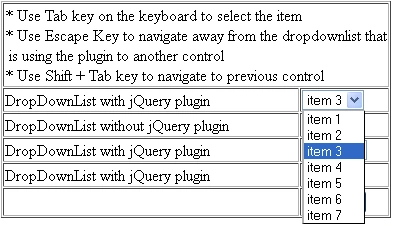
Implementation
Shown in listing 1-3 is the brief summary of the plug-in; comments are included on each line. The key code for the Tab key is 9. By default, pressing the Tab key will cause the cursor to advance to the next control. We can use the event.preventDefault() method to prevent the default action of an element from happening. Now, when the user presses on the Tab key, the item in the drop-down list will switch focus on the next item in the list. Basically the next selected index is equal to the current selected index plus one. In order to get rid of the blank drop-down list (Figure 1), when the selection reaches the last item, set the selected index to 0.
Listing 1
//Tab key pressed
if (keyCode == 9)
{
e.preventDefault();
//increase the selected index by 1 and set selected to the new index
$this.prop('selectedIndex', parseInt(curSelItemIndex) + 1);
//if selected index == number of items
// set the selected index=0
if (curSelItemIndex == items - 1)
{
$this.prop('selectedIndex', 0);
}
}
Figure 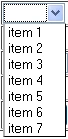
The next task is to remove the focus from the selected drop-down list and set the focus to the next control when the escape key is pressed. We can use the jQuery blur() function to remove the focus from the highlighted drop-down list. After that search for the next first element within the selected drop-down list object and set the focus to that element.
Listing 2
//Escape key pressed
if (keyCode == 27)
{
e.preventDefault();
// remove the focus from the selected dropdownlist and
$this.blur();
// move the focus on selected control to the next control
jQuery(":input:eq(" + (jQuery(":input").index($this) + 1) + ")").focus();
return;
}
The final task is to ensure that pressing the Shift + Tab key will bring the focus back to the previous control. Please refer to listing 3.
Listing 3
//Shift + Tab Key
if (keyCode == 9 && e.shiftKey)
{
e.preventDefault();
// remove the focus from the selected dropdownlist and
$this.blur();
// move the focus on selected control to the previous control
jQuery(":input:eq(" + (jQuery(":input").index($this) - 1) + ")").focus();
return;
}
Using the code
Include the jQuery library and the plug-in and as many drop-down list control/element as you want into the web page. Please refer to listing 4 on how to call the plug-in.
Listing 4
<script type="text/javascript">
$(document).ready(function () {
$("[id$='DropDownList1']").myDDLPlugin();
$("[id$='DropDownList3']").myDDLPlugin();
$("[id$='DropDownList5']").myDDLPlugin();
});
</script>
Point of Interest
At one point I was stuck trying to figure out how to move the focus to previous and next controls with cross browser compatibility support. Later I found the workaround on http://stackoverflow.com. For some reason the following code works fine without any input tag on the page. The code clearly indicated that it should look for the next input element. Anyway, I have tested it on both the HTML and ASP.NET page and it work fine.
Listing 5
jQuery(":input:eq(" + (jQuery(":input").index($this) + 1) + ")").focus(); //next
jQuery(":input:eq(" + (jQuery(":input").index($this) - 1) + ")").focus(); //previous
I think this plug-in might be handy for in-house data entry web applications.
Conclusion
I hope someone will find this information useful and make your programming job easier. If you find any bugs or disagree with the contents or want to help improve this article, please drop me a line and I'll work with you to correct it. I would suggest downloading the demo and explore it in order to grasp the full concept of it because I might miss some important information in this article. Please send me an email if you want to help improve this article.
Resources
http://stackoverflow.com/questions/290535/best-way-to-find-next-form-input-element-in-jquery
http://stackoverflow.com/questions/4954403/can-jquery-keypress-detect-more-than-one-key-at-the-same-time
http://docs.jquery.com/Plugins/Authoring
http://api.jquery.com/event.preventDefault/.docx
Join the conversation! Your thoughts help the community grow.