

In my previous article I described what the ASP.NET Web Optimization Framework is and what all the classes provided by this framework are in order to use this framework in web form, web pages and ASP.NET MVC. So here this article explains how to use this framework in a web form.
Since in my previous article I have already explained the ASP.NET Web Optimization framework so without describing anything about it I am directly switching to the implementation. But I will recommend before reading this article please go through my previous article because that is a prerequisite for this article.
So now let's see how to use this framework in a web form application step-by-step. Here I will describe it from scratch by taking an Empty template of a Web form application.
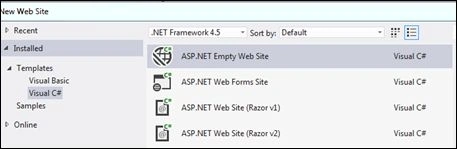
- Create an "ASP.NET Empty Web Site" as in the following and please ensure that the .NET Framework is 4.5.
- Now you need to install this framework in your website so open the NuGet Package Manager console as per the following screenshot:
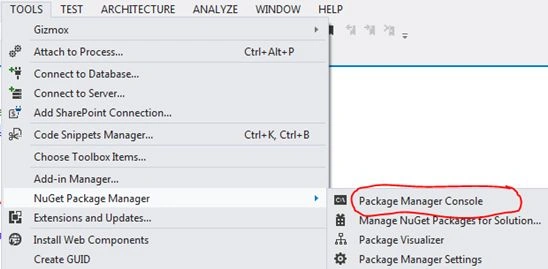
- Write the command “Install - Package Microsoft.AspNet.Web.Optimization” and press Enter. It will install the ASP.NET Optimization Framework in your web site.

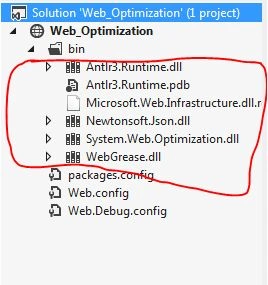
- You can check in the bin folder to ensure that the required DLLs have been added.
- Now you need to create two folders Scripts and Styles for keeping scripts and CSS files and one web form named Test.aspx. Here I have not used a MasterPage because of the same thing, whatever I used in the Test.aspx , you can use in the masterpage. Now your Solution Explorer should look like the following:
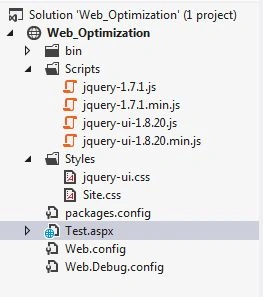
Here I added 4 files in the scripts folder and 2 files in the Styles for demonstration. You can add as per your requirements.
- Add the Global.asax file in your website in the following way:
Right-click on Solution Explorer
Click on Add and from the submenu select Add new item
Select Global.aspx file
You can see there are many events in the Global.asax file. I am focusing on the application_Start event here. You need to write the following code for this event.
System.Web.Optimization.BundleTable.Bundles.Add(new System.Web.
Optimization.ScriptBundle("~/bundle/js").Include("~/Scripts/*.js"));
System.Web.Optimization.BundleTable.Bundles.Add(new System.Web.
Optimization.ScriptBundle("~/bundle/css").Include("~/Styles/*.css"));
Here I am directly creating and adding two bundles into the bundle table. You can define them depending on your classification and use. You can further classify a single bundle into other sub bundles. One more thing you might have noticed here is that I am using *.js , because I am adding all js files into one bundle and the same for CSS. So exactly what I did here is I bundled all JavaScript file into one bundle so they will load as a single entity, not as multiple different files and the same for CSS, I created a single bundle for all CSS files.
I think now you can better understand practically how this framework optimizes the calls and the loading of resources.
In some articles, you might find that they have created a separate file called BundleConfig for creating the bundle in a static file and they add bundles in the global.asax file by calling that static method. This provides one more level of abstraction. Since this is a very basic article I have directly created and added bundles in the global.asax file.
- Now we are ready with our bundle so the last task is to include this bundle into our aspx file. That we can do using the Scripts.Render and Styles.Render methods as in the following:
<%: System.Web.Optimization.Scripts.Render("~/bundle/js") %>
<%: System.Web.Optimization.Styles.Render("~/bundle/css") %>
- Now we are ready with all the implementation. Only one task remains, that is to enable the bundling and minification. As I described in my previous article, there are two ways to enable it. So you can use either of the ways. Here I am enabling by setting the web.config file's compilation elements debug attribute as in the following:
<system.web>
<compilation debug="false" />
</system.web>
- So now it is time to be happy and test our work. So run the application and you will get the following screen.

Click on the Script tab and select the Test.aspx dropdown list. You can see js?v…….. like some random string that is the bundle name.
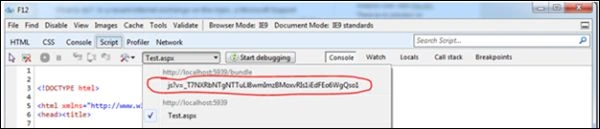
Here if you have observed that instead of separate js files only one bundle is loading. You can see the real calling for the various resources into the Network tab. Here you can see, there is only one call for JavaScript files and one for CSS files.

If you have not seen this developer tool of Internet Explorer and you did not observe here for a normal application without the ASP.NET Optimization Framework then you might not be able to differentiate the real so for those people I can show you the proper difference. Now just return to your web.config file and set debug = true and run the application and again press F12 , you will now get the following screen when you click on the Script tab:
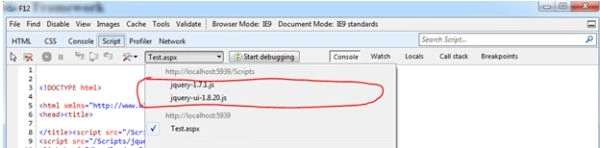
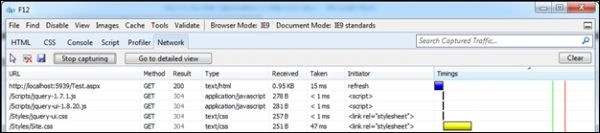
You can observe here that now you can see two separate JavaScript files are loading separately. Suppose you have added 20 js files to your aspx page then there are 20 separate calls made for the 20 js files. Now just check in the network tab so here you can see there are 4 separate calls for 4 separate files.
Now I think you can better understand the use of the ASP.NET Web Optimization framework. So here in this article I tried to cover all the basics of how to use the ASP.NET web optimization framework in your website. Please try to use it, if you have not used it then you will surely get a good experience with it.
Thanks for reading.
Manas MohapatraPosted Aug 20, 2015, 3:19 AM
Very Informative..