

This article demonstrates how to create & use jQuery to limit or count the number of characters in a TextArea or Text Field.
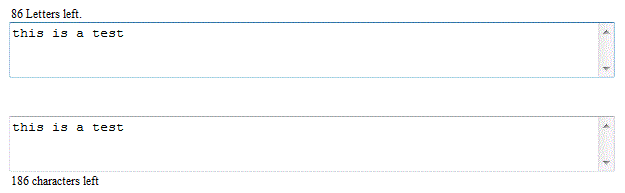
Table of contents
- Introduction
- Implementation
- Using the code
- Conclusion
- History
- Resources
- Watch this script in action
- Download
Introduction
Lately, I was revising the article ASP.NET - Limit number of characters in TextBox control that I wrote nearly two years ago. I decided to take the opportunity to improve it and brush up my jQuery skills. In this article, I will share with everyone how to implement this using jQuery. You can use this jQuery plug-in limit_textarea to limit and count the number of characters in the TextArea or TextBox with multiline text mode on client-side only. The sample codes includes an example of how to use the plug-in with ASP.NET web forms, HTML and MVC 3 pages.
Implementation
In this version, the plug-in accepts three optional parameters, namely maxLength, displayText and displayTextPosition. The maxLength parameter allows us to specify the maximum number of characters in the TextArea. There is also an option to customize the ending display text through the displayText property. Last but not least, the displayTextPosition provides the flexibility to specify the location of the display text message. The valid values are topLeft, bottomLeft, topRight and bottomRight. By default, the maximum allowable number of characters is 500, the display text message is "characters left" and the text position is the top left.
There are three functions inside the plug-in, namely createLabel, trimEnter and validateLimit. Shown in Listing 1 is the createLabel function. It is responsible for creating the display message based on the displayText and displayTextPosition parameters. The display message is placed inside the HTML span tag and its ID is the combination of the TextArea object ID and the static text "_lbl". The display text position is calculated using the TextArea object position, width and height. The formula to derive the text position was from trial and error, you are welcome to enhance it.
Listing 1
this.createLabel = function (txtArea, options) {
var txtAreaID = txtArea.attr("id");
var labelID = txtAreaID + "_lbl";
//textarea position
var txtLeftPos = $("[id='" + txtAreaID + "']").position().left;
var txtTopPos = $("[id='" + txtAreaID + "']").position().top;
var displayLabel = $('<span id=' + labelID + '>' + options.displayText + '</span>')
.css({ position: 'absolute', height: 15, padding: 2,
'font-size': '75%', display: 'inline-block'
});
//attach the label to text area
txtArea.after(displayLabel);
//position
switch (options.displayTextPosition) {
case 'topRight':
displayLabel.css({ top: txtTopPos - 18, left: txtArea.width() - $("[id='" + labelID + "']").width() - 5 });
break;
case 'bottomLeft':
displayLabel.css({ top: txtTopPos + txtArea.height() + 5, left: txtLeftPos });
break;
case 'bottomRight':
displayLabel.css({ top: txtTopPos + txtArea.height() + 5,
left: txtArea.width() - $("[id='" + labelID + "']").width() - 5 });
break;
default:
displayLabel.css({ top: txtTopPos - 18, left: txtLeftPos });
break;
}
//initialize
limit_textarea.validateLimit(txtArea, options);
return true;
}
The trimEnter function in Listing 2 will replace the carriage returns or newlines in the TextArea with an empty string.

Gowtham RajamanickamPosted Apr 23, 2016, 12:04 AM
very good work....
Bryian TanPosted Feb 19, 2013, 8:40 PM
Hi Sam, Good catch, I'll make some adjustment to it soon. Thanks, Bryian Tan
Sam HobbsPosted Feb 19, 2013, 8:01 PM
This looks good. It looks very useful. Thank you for provdiding the Demo page. There is one improvement to make. It should process control keys even if the maximum nunber of characters has been reached. More specifically, when I use your demo site and type in 100 characters so I get the message "0 Letters left." and then press "Ctrl-A" to select all text, nothing happens; in other words, the Ctrl-A gets eaten but should not be. So then I press backspace and that gets eaten. Then I press backspace again and then it works. Then I press "Ctrl-A" and that works.