
Fuzziness?
Just like a light switch the value is either "on" or "off", we all know the value for a Boolean is either a False (zero or "off") or a True (one or "on"). Fuzzy numbers fit in the infinite space between the Boolean zero and one and provide us with a "dimmer" switch through which to view the world. The applications of this "dimmer switch" approach are all around us in products such as anti-lock breaks, washing machines, thermostats, auto-focus cameras, and more.
Here is a simple example of what we are talking about: If you have someone who is 6ft (72in) tall, would they be considered tall or short? It's not that simple, right. They are kind of tall, or depending on the population they are being compared against, they could be considered not tall at all.
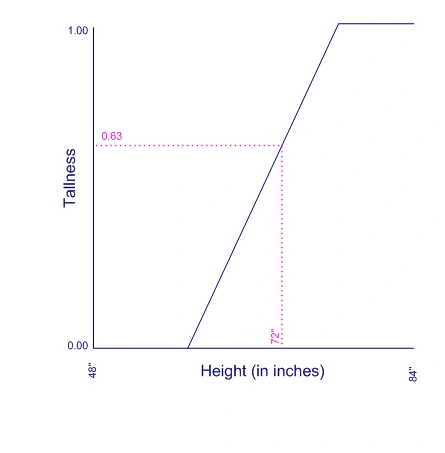
If you look at the graph below, you'll see a person of 72in is 0.63 tall, or has a 0.63 correlation to the "tall" concept. This person is more tall than not tall, but not 100% (1.00) tall. These are our "shades of grey" in respect to tall. The membership function can be defined differently or modified through what are called hedges (but that's a subject for a later article). At a certain point the fuzzy logic lines up with regular Boolean logic where the correlation to the "tall" concept is either 0.00 (absolutely false) or 1.00 (absolutely true). If we need to convert a fuzzy number (from 0.00 to 1.00) to a Boolean value, we just say it is true if the fuzzy value is greater than 0.50.
Fuzzy Controller
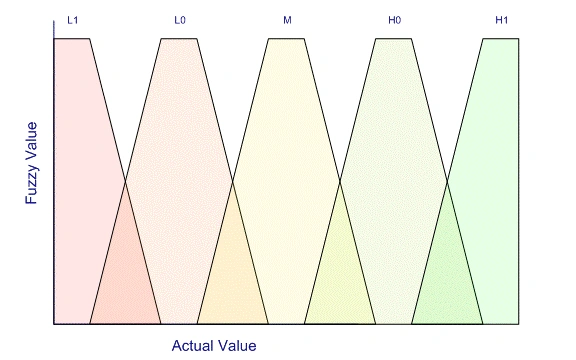
Usually, a fuzzy controller has multiple "area" definitions as in the graph below. Traditionally, they are labeled: L1, L0, M, H0, and H1 (L standing for Low and H standing for High).
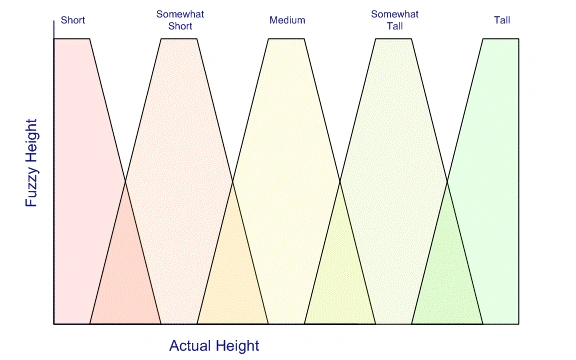
If we apply this method to the concept of tall well be using the following ranges: "short", "somewhat short", "medium", "somewhat tall", and "tall".
And now if we look at 72in, we have a fuzzy relation to the somewhat tall and tall groups (with values 0.75 and 0.25 respectively). Now we can code against these fuzzy definitions and can think in terms of ranges of heights instead of specifics.
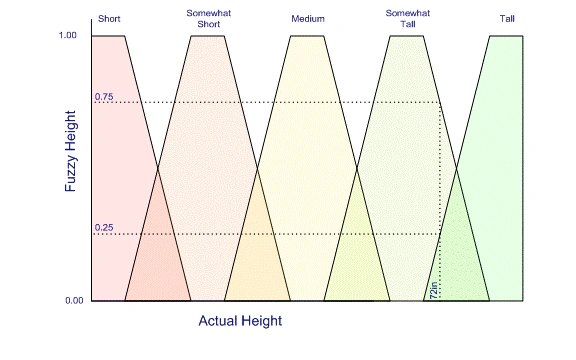
Just as a side note, defined fuzzy regions don't necessarily have to be exactly the same. They can also be triangles and the slopes on each section can vary instead of the symmetric plateau-shaped polygons I am using in the examples. It all depends on how you want to look a the data.
Boolean Operators
We can use basic Boolean operators on fuzzy numbers. The table below shows how they would be evaluated.
| Operator | Boolean Logic | Fuzzy Implementation |
| | (OR) | Sort OR Somewhat Short | MAX(Short, Somewhat short) |
| & (And) | Short AND Somewhat Short | MIN(Short, Somewhat short) |
| ! (NOT) | NOT Short | 1.0 - Short |
Code Sample
The sample application consists of a bunch of points on a windows app. Each point has a momentum which is modified depending on how far from the center of the screen they are located. The momentum of each point is also modified by the relations with all other points. This gives us a chaotic system which is kind of fun to watch.
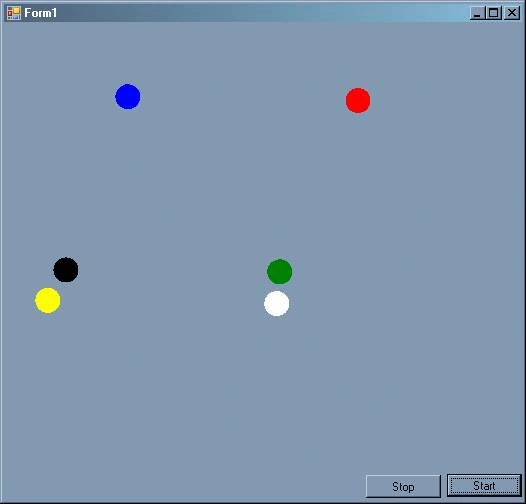
Here is our fuzzy number class which is pretty straightforward. Notice the overloaded Boolean operators:
public class FuzzyNumber
{
    public FuzzyNumber(double value)
    {
        m_value = value;
    }
    private double m_value;
    public double Value
    {
        get { return m_value; }
        set { m_value = value; }
    }
    public bool IsTrue()
    {
        return m_value > 0.5;
    }
    public static FuzzyNumber operator | (FuzzyNumber A, FuzzyNumber B)
    {
        return new FuzzyNumber(Math.Max(A.m_value, B.m_value));
    }
    public static FuzzyNumber operator & (FuzzyNumber A, FuzzyNumber B)
    {
        return new FuzzyNumber(Math.Min(A.m_value, B.m_value));
    }
    public static FuzzyNumber operator !(FuzzyNumber A)
    {
        return new FuzzyNumber(1.0 - A.Value);
    }
}
I have defined the distances and positions with enums as follows:
public enum HorizontalPosition : int
{
    FarLeft, Left, Center, Right, FarRight
}

public enum VerticalPosition : int
{
    ExtremeLow, Low, Middle, High, ExtremeHigh
}

public enum Distance : int
{
    VeryClose, Close, SlightlyClose, Normal, SlightlyFar, Far, VeryFar
}
And so can define how the velocities of each point will changed based on these enums:
m_horizAdjustments = new Dictionary<HorizontalPosition, float>();
m_horizAdjustments.Add(HorizontalPosition.FarLeft, -.075F);
m_horizAdjustments.Add(HorizontalPosition.Left, -0.25F);
m_horizAdjustments.Add(HorizontalPosition.Center, 0.0F);
m_horizAdjustments.Add(HorizontalPosition.Right, 0.25F);
m_horizAdjustments.Add(HorizontalPosition.FarRight, 0.75F);
m_vertAdjustment = new Dictionary<VerticalPosition, float>();
m_vertAdjustment.Add(VerticalPosition.ExtremeHigh, 0.75F);
m_vertAdjustment.Add(VerticalPosition.High, 0.25F);
m_vertAdjustment.Add(VerticalPosition.Middle, 0.0F);
m_vertAdjustment.Add(VerticalPosition.Low, -0.25F);
m_vertAdjustment.Add(VerticalPosition.ExtremeLow, -0.75F);
m_distAdjustment = new Dictionary<Distance, float>();
m_distAdjustment.Add(Distance.VeryFar, 100.0F);
m_distAdjustment.Add(Distance.Far, 10.0F);
m_distAdjustment.Add(Distance.SlightlyFar, 1.0F);
m_distAdjustment.Add(Distance.Normal, 1.0F);
m_distAdjustment.Add(Distance.SlightlyClose, 1.0F);
m_distAdjustment.Add(Distance.Close, 1.0F);
m_distAdjustment.Add(Distance.VeryClose, 1.0F);
In Conclusion
I'm not going to go through all the code for implementing the project because it would take too long, however it is pretty self-documenting and if you have any questions, let me know and I'll do my best to answer them.
Download the source and try adjusting the settings (above) to see how the points interact differently. If nothing else, it is a fun toy to play with.
In upcoming articles, I'll dig into other ways to implement fuzzy computing, but for now I hope you found this article interesting.
Until next time,
-Happy coding
Linh HuynhPosted Aug 20, 2020, 9:23 AM
Based on what criteria you can create the graphs for "short", "somewhat short", "medium", "somewhat tall", and "tall"? Thanks
Jason JakobPosted Dec 20, 2018, 3:48 PM
You can reduce flash by setting this property on the form. DoubleBuffered = true;
Mudhitha DharmasenaPosted Feb 15, 2013, 10:38 AM
Thanks for the article, Matthew Cochran . you bring up some great points.
ruslan abdullaPosted Dec 25, 2011, 8:02 AM
thank you for interesting work. But it would be better to upload simpler code to get the idea how fuzzy works especially for newbies. As being newbie in fuzzy logic its hard to follow idea even I understand the c# codes. Anyway, thanks. it really gives some idea
robertPosted Dec 24, 2010, 9:37 AM
Is there any follow up articles or coding references for this interesting topic?
olga belovaPosted Nov 21, 2010, 12:01 PM
How you build membership functions (high, low)&
Ahmed ElsharkawyPosted Oct 29, 2010, 5:50 PM
Thanx for this article. It is so good. but i have a question,How can i interface between c# and Fuzzy Logic, and please i want to learn more about fuzzy logic because i'll use it in my project (Intelligent Classroom). If you want to contact with me,this my e-mail([email protected]). With my best wishes
nurhuda arieffiantoPosted Sep 2, 2010, 7:03 PM
I am a beginner of Indonesian students, what methods you use from the article titled "Introduction to Fuzzy Computing: Part I"? email me: [email protected] send me too fuzzy logic visual basic version, please... because i am a beginner
rachad rachaddPosted Apr 11, 2009, 1:03 PM
firstly tank you for this very interesting doc, i m traing to programme a fuzzy logic controller using a C18 is like a C# . i m using matlab for that and it s my first time with C, pleaz if you have some examples for me i was very tankfull. thanks.