

JSON
JavaScript Object Notation (JSON) is an open and lightweight data-interchange format easily readable by humans that consists of attribute-value pairs. Even though it is derived from JavaScript, it is totally language independent and the vast majority of modern programming languages have adopted it as an alternative to XML.
Nowadays, it is commonly used to transfer the data using the wire, usually between the server and the web application. Compared to XML, the code generation and parsing is much faster and simpler. Still, that doesn't mean that XML should be buried and sent to the dustbin of history as there are many scenarios when XML is a very viable option.
JSON is built on the following two data structures:
- An object that is a collection of name/value pairs
- An array representing an ordered list of values
Object
An object is simply an unordered list of name/value pairs surrounded by curly brackets "{}". Each name/value pair is divided by a colon ":" and the name/value pairs are separated by a comma "," from each other.

- {
- "name" : "Mike",
- "age" : 32,
- "occupation" : "developer"
- }
Array
An array is an ordered list of values surrounded by square brackets "[]" with values themselves being separated by a comma ",".

- [
- "Austria",
- "Germany",
- "Slovakia"
- ]
A value is one of the data representations listed below. These can be nested to create a complex multi-tier data structure.
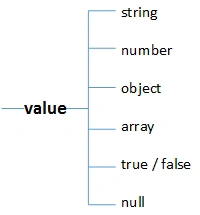
 Smaller in size than corresponding XML
Disadvantages
 Does not allow any form of comment syntax
JSON and C#
When it comes to using JSON within our C# application, we have two options. The first one is to rely on the .Net built-in support and use the JavaScriptSerializer class from the System.Web.Extensions assembly or the DataContractJsonSerializer (available since .Net 3.5) class built and designed for WFC. The next option is to rely on some third-party library and add a reference to it. We ususally lean towards the built-in support whenever possible. However, in the case of JSON, using third-party libraries is much more popular.
We will not be different and will use the most popular one called Json.NET with over 3 millions downloads and counting.
Installing Json.NET
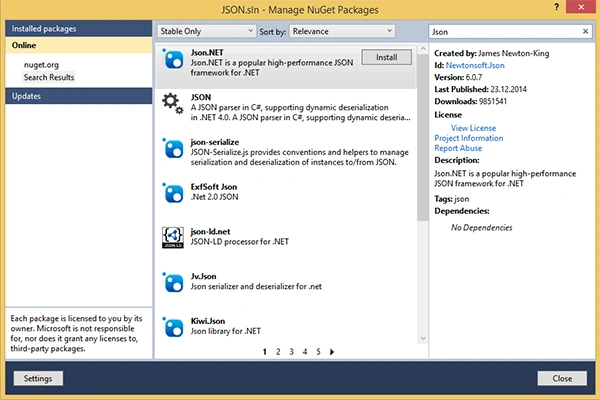
We start by downloading the library and referencing it in our project. The times of boring downloads outside the Visual Studio are already forgotten and we can easily use the NuGet Package Manager (Tools -> NuGet Package Manager -> Manage NuGet Packages for Solution). After invoking the manager from the menu, a window will pop-up with all the packages available.
We use the search feature and type “json” into the textbox in the upper-right corner. After a short while, the list is populated with all the JSON related libraries. We choose "Json.NET" and hit the Install button.
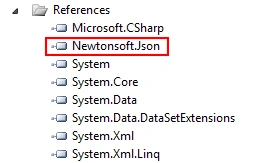
Now everything is set up and we are ready to use JSON in our application.
Serialize JSON
Before diving deeper into the serialization process, we will create a simple dummy class for the serialization. We name the class “Person” and add the three properties, a name as string, an age as integer and occupations as a list of strings.- public class Person
- {
- public string Name { get; set; }
- public int Age { get; set; }
- public IList<string> Occupations { get; set; }
- }
Please note that Json.NET supports a wide range of attributes for decorating the entire class or the properties themselves, so you can alter the final result. To learn more about these attributes I suggest using the official documentation: Json.NET documentation.
To serialize a newly created Person object, we just call the static SerializeObject method that does all the stuff needed and returns a serialized string representation of our Person object. When calling the method, we also add the optional second parameter to preserve the formatting for the console output purposes.- Person person = new Person
- {
- Age = 30,
- Name = "Peter",
- Occupations = new List<string>
- {
- "Developer",
- "Engineer",
- "DB specialist"
- }
- };
- string json = JsonConvert.SerializeObject(person, Formatting.Indented);
- Console.WriteLine(json);
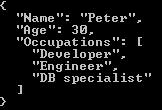
Now we print the serialized string to the console to visually verify the process.
Deserialize JSON
For deserialization, we call the static DeserializeObject method that deserializes JSON to a specific .Net type. In this case, it is the Person type we have created. The method takes just one mandatory parameter, the serialized object in the form of a string.
- Person person2 = JsonConvert.DeserializeObject<Person>(json);
- Console.WriteLine("Name: " + person2.Name);
- Console.WriteLine("Age: " + person2.Age);
To verify the process, we print the Person's name and age to the console.

JSON.NET Advanced Topics
Json.Net is a powerful and open-source library that offers much more than just pure object serialization and deserialization.
It supports the JSON schema standard that is used to validate the structure via the Newtonsoft.Json.Schema namespace, very similar to XML Schema for XML. It also offers a LINQ to JSON API that enables quick querying and creation of JSON objects. To learn more about these advances topics, I suggest visiting the library's official website.
Conclusion
JSON is a lightweight and widely used data-exchange format that offers several benefits over the standard XML. In C#, we use either the built-in functionality to parse and serialize the object, or rely on some third-party library with Json.NET being the most popular.
Gaurav Kumar AroraPosted Dec 26, 2014, 11:33 AM
Sumit Jolly - sure, in coming articles of my asp.net web API series, I will share the same. And there are lot of forum threads for this issue. It happens when One object is referenced in another object as a property and get initialized in constructor. I have detailed and a long article on the same, currently in draft mode, I will share it on the Csharpcorner very soon.
Pramod LawatePosted Dec 26, 2014, 10:24 AM
Superb....!
Guest UserPosted Dec 26, 2014, 7:43 AM
Gaurav Kumar Arora, I never encountered situation regarding Cyclic Reference. Can you share some code/use case regarding that and how did you solve it? Maybe an article on the same, because I'm sure many people may get benefit out of it.
Gaurav Kumar AroraPosted Dec 26, 2014, 5:01 AM
Michal Habalcik - Good representation of Json. It is good practice to use json while sending data across. Generally, I used json with Rest APIs. Sometime, I received Cyclic Reference in Object graph while serializing or deserializing the Json. I used Json2 to resolve the issue. But, I am looking for any good solution. Is there any good solution when we are dealing with Complex Object and getting Cyclic reference in Object graph during deserialize/serialize objects into/from json. I really get a good idea about json standards from this article. Keep posting good contents.
Kalpesh BhadraPosted Dec 26, 2014, 4:48 AM
very usefull article... simple to understand....
Michal HabalcikPosted Dec 26, 2014, 2:10 AM
thanks you all for kind words
Ravi MakhijaPosted Dec 26, 2014, 1:25 AM
nice article .. thnx for sharing!
Manish Kumar ChoudharyPosted Dec 25, 2014, 10:56 PM
Nice explanation Michal Habalcik sir.. very helpful for me.. Thanks for sharing it..
Guest UserPosted Dec 25, 2014, 10:24 PM
I use camelcase serializer by default while parsing webapi's http://odetocode.com/blogs/scott/archive/2013/03/25/asp-net-webapi-tip-3-camelcasing-json.aspx
Guest UserPosted Dec 25, 2014, 10:22 PM
JSON now being used widely now.Newtonsoft.JSON is good library for parsing JSON files. Another good article by you!
Vithal WadjePosted Dec 25, 2014, 9:48 PM
another super article,keep it up