

In my previous article, you might have seen the basic example of the Singleton Pattern in C# that was not thread safe. In this article, we will see how to make it thread safe.
Thread Safe Singleton class using early binding
- namespace PrashantBlogs.SingletonPattern
- {
- /// <summary>
- /// The Singleton class that allows unique
- /// instance creation
- /// </summary>
- sealed class Singleton
- {
- //This is known as early binding or initialization
- private static Singleton _instance = new Singleton();
- //Constructor is marked as private
- //so that the instance cannot be created
- //from outside of the class
- private Singleton()
- {
- }
- //Static method which allows the instance creation
- static internal Singleton Instance()
- {
- //All you need to do it is just return the
- //already initialized which is thread safe
- return _instance;
- }
- }
- }
- private static Singleton _instance = new Singleton();
Thread Safe Singleton class using lock
- using System;
- namespace PrashantBlogs.SingletonPattern
- {
- sealed class Singleton
- {
- private static readonly object _lockObj = new object();
- private static Singleton _instance = null;
- private Singleton()
- {
- }
- static internal Singleton Instance()
- {
- lock (_lockObj)
- {
- if (_instance == null)
- {
- _instance = new Singleton();
- Console.WriteLine("Created the instance of Singleton class");
- }
- else
- {
- Console.WriteLine("Returning already created instance of Singleton class");
- }
- return _instance;
- }
- }
- }
- }
- private static readonly object _lockObj = new object();
- private static Singleton _instance = null;
Thread Safe Singleton class using double-check locking
- using System;
- namespace PrashantBlogs.SingletonPattern
- {
- sealed class Singleton
- {
- private static readonly object _lockObj = new object();
- private static volatile Singleton _instance;
- private Singleton()
- {
- }
- static internal Singleton Instance()
- {
- if (_instance == null)
- {
- lock(_lockObj)
- {
- if(_instance == null)
- {
- _instance = new Singleton();
- Console.WriteLine("Created the instance of Singleton class");
- }
- else
- {
- Console.WriteLine("Returning already created instance of Singleton class");
- }
- }
- }
- return _instance;
- }
- }
- }
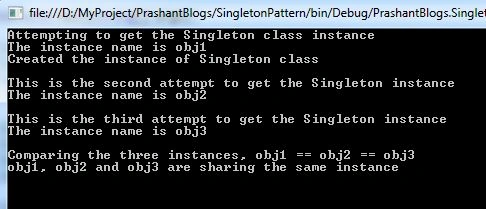
To test the preceding classes, you can use the following code snippet that is a main program written for creating a single instance using the Singleton Pattern.
Program.cs
- using System;
- namespace PrashantBlogs.SingletonPattern
- {
- class Program
- {
- static void Main(string[] args)
- {
- Console.WriteLine("Attempting to get the Singleton class instance");
- Console.WriteLine("The instance name is obj1");
- Singleton obj1 = Singleton.Instance();
- Console.WriteLine();
- Console.WriteLine("This is the second attempt to get the Singleton instance");
- Console.WriteLine("The instance name is obj2");
- Singleton obj2 = Singleton.Instance();
- Console.WriteLine();
- Console.WriteLine("This is the third attempt to get the Singleton instance");
- Console.WriteLine("The instance name is obj3");
- Singleton obj3 = Singleton.Instance();
- Console.WriteLine();
- Console.WriteLine("Comparing the three instances, obj1 == obj2 == obj3");
- if (obj1 == obj2 && obj1 == obj3 && obj2 == obj3)
- {
- Console.WriteLine("obj1, obj2 and obj3 are sharing the same instance");
- }
- Console.ReadKey();
- }
- }
- }
Your feedback will help me in further improvements context wise so please feel free to post it/them.
Santhakumar MunuswamyPosted Apr 28, 2015, 2:55 PM
Good work
Karthik Muthu KaruppanPosted Apr 28, 2015, 11:40 AM
Good
Gowtham RajamanickamPosted Apr 28, 2015, 4:08 AM
good
NitinPosted Apr 28, 2015, 1:02 AM
Nice