

Introduction
The term multithreaded programming may sound complicated, but it is quite easy to do in C#. This article explains how multithreading works on your typical, general purpose computer. You will learn how the operating system manages thread execution and learn how to manipulate the Thread class in your program to create and start managed threads. This article also renders the information you need to know when programming with multiple threads, such as the Thread class, pools, threading issues and BackgroundWorker.
Multithreading Overview
A thread is an independent stream of instructions in a program. Each written program is a paradigm of sequential programming in which there is a beginning, an end, a sequence and a single point of execution. A thread is similar to a sequential program. However, a thread itself is not a program, it can't run its own, but run within a program.
The real concern of threads is not about a single sequential thread, but rather the use of multiple threads in a single program. All running at the same time and performing multiple tasks. This mechanism is referred to as Multithreading. A thread is considered to be a lightweight process because it runs within the context of a program and takes advantage of resources allocated for that program.
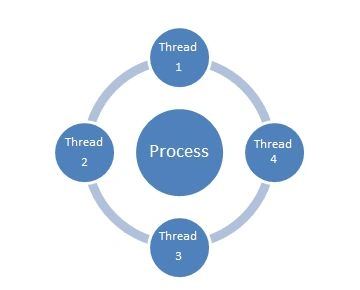
Threads are important, both for client and server applications. While in C# program coding, when you type something into an editor, the dynamic help (intellisense) windows immediately shows the relevant topics that fit the code. One thread is waiting for input from the user, while another does some background processing. A third thread can store the written data in a temporary file, while another one downloads a file from a specific location.
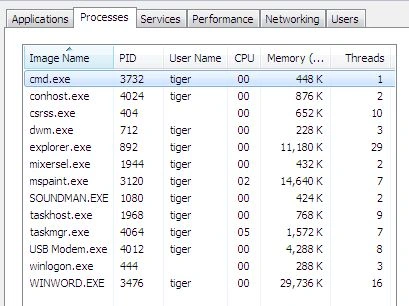
With the task manager, you can turn on the Thread column and see the processes and the number of threads for every process. Here, you can see that only cmd.exe is running inside a single thread while all other applications use multiple threads.
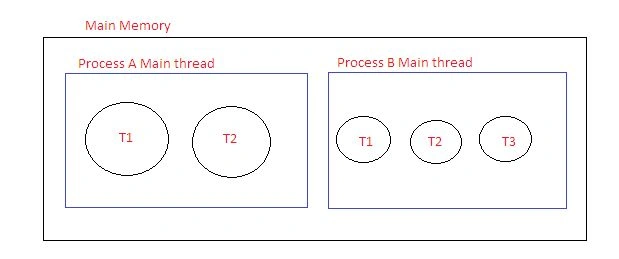
The operating system schedules threads. A thread has a priority and every thread has its own stack, but the memory for the program code and heap are shared among all threads of a single process.
A process consists of one or more threads of execution that is simply referred to as threads. A process always consists of at least one thread called the main thread (the Main method in a C# program). A single thread process contains only one thread whereas a multithread process can contain more than one thread of execution.
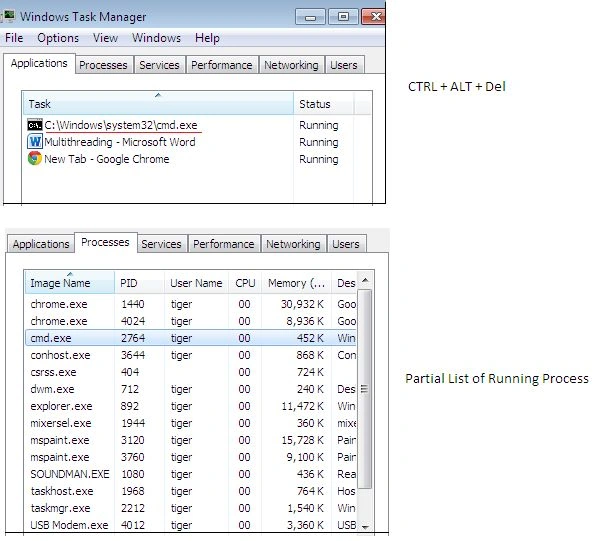
On a computer, the operating system loads and starts applications. Each application or service runs as a separate process on the machine. The following image illustrates that there are quite a few processes actually running than there are applications. Many of the processes are background operating system processes that are started automatically when the computer powers up.
System.Threading Namespace
Under the .NET platform, the System.Threading namespace provides a number of types that enable the direct construction of a multithreaded application.
| Type | Description |
| Thread | It represents a thread that execute within the CLR. Using this, we can produce additional threads in application domain. |
| Mutex | It is used for synchronization between application domains. |
| Monitor | It implements synchronization of objects using Locks and Wait. |
| Smaphore | It allows limiting the number of threads that can access a resource concurrently. |
| Interlock | It provides atomic operations for variables that are shared by multiple threads. |
| ThreadPool | It allows you to interact with the CLR maintained thread pool. |
| ThreadPriority | This represents the priority level such as High, Normal, Low. |
System.Threading.Thread class
The Thread class allows you to create and managed the execution of managed threads in your program. They are called a managed thread because you can directly manipulate each thread you create. You will find the Thread class along with useful stuff in the System.Threading namespace.
| Member | Type | Description |
| CurrentThread | Static | Return a reference of current running thread. |
| Sleep | Static | Suspend the current thread for a specific duration. |
| GetDoamin | Static | Return a reference of current application domain. |
| Currentcontext | Static | Return a reference of current context in which the thread currently running. |
| Priority | Instance Level | Get or Set the Thread priority level. |
| IsAlive | Instance Level | Get the thread state in form of True or False value. |
| Start | Instance Level | Instruct the CLR to start the thread. |
| Suspend | Instance Level | Suspend the thread. |
| Resume | Instance Level | Resume a previously suspended thread. |
| Abort | Instance Level | Instruct the CLR to terminate the thread. |
| Name | Instance Level | Allows establishing a name to thread. |
| IsBackground | Instance Level | Indicate whether a thread is running in background or not. |
Multithreading Implementation
The following section plays with the numerous System.Threading namespace static and instance-level members and properties.
Obtaining Current Thread Information
To illustrate the basic use of the Thread type, suppose you have a console application in which the CurrentThread property retrieves a Thread object that represents the currently executing thread.
- using System;
- using System.Threading;
- namespace threading
- {
- class Program
- {
- static void Main(string[] args)
- {
- Console.WriteLine("**********Current Thread Informations***************\n");
- Thread t = Thread.CurrentThread;
- t.Name = "Primary_Thread";
- Console.WriteLine("Thread Name: {0}", t.Name);
- Console.WriteLine("Thread Status: {0}", t.IsAlive);
- Console.WriteLine("Priority: {0}", t.Priority);
- Console.WriteLine("Context ID: {0}", Thread.CurrentContext.ContextID);
- Console.WriteLine("Current application domain: {0}",Thread.GetDomain().FriendlyName);
- Console.ReadKey();
- }
- }
- }
After compiling this application, the output will be as in the following:
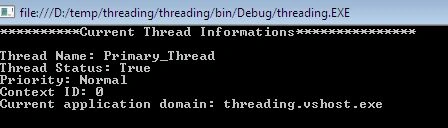
Simple Thread Creation
The following simple example explains the Thread class implementation in which the constructor of the Thread class accepts a delegate parameter. After the Thread class object is created, you can start the thread with the Start() method as in the following:
- using System;
- using System.Threading;
- namespace threading
- {
- class Program
- {
- static void Main(string[] args)
- {
- Thread t = new Thread(myFun);
- t.Start();
- Console.WriteLine("Main thread Running");
- Console.ReadKey();
- }
- static void myFun()
- {
- Console.WriteLine("Running other Thread");
- }
- }
- }

The important point to be noted here is that there is no guarantee of what output comes first, in other words which thread starts first. Threads are scheduled by the operating system. So which thread comes first can be different each time.
Background Thread
The process of the application keeps running as long as at least one foreground thread is running. If more than one foreground thread is running and the Main() method ends, the process of the application keeps active until all foreground threads finish their work.
When you create a thread with the Thread class, you can define it as either a foreground or background thread by setting the property IsBackground. The Main() method set this property of the thread t to false. After setting the new thread, the main thread just writes an end message to the console. The new thread writes a start and an end message and in between it sleeps for 2 seconds.
- using System;
- using System.Threading;
- namespace threading
- {
- class Program
- {
- static void Main(string[] args)
- {
- Thread t = new Thread(myFun);
- t.Name = "Thread1";
- t.IsBackground = false;
- t.Start();
- Console.WriteLine("Main thread Running");
- Console.ReadKey();
- }
- static void myFun()
- {
- Console.WriteLine("Thread {0} started", Thread.CurrentThread.Name);
- Thread.Sleep(2000);
- Console.WriteLine("Thread {0} completed", Thread.CurrentThread.Name);
- }
- }
- }

If you change the IsBackground property to start the new thread to true, the result shown in the console is different as in the following:

Concurrency issues
Programming with multiple threads is not an easy task. When starting multiple threads that access the same data, you can get an intermediate problem that is hard to resolve. When you build multithreaded applications, the program needs to ensure that any piece of shared data is protected against the possibility of numerous threads changing its value.
Race Condition
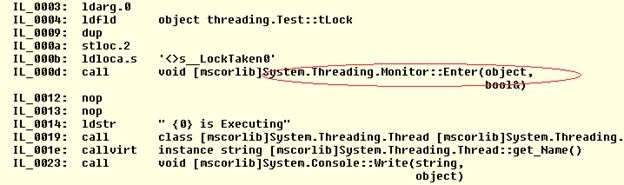
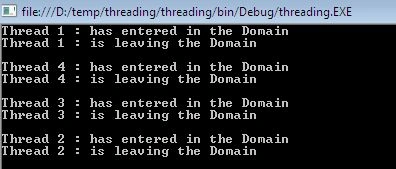
A race condition can occur if two or more threads access the same objects and access to the shared state is not synchronized. To illustrate the problem of a Race condition, let's build a console application. This application uses the Test class to print 10 numbers by pausing the current thread for a random number of times.


Anil KumarPosted Feb 11, 2015, 6:28 AM
So nicely explained :)
Rupesh SharmaPosted Feb 11, 2015, 4:13 AM
great article
Michal HabalcikPosted Feb 11, 2015, 2:03 AM
deep explanation. thanks for sharing. maybe you should have mention the TPL library with Tasks.