

The most crucial first step in planning an effective information architecture is understanding your users and assisting them in finding what they need to complete tasks in a way that makes the most sense to them. Well-planned and executed information architecture is a prerequisite for an intelligent and high-performing intranet, hub, or site.
Along with lowering IT expenses, minimizing information overload, and lowering compliance and security concerns, information architecture also aids in enhancing user acceptance, contentment, and productivity.
The following sections are covered in this article.
- Introduction to SharePoint Information Architecture
- Information Architecture Elements in SharePoint
- Information Architecture Goals
- Unlocking the Power of SharePoint
- SharePoint Functionality
Introduction to SharePoint Information Architecture
For the purpose of maximizing content's discoverability, usability, and efficacy, a SharePoint environment uses information architecture (IA). It entails creating and putting into place a logical hierarchy of sites, lists, libraries, and metadata that reflects the organizational business demands and objectives.
SharePoint information architecture is officially defined as "the art and science of organizing and labeling the content (documents, data, and sites) to support findability and usability." Therefore, businesses must take deliberate steps to own and organize all of their corporate material in SharePoint. The organization's SharePoint site's performance and durability depend on it greatly!
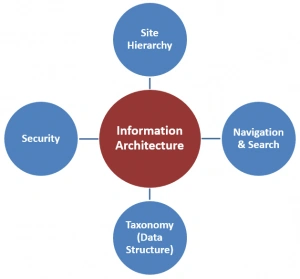
Information Architecture Elements in SharePoint
Information architecture is concerned with how you arrange and categorize your material as well as how your users use it to complete tasks. Information architecture on websites comprises components like site organization, taxonomy, navigation, search, and security. The proper content must reach the right users and adhere to your organization's content compliance standards, and this is another concern of modern SharePoint information architecture.
Six key components of information architecture are related to wayfinding in SharePoint:
- Global navigational structure- Describes how you organize your sites so that users can discover material, such as the home page of your intranet, and is the highest level of navigation across your SharePoint tenant.
- Hub structure and organization- You may gather together related subjects, tasks, and material using Hubs.
- Local site and page navigational structure- How each site's and page's content is structured to enable users to efficiently move through and consume it.
- Metadata architecture- The structure of search and browsing, as well as compliance and retention requirements, are all impacted by metadata.
- Search experiences- How your users “consume” information architecture in addition to browsing.
- Personalized content experiences- How specific content is targeted to certain users and groups of users.
It takes careful planning to create hubs, sites, and pages with the best structure possible. Additionally, it necessitates familiarity with the domain, the information, the user experience, design methodologies, and best practices for Microsoft SharePoint. Information architecture is a constant process, even when it is well thought out. Organizations, individuals, and projects all undergo continual change.
Information Architecture Goals
From the user's point of view, navigation should always be planned. Thinking about the information your audience wants or needs to consume while you plan your navigation is just as important as planning the content you want to offer. It is therefore essential for usability and discoverability to organize and label your navigation links.
The following are some benefits of effective intranet and website navigation:
- Find information- Users must quickly and efficiently locate the files, papers, and links that are most pertinent to the task they accomplish. Make sure to start off with the information that is the most pertinent and important.
- Take action- When users visit a website, they often have a specific objective in mind. Be careful to incorporate frequent tasks within the navigational structure as labels and links so they may be quickly found and accessible.
- Understand company structure- Users ought to be able to tell the organization's structure from a quick glance. Make sure your site and intranet navigation reflect hierarchy and organization.
Unlocking the power of SharePoint
Microsoft SharePoint is becoming more and more popular among small and medium-sized organizations. One of the most adaptable and cost-effective cloud collaboration platforms on the market, SharePoint empowers workers to work anywhere, at any time, with its contemporary workplace capabilities.
For your staff to be productive, you must implement a modern workplace model using SharePoint. While ensuring that everyone is on the same page and keeping your business information safe and secure, SharePoint can efficiently support remote team collaboration.
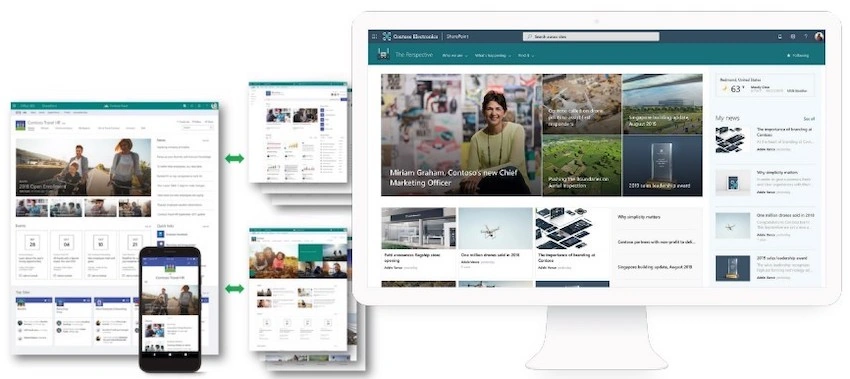
SharePoint Functionality
The following are some of SharePoint's top attributes:
- Document Management: SharePoint makes it simple to organize, store, and distribute documents among your team members. Document libraries may be made, permissions can be specified, and real-time document collaboration is possible.
- Collaboration: It provides a variety of tools for teamwork, including discussion boards, social networking capabilities, and team sites, which make it simple to collaborate and share ideas with your team.
- Customization: SharePoint may be tailored to your organization's unique requirements. Using the SharePoint developer tools and API, you may build your own lists, processes, templates, and even custom solutions.
- Search: SharePoint has robust search features that make it easy to find the data you require. All of the content in your SharePoint environment is searchable, including people, documents, and other types of content.
- Security: A variety of security features are offered by SharePoint to assist safeguard your data and guarantee that only authorized users may access it. Permissions can be established for specific documents or entire sites, and SharePoint also supports various security measures like multi-factor authentication.
Whether you run a small business or a huge corporation, SharePoint can help you improve collaboration, document management, and business process automation. It can also help you optimize processes, boost teamwork, and manage material more efficiently.
Join the conversation! Your thoughts help the community grow.