

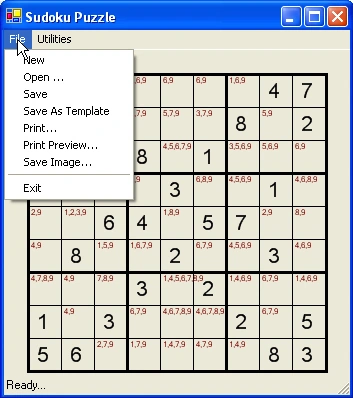
Figure 1 - Sudoku Puzzle Player and Some of the Options
I am pretty much flabbergasted at how prevalent the Sudoku craze is here. If you pick up many of the newspapers in NY city, there are Sudoku puzzles next to the crossword. Borders and Barnes and Noble have Sudoku books on their counter spaces. And just today, I was talking to a cohort at work, and found out that he does the Sudoku puzzle on the way to work on the train from Jersey. So is Sudoku a fad or a brainteaser staple? Time will only tell. In the meantime, "if you can't beat'em join'em." This .NET program will allow you to play Sudoku, print Sudoku, save Sudoku, and check Sudoku puzzles that you come across in your day to day activities (I almost went as far to add e-mal Sudoku functionality, but figured that would be taking things a bit far). The program also comes with a hint feature, that figures out the possible values for each square as you are playing the game. I don't know about you, but I just want to solve the puzzle and not go through the work of writing the possible values for all 30 some cells (although some people may argue that this is half the fun of Sudoku so you are free to turn this feature off in the Utilities menu). This app also allows you to create a Sudoku template and save it or save a Sudoku puzzle in progress. Sudoku templates are saved with a .xml extension, where work in progress is saved with a .sav extension. Both types of files are xml files. An example of a Sudoku template is shown in the figure below:

Figure 2 - Sudoku Template File saved in Xml Format
Saving a Sudoku Template
To create a brand new template, first click File -->New in the menu. Then go to Utilities-->and Check Template Mode in the menu. Finally proceed to type in a Sudoku puzzle you found in the paper. When you are finished, choose File-->Save As Template to save the fresh puzzle. If you ever want to start the puzzle over, either open the file you saved, or choose Restart from the Utilities menu.
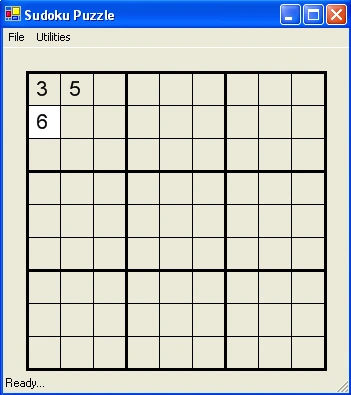
Figure 3 - Creating a Sudoku Puzzle in Template Mode
Playing Sudoku
Now that you have your puzzle, be sure to turn off Template Mode in the Utilities Menu and begin to play. Just type in your guesses. Allowable values are 0-9 and <space>. The zero and <space> keys both allow you to clear a cell you feel may be a wrong choice. Speaking of wrong choices, the puzzle will also warn you if you put in a number that is in a duplicate Sudoku block, column, or row as shown in figure 4.
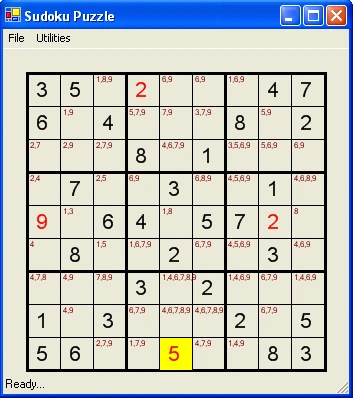
Figure 4 - Sudoku Guess with Duplicate Entry
Design
The design of the Sudoku Game Player is fairly simple with only three classes: the main form, the SudokuReader and the SudokuGrid class. The Form does all the painting, printing, and user interaction. The SudokuGrid maintains all the Grid Data, calculates hints, and checks the board. The SudokuReader reads and writes the Sudoku data to xml.
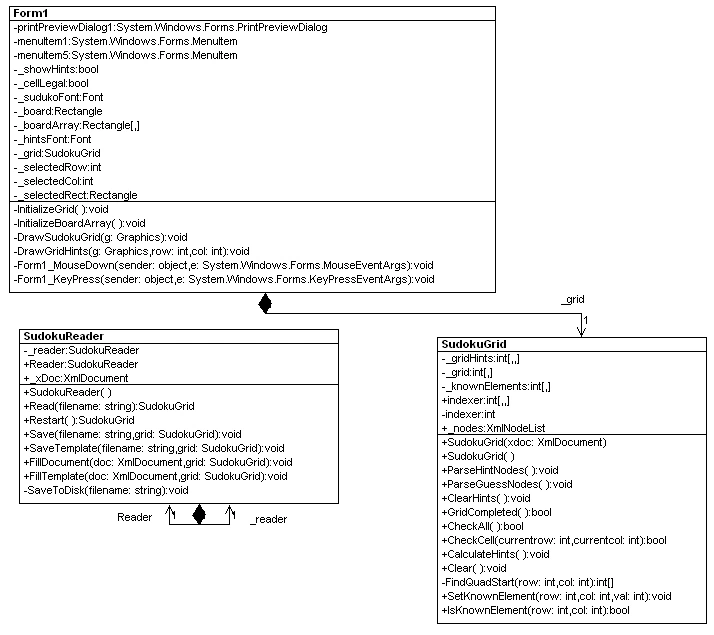
Figure 5 - UML diagram of Sudoku Player reverse engineered using WithClass
Code
There are a lot of aspects of the code that are worth mentioning, but for the purpose of this article, we will talk about how to use Xml to read and write the grid data. The Xml library in .NET is extremely rich. There are many ways you can read and write Xml using .NET from including DataSets, Searlizable Objects, or the System.Xml library. In this article we chose to use the System.Xml libray in order to customize our xml format to one shown in Figure 2. Reading the Xml is performed using the XmlDocument. The XmlDocument has a method called Load that allows you to load any well formed document into the XmlDocument object and then work with the Xml as a hierarchal collection of XmlNode objects. We can also use XPath (the Xml Query Language) to read the particular nodes we are interested in, instead of traversing the whole XmlDocument tree.
Listing 1 - Reading the Sudoku puzzle into an XmlDocument to get the grid data
|
XmlDocument _xDoc = new XmlDocument(); // Construct the grid data from the xml file return grid; return null; } |
The Constructor of the SudokuGrid calls on XPath to pull out the collection of Row nodes inside the XmlDocument. These Row nodes are each traversed and the data within is parsed and stuck inside the grid. Each number in a row is separated by commas, so this data can be split up into an array using the string Split method.
Listing 2 - Parsing out the Xml Data using a combination of XPath and string.Split
|
public SudokuGrid(XmlDocument xdoc) // parse out the numbers in the row // read in sudoku player guess nodes using XPath // parse out the numbers in the row } public void ParseHintNodes() // precondition - there must be nodes to parse // traverse each xml node and pull out the text. foreach (XmlNode n in _nodes) // split the comma delimited string of numbers in the row // track the cells that are hint cells. col++; } |
Writing out the Sudoku Grid
Writing the grid is a little more complicated because it involves constructing each node of Xml documenting and appending children to each node. Once the node structure is built, you can simply use the Save method of the XmlDocument object in conjunction with an XmlWriter to write out the Xml file. Below is the code used to save the Xml Template shown in Figure 2.
Listing 3 - Saving the contents of the grid to an Xml Template file t using XmlDocument and XmlWriter
|
public void SaveTemplate(string filename, SudokuGrid grid) // fill the xml document from the existing grid data // save the xml document to disk with the filename passed in // FillTemplate fills the xml structure from the grid data public void FillTemplate(XmlDocument doc, SudokuGrid grid) doc.AppendChild(sudoku); // add each of the 9 rows from the grid as a XmlNode element called Row // append the Row node as a child of the Rows node for (int col = 0; col<9; col++) // remove the last comma from the row } } private void SaveToDisk(string filename) // save the contents of the XmlDocument structure to disk // close the stream of the file |
Conclusion
Sudoku may keep you busy on route to work, but coding xml file manipulation can keep you busier. Using XmlDocument along with XPath, reading the contents of Xml files becomes a bit easier, especially if you are targeting specific information. The XmlDocument class also helps you easily write an xml structure out to a file. With the huge amount of support .NET gives you, you can come out xml'ing like roses.
Site References
Sudoku - Generating and Solving using the Pocket PC,
Using Genetic Algorithms to come up with Sudoku Puzzles,
Affiliates
Sudoku for Kids - 120 Printable Puzzles
Sudoku Secrets
Vithal WadjePosted Sep 26, 2014, 2:02 PM
super keep it up
jonPosted Oct 10, 2008, 5:15 PM
Thanks, I was looking for just this type of program. I was working on creating a program that generates and solves sudoku but being so inexperienced I could think of a good way to present it. Over the last couple of years I have been working on it in my spare time and I think I have completed it. If you want to take a look at it that would be awesome you can donload it at http://www.freewebs.com/tonysfiles Thanks again, Tony Brix